


 Posts



Shay Shmeltzer, a PM for JDeveloper, wrote a great blog for OTN forum users. Please read it.
Everyone of his points are pertinent and relevant, so even though I am loathe to single out a few, I will! The ones I said "YES" out loud to, are #1, 6 and 8.
If you haven't found it before, the SQL Developer Forum on OTN is quite active.
Sue
13 March 2007


12 March 2007
Some New Bits for You: The Migration Workbench and a new Search
What Release of SQL Developer are you Using?
I am sure you are all on SQL Developer 1.1 Patch 2 (1.1.2.25.79) If you are, then you might be interested in the 2 features I am going to talk about below. I do know some of you are not on patch 2 and there are still many of you still on 1.0 (1.0.0.15.57). I am sure there are lots of reasons you don't upgrade to a new release. Better the devil you know...etc. Maybe you are from a big company and so new software is rolled out slowly. Maybe you just didn't hear the news. (I've been a pretty poor blogger...) Maybe you are concerned about some of the entries on the forum and so won't try the new release. Did it occur to you that you may use the product for different things? That you might find the updates just perfect for you? Performance improvements, a few new context menus, some powerful reporting capabilities?
Let's look at the releases. SQL Developer 1.0 was our initial release and many of you were excited by the release and started to use it. It does what you need, so you're happy. SQL Developer 1.1 brought a whole bunch of new features and a whole rewrite of underlying technology. When a rewrite happens, inevitably a few features may not make it back into the product. We had to weigh up delaying the release or getting it out to you quickly. We decided that the number of new features outweighed the few that were missing. In the same way as we did for 1.0, we quickly followed with 2 patch releases, filling in the gaps with the bugs that slipped the net. I know this is frustrating for you and there are a few of the inevitable rants about testing and quality. We agree, but the overwhelming feedback has been better in each release and we feel the latest patch release of SQL Developer brings you more functionality, performance and stability than the others. Try it, download from here!
Migration Workbench - Early Adopter Release
Just last week we added something new. It might not be something you all need, but we know that many of you do have multiple databases and they're not all Oracle. We have seen your interest in the ability to connect to and browse third party databases. Well, the team that brought you the Oracle Migration Workbench, have rewritten the Workbench as an extension to SQL Developer. This extension is designed to give you a seamless experience; moving from browsing a third party database to migrating the database schema definitions and schema data to an Oracle database schema. Once you have completed the migration you can continue to work with and query your data, using SQL Developer.
The Workbench Extension is currently a preview or early adopter release and so is only available through Check For Updates, using SQL Developer 1.1. patch 2 (1.1.2.25.79) So that's one really important reason to move up to Patch 2. We will release SQL Developer Migration Workbench as a complete SQL Developer install for production. For more information about the new extension see this page.
A Snippet of Information - Searching Database Objects.
 In SQL Developer 1.1, you might have notice the new DB Search Object. Have you tried it? You'll find it in a minimized window on the right, near your Snippets window. (That is until you start rearranging your windows.)
It's neat in that you can do a search for a database object and it'll search across schemas. In my example below I did a wild card search for occurrences of EMP%. It produced a healthy list.
Once an object is found, the same context menus, you'll find for your objects in the navigator, are available to you in the search window.

So this week's task for you is to update your SQL Developer release and have a play. My tasks for this week are to update each of my blogs daily! (Aside from being slack here, I have outstanding photo and Delhi entries to update!) Let's see how we do.
Sue
12 February 2007
A Conference I am Not Attending
The months roll by! I should have told you about the release of SQL Developer 1.1 and then didn't and now Patch 1 is out. If you're still on SQL Developer 1.0, then do download the Patch release. It's a full install, and well worth the update. I'll start writing again and telling you more about what we're doing and about the product.
RMOUG
I should be packing today to be flying out to Denver for the RMOUG Training Days this week. This was the first conference I attended as a fledgling PM many years ago and so it's really strange not to be attending it this week. Denver is the kind of city where you'll be walking in warm sunshine one day and playing in the snow on the sidewalks the next. With RMOUG in February, that has certainly happened to us.
I really like the RMOUG event. I think it's a serious conference with folk attending who are serious about learning and sharing what they know. I always think it's a "no fluff, just stuff" event.
I have also always been struck at how few Oracle folk go, compared to other events, and I like the low key approach. (As a product manager, perhaps I shouldn't admit that!)
This year 2 of my team will be there, so there's an added regret not to be able to make it. Mike Hichwa, VP of the Database Tools Group, and Kris Rice, architect for SQL Developer, will both be doing quite a bit of work there. Mike and Kris are both doing a bit of training on Tuesday in the pre-event training session and then Mike kicks off with the keynote on Wednesday morning.
Kris is doing 2 SQL Developer talks on Wednesday, so if you have any questions, he's the man to catch.
If you are still prevaricating about whether to go, I'm sure there is still time to change your mind and dash along. Great city, great event, a worthwhile gathering.
How's this for a list of big names, taken straight from the RMOUG presentations page...
Adams | Aldridge | Arseneau | Ault | Baker | Baxter | Beresniewicz | Blake | Briggs | Brooks | Brown B | Brown T | Burleson D | Burleson J | Carlson | Caviness | Closson | Cunningham | Dacko | de Visser | Deshpande | Dijcks | Dorsey | Engel |Fink | Fons | Freeman | Fuston | Garmany | Haastrup |
Hailey | Haisley | Hall | Hay | Hichwa | Hotka | Ioan | Jackson | Jenne | Jeunnette | Karam| Katsaris | King | Koletzke | Koopmann | Kurtz | Kutrovsky | Leal | Lemme | Likarish | Looney | Marx | Millsap | Mishek | Moore | Moskovitz | Munsinger | Nanda | Ostrowski | Pal | Peters | Phillips | Presser | Pystynen | Reading | Rice | Richards | Scheerer | Schrag | Senegacnik | Still | Sutton | Sweeney |Swing | Than | Thater | Tierstein | Turner-Underwood | Vaidyanatha | Vallath | Weaver | Wille | Wimsatt | Wood |
Other things...
As for me, I'll just have to think about all the different people I have met, and friends I have made over the years at RMOUG and hope they have a very fine time.
I am packing later this week. It's not work related, so my suitcase will not hold my "Oracle uniform". I'm heading East, with a small team, to Delhi. We're going to do a little work in one of the Delhi slums, called Zakhira. So I will be blogging again, but for a while, it might be here, on the delhiminimission instead.
11 December 2006
SQL Developer, Migrations and Third Party Databases
A week or so ago, I popped over to Ireland to see some of the developers who are based there. I have mentioned before that the team based in Dublin are the Migration Technology Group. They are a busy team; building the Migration Workbench as an extension to SQL Developer, are also working on SQL Developer and have just released the Oracle Application Express Application Migration Workshop. Take a look at Donal's blog for a bit more on that.
There is lots to tell you about the trip, the work they are doing and have already released and I'll come back and tell you more another time, right now I want to give you a dip into something you can test in SQL Developer.
Part of the Migration Workbench functionality is the ability to connect to and review the objects in a third party database, such as MySQL, SQL Server and Access. In fact these are the three third party databases the team are targeting for their first release. So the Migration Workbench extension to SQL Developer, will allow you to browse your third party database, and then migrate all or some of these objects and data to Oracle. Very exciting! Well, the full Workbench is only due for next year. What we've added to SQL Developer 1.1 is the ability to connect to and browse a third party database. Here's How:
1. JDBC Drivers: Assuming you have an MySQL or SQL Server database, verify you have the correct jdbc drivers. This Getting Started document on SQL Developer 1.1 has links for you to download the drivers you will need.
2. SQL Developer 1.1: This functionality will only be available in SQL Developer Release 1.1. You can test the functionality with the current evaluation release, 1.1.0.22.71, available from here.
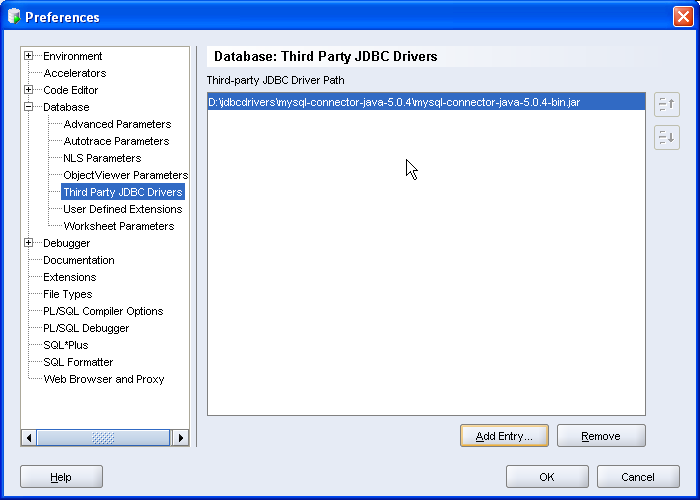
3. In SQL Developer, navigate to the Tools menu: Preferences >Database > ThirdParty JDBC Drivers.
4. Click Add Entry and add your specific jar file.
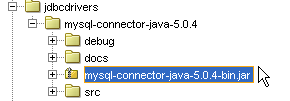
The jars on this preference panel are used for all third party databases.
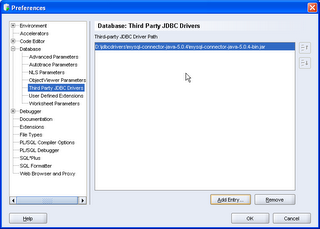
5. Now you can add your connections. Navigate to the Connections dialog and add a new connection.
My example is for a MySQL Database. As for Oracle, be sure your third party database is up and running!

6. Test and save the connection. Note, in my example I have an ACCESS connection tab too. This will be available in the SQL Developer releases post Evaluation Release 3 (1.1.0.22.71.)
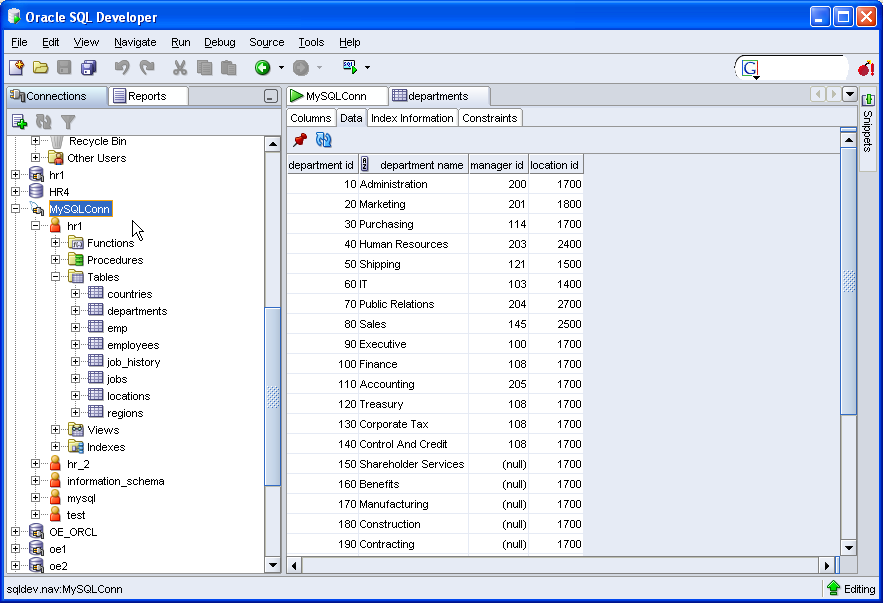
7. You should now see the third party connection in the navigator. Remember this is read only access you have. However, the appropriate tabs and details are available for you to browse and review your database objects.
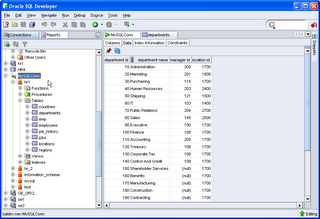 Have fun!
There is lots to tell you about the trip, the work they are doing and have already released and I'll come back and tell you more another time, right now I want to give you a dip into something you can test in SQL Developer.
Part of the Migration Workbench functionality is the ability to connect to and review the objects in a third party database, such as MySQL, SQL Server and Access. In fact these are the three third party databases the team are targeting for their first release. So the Migration Workbench extension to SQL Developer, will allow you to browse your third party database, and then migrate all or some of these objects and data to Oracle. Very exciting! Well, the full Workbench is only due for next year. What we've added to SQL Developer 1.1 is the ability to connect to and browse a third party database. Here's How:
1. JDBC Drivers: Assuming you have an MySQL or SQL Server database, verify you have the correct jdbc drivers. This Getting Started document on SQL Developer 1.1 has links for you to download the drivers you will need.
2. SQL Developer 1.1: This functionality will only be available in SQL Developer Release 1.1. You can test the functionality with the current evaluation release, 1.1.0.22.71, available from here.
3. In SQL Developer, navigate to the Tools menu: Preferences >Database > ThirdParty JDBC Drivers.
4. Click Add Entry and add your specific jar file.
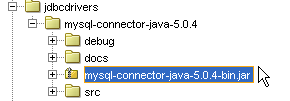
The jars on this preference panel are used for all third party databases.
5. Now you can add your connections. Navigate to the Connections dialog and add a new connection.
My example is for a MySQL Database. As for Oracle, be sure your third party database is up and running!

6. Test and save the connection. Note, in my example I have an ACCESS connection tab too. This will be available in the SQL Developer releases post Evaluation Release 3 (1.1.0.22.71.)
7. You should now see the third party connection in the navigator. Remember this is read only access you have. However, the appropriate tabs and details are available for you to browse and review your database objects.
 Have fun!
15 November 2006
SQL Developer 1.1. How Do I Build a Master Detail Report (with Chart)?
Perfect, a query on the Forum triggered a thought for this entry. "How do I create a report that has a table and chart in it?"
Let's start with a Master-Detail report.
1. Using SQL Developer 1.1 Evaluation Release 2 (1.1.0.21.97) go to the reports tab and select "Add a Report" under the User Defined Reports. I'll leave you to fill in the name, description and tooltip details. The report we are creating uses the demo schema HR, with the EMPLOYEES, DEPARTMENTS and LOCATIONS tables.
2. Although you only see one panel at this stage, you are creating the Master query. Set the Style as Table and enter the following query:
select d.department_id, department_name, city
from departments d, locations l
where d.location_id = l.location_id
Note: No trailing ';'
You can elect to test the reports at any stage, using the Test button.
3. Now to add the detail.
Select the Add Child button to open a new panel in the dialog.
The basic detail query, without chart or any complexities is as follows:
Select * from employees
where department_id = :DEPARTMENT_ID
Note: The bind is CASE sensitive. Also useful to note, the child query knows that this bind is from the table above.
Another example using that bind variable is:
select :DEPARTMENT_NAME, last_name, salary
from employees where department_id = :DEPARTMENT_ID
It is not that interesting, to have the department name in the detail records, because you'll just see that name duplicated.
4. Run the report to see the master detail in operation.
That's it, a Master -Detail report in action.
Making the Detail a Chart.
Let's take it further and pull the CHART into play...
5. Select Edit to open the report again.
From the previous blog entry on charts, you saw that we need to select X, Y and data, so we'll do the same here. Replace the child query with:
select m.last_name, e.last_name, e.salary
from employees e, employees m
where m.employee_id = e.manager_id
and e.department_id = :DEPARTMENT_ID
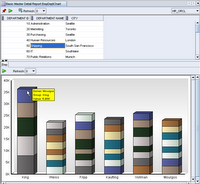
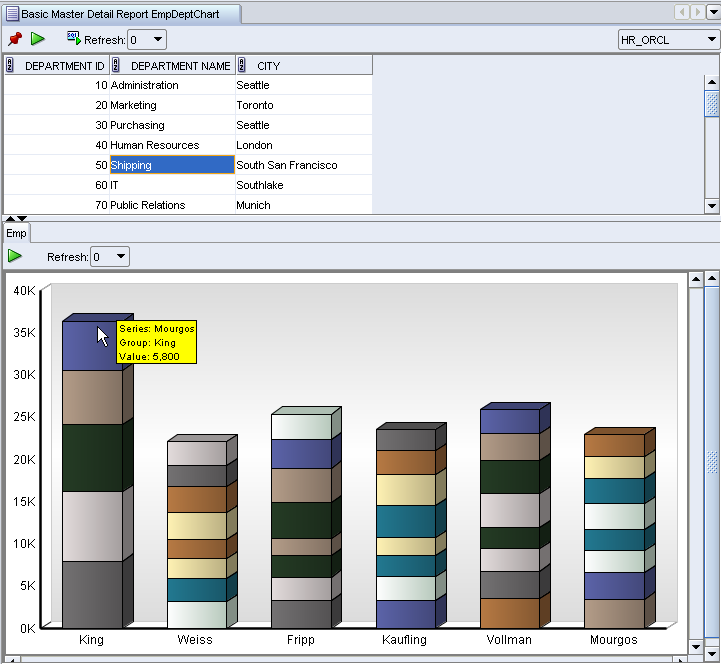
So now I am looking at the departments table and for each department, I want to know who works for each manager in that department and see their salaries.
To create the chart, set the child style to CHART and then look at the chart details and set them to BAR_VERT_STACK and select the Test button.
When you are happy select Apply. Here's mine:
Let's start with a Master-Detail report.
1. Using SQL Developer 1.1 Evaluation Release 2 (1.1.0.21.97) go to the reports tab and select "Add a Report" under the User Defined Reports. I'll leave you to fill in the name, description and tooltip details. The report we are creating uses the demo schema HR, with the EMPLOYEES, DEPARTMENTS and LOCATIONS tables.
2. Although you only see one panel at this stage, you are creating the Master query. Set the Style as Table and enter the following query:
select d.department_id, department_name, city
from departments d, locations l
where d.location_id = l.location_id
Note: No trailing ';'
You can elect to test the reports at any stage, using the Test button.
3. Now to add the detail.
Select the Add Child button to open a new panel in the dialog.
The basic detail query, without chart or any complexities is as follows:
Select * from employees
where department_id = :DEPARTMENT_ID
Note: The bind is CASE sensitive. Also useful to note, the child query knows that this bind is from the table above.
Another example using that bind variable is:
select :DEPARTMENT_NAME, last_name, salary
from employees where department_id = :DEPARTMENT_ID
It is not that interesting, to have the department name in the detail records, because you'll just see that name duplicated.
4. Run the report to see the master detail in operation.
That's it, a Master -Detail report in action.
Making the Detail a Chart.
Let's take it further and pull the CHART into play...
5. Select Edit to open the report again.
From the previous blog entry on charts, you saw that we need to select X, Y and data, so we'll do the same here. Replace the child query with:
select m.last_name, e.last_name, e.salary
from employees e, employees m
where m.employee_id = e.manager_id
and e.department_id = :DEPARTMENT_ID
So now I am looking at the departments table and for each department, I want to know who works for each manager in that department and see their salaries.
To create the chart, set the child style to CHART and then look at the chart details and set them to BAR_VERT_STACK and select the Test button.
When you are happy select Apply. Here's mine:
13 November 2006
SQL Developer 1.1. How Do I Build a Chart?
I did a few "Sneak Peeks" into 1.1, in an attempt to show you what you might expect down the line. Now that 1.1 evaluation release is available, you can go back and look a those and find the features I mentioned.
I'd now like to take this further and do a series of "SQL Developer 1.1: How Do I ....", first using the evaluation drops as they become available and continue that into the production release.
In showing how to go about discovering new things and working with 1.1 in general, I could take 2 quite different approaches. The one approach would be to be quite organized and plan a whole schedule of entries and the other is to write random ad hoc entries that just jump in and out of the tool all over the place. I'm opting for the latter approach, because right now I am inspired to do a quite write up, just covering a basic chart in SQL Developer 1.1
Assumptions:
The query I will use in my example is for the user SCOTT/TIGER and requires that you have access to SCOTT's EMP and DEPT tables and a Connection to SCOTT.
Starting with the Reports Tab, select User Defined Reports and, using the context menu, select Add Report. If you're diligent, you could add a folder first, so that all your reports are saved into carefully planned categories.
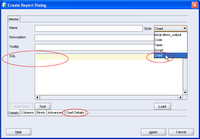
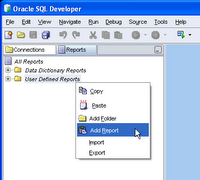 Once you have invoked the new report dialog, there are three areas you should take special note of:
 It is obviously important to complete other details, such as name and tooltip, these I'll leave you to do. I want to create a chart of Employees' Salaries per Department. Here's my query. Note, no trailing ';'
select emp.deptno, emp.ename, sal
from emp, dept
where emp.deptno = dept.deptno
order by dept.deptno, sal
When creating a chart, the rule of thumb is select group, series, data from table
Before you test the chart, select the Chart Details and change the chart type to BAR_VERT_STACK. For the rest of the options, you can make your own choices. For bigger reports, the Legend can take up quite a bit of real estate, so I tend to set that to False. You can see what suits you. Once you have set the Chart Details, you can return to the Details tab and Test the chart or just select Apply.
Once back in the Navigator, select your report and select the connection you have for SCOTT.
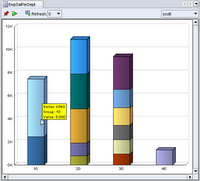 The stripy pajama report reflects the 4 departments in the table , with each employee and salary. The mouseover for each node indicates Employee name and Salary. The power of the chart is that a glance you can see that, based on my data, Department 20 has the greatest salary bill, while Department 10 appears to have the highest paid employee.
This is a trivial example, but you'll note that the results returned are quite rich. Why not try this against some of your System data?
I'd now like to take this further and do a series of "SQL Developer 1.1: How Do I ....", first using the evaluation drops as they become available and continue that into the production release.
In showing how to go about discovering new things and working with 1.1 in general, I could take 2 quite different approaches. The one approach would be to be quite organized and plan a whole schedule of entries and the other is to write random ad hoc entries that just jump in and out of the tool all over the place. I'm opting for the latter approach, because right now I am inspired to do a quite write up, just covering a basic chart in SQL Developer 1.1
Building a Chart using SQL Developer 1.1
At this stage I should point out, that the only 1.1 software you have access to is SQL Developer 1.1 Evaluation Release 1.1.0.21.41. That's what I am going to use. If you do not yet have that release, then go to OTN and follow the links to download it.Assumptions:
The query I will use in my example is for the user SCOTT/TIGER and requires that you have access to SCOTT's EMP and DEPT tables and a Connection to SCOTT.
Starting with the Reports Tab, select User Defined Reports and, using the context menu, select Add Report. If you're diligent, you could add a folder first, so that all your reports are saved into carefully planned categories.
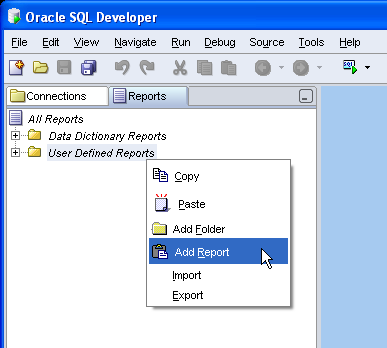 Once you have invoked the new report dialog, there are three areas you should take special note of:
- The Style of report, in this case a CHART
- The SQL text
- Chart Details
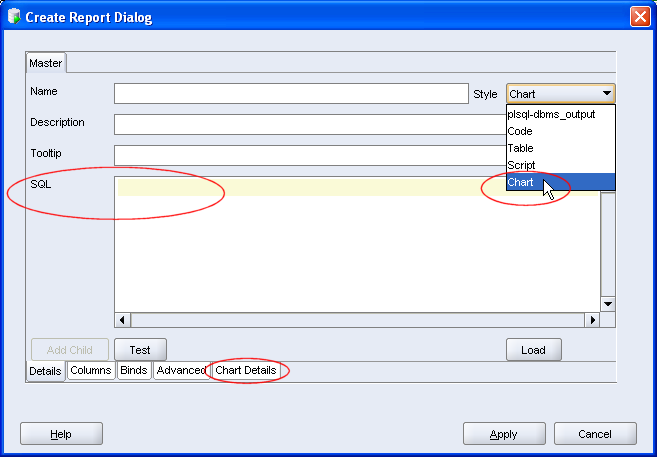 It is obviously important to complete other details, such as name and tooltip, these I'll leave you to do. I want to create a chart of Employees' Salaries per Department. Here's my query. Note, no trailing ';'
select emp.deptno, emp.ename, sal
from emp, dept
where emp.deptno = dept.deptno
order by dept.deptno, sal
When creating a chart, the rule of thumb is select group, series, data from table
Before you test the chart, select the Chart Details and change the chart type to BAR_VERT_STACK. For the rest of the options, you can make your own choices. For bigger reports, the Legend can take up quite a bit of real estate, so I tend to set that to False. You can see what suits you. Once you have set the Chart Details, you can return to the Details tab and Test the chart or just select Apply.
Once back in the Navigator, select your report and select the connection you have for SCOTT.
 The stripy pajama report reflects the 4 departments in the table , with each employee and salary. The mouseover for each node indicates Employee name and Salary. The power of the chart is that a glance you can see that, based on my data, Department 20 has the greatest salary bill, while Department 10 appears to have the highest paid employee.
This is a trivial example, but you'll note that the results returned are quite rich. Why not try this against some of your System data?
09 November 2006
SQL Developer Presentations from Oracle World Available
If you missed Oracle World in San Francisco, or even if you were there, the presentations for the talks are now available for you to browse.
This link takes you to the Content Catalog. Note this app does require a username and password, but they are there for you to use.
If you want to see the talks that Kris and I did, just enter "sue harper" into the Speaker name field and you'll get the Overview and Advanced presentations. (No demos, just power points!) Kris and I will be doing blog entries of the demos in the next few weeks.
If you want to see more SQL Developer related talks, enter "SQL Developer" and you'll also get Donal's talk on the work the Migration Workbench team are doing and how they're using SQL Developer.
Of course you know how to use a simple app like this, but I want to be sure you see the good stuff... ;-)
07 November 2006
Oracle SQL Developer 1.1 Evaluation Release is Now Available!
Need I say more? The long awaited evaluation copy of Oracle SQL Developer 1.1 is now available for you to play with. Please send us your comments! I'll give you the links in a mo, please note, this is NOT a Supported release, it is for evaluation purposes only. The team is still working on the code and closing bugs as I write. We'll be doing regular drops for you to evaluate over the next few weeks and will be using a FeedBack Application to track issues and comments.
You will not be supported through Oracle Support or the Forum, only the feedback site. You will not get the evaluation software from the production download site, instead follow the links through the short survey and on to the evaluation release download. (For subsequent downloads you'll be redirected past the survey) When you reach the download page, there are links to a few very useful documents:
No, I can't tell you the production date yet.
Have fun!
You will not be supported through Oracle Support or the Forum, only the feedback site. You will not get the evaluation software from the production download site, instead follow the links through the short survey and on to the evaluation release download. (For subsequent downloads you'll be redirected past the survey) When you reach the download page, there are links to a few very useful documents:
- New Features - This is a list of new features, quite comprehensive, possibly missing a few little features here and there
- Known Issues - This is a list of bugs already logged, some already fixed in a later build and which you'll pick up in next week evaluation drop.
- Getting Started - This is really important. If you are using 1.0, there are some files you need to back up if you want to preserve them and go back to SQL Developer 1.0.
No, I can't tell you the production date yet.
Have fun!
30 October 2006
SQL Developer Exchange: Vote for Features, Log Requests
At conferences, we always get people who have never heard of our products, or have heard of them but don't really use them, or use them a daily. Then there is always a group that always 'just LOVES' them. This year, when asking around the responses almost all fell into the last two categories, many of whom had a list of feature requests, only to find their requests will be solved in 1.1. That's another story.
...BUT...BUT ...No-one seemed to have heard of this site: http://sqldeveloper.oracle.com
That site is SQL Developer Exchange!
Now you might have a few regular URLS at your fingertips... www.oracle.com, technet.oracle.com, or even google.com and asktom.oracle.com
From http://sqldeveloper.oracle.com you can add your own feature requests. Admittedly, for a while it was difficult to find out if something had already been requested, or to see if we had even looked at your requests. Now we have updated and tweaked the feature area a touch. The more we use it, then more we see there are more things we could do. However, you can now sort on last updated, date created and search. You can see if a feature has made it into 1.1 or is still on a list for a future release.
 Please VOTE: If you see a feature you like or want, please select that feature and add a vote and a comment. If there is only one request and no further votes, then we might assume the community is not after such a feature.
Please keep adding requests. What more is there to say. Requests may be little or large, we'll update the site with feedback and, who knows, your request might make it into a release sooner than you think. If you don't tell us, we don't know.
The main page for http://sqldeveloper.oracle.com has a link to the forums and the main OTN page for SQL Developer. It allows you to see snippets other folk find useful and there are a few hints and tips too.

Make http://sqldeveloper.oracle.com work for you...
25 October 2006
Busy, Busy at Open World
It seems everyone linked to Open World is busy, busy. There are the Oracle staff who are on Hands On Session duty up near Union Square in the Hilton, for an hour or two , then back down to the Moscone for a shift on the demo pods and then back to the Hilton to do a presentation. There are a few aching feet around.
Then of course as an attendee, if you want to do some Hands On and then see more on the demogrounds, and then attend a talk, you're also dashing up and down.
Kris Rice, SQL Developer architect, and I had 2 talks at the Hilton yesterday, so we just hung out up there until we were done. Our attendees didn't though, because there was a paper down at the Moscone between ours they wanted to see. There were a few out of breath folk!
I attended Thomas Kurian's keynote, one of the 2 simultaneous keynotes running on Monday. It was jam packed full of information. As an employee and working in the area either previously with the JDeveloper crowd, or now as one of the Database Tools PM, I've heard most of this before, but there was one piece that really "wow'ed" me.
At the end of the talk, they announced the Oracle Developer Depot. It is focused on the Java, SOA developer and is a great concept. So often this new technology is intimidating and all you need is an example to see how something works, and help on getting setup so that you can at least start and some sample code, installed right where you need it, so that you can get started. That is what this site does. Very, very impressive.
Unrelated to the depot, but related to SQL Developer is the Migration Workbench team. They are here at the show and demonstrating how you can migrate your data structures and data from other database to Oracle. It's an extension to SQL Developer. Very nice. Donal Daly heads up that team and he has just started a blog. Take a look at that here: http://donaldaly.blogspot.com/
23 October 2006
Tent City
It's a dilemma for me. I really want to keep my blog focused on products and not to have daily ramblings about "life and the universe" , this week tho' I think I'm going to slip into "diary mode". You've been warned!
I think it's got to be done. Just look at this (double click for full size or potter over to my photo blog)
 We're in San Francisco. If you're an Oracle blog reader, you'll have seen entries and you'll be seeing lots of entries about the conference this week. For the past few years we have spilled over from Moscone South and North into Moscone West. These are city blocks, I must add, and the halls and demo areas and theatres are on levels above and below street level. A lot happens under the street between Moscone North and South. So what happens when you run out of space under the street? You tent over the street! Fab! That street scene is Howard and it's a pretty busy street as a rule. So for this week, there going to be an interesting traffic puzzle while cars have to divert around the block and negotiate the one way system that is San Francisco. The tented area is carpeted, the length of the city block. This is where invited guests were welcomed last night and where attendees will do meals for the week. Quite remarkable. The buzz on Monday should be great.
If a piece of your world touches Oracle, then there should be something for you here this week. There are talks in Moscone and in the Hilton near Union Square, where a bunch of the technical talks will be in smaller rooms, seating around 90 - 120. Small is good, because it's less intimidating for people to ask questions and it's a cozier atmosphere. At a conference with 45 000 people milling around, cozy might not be good for all the attendees. Our SQL Developer talks on Tuesday are almost at capacity. Last I looked we'd been swapped to a bigger room.
Kris has managed to get another hour for us in the OTN Lounge on Tuesday, so hopefully we'll be able to talk to more folk. Also we'll be hanging around at OTN night on Monday while there is a big Linux Install fest and of course folk will be installing SQL Developer too.
When we're not presenting we'll be on the demo rounds in Moscone West, demonstrating some new stuff! It should be fun.
I was chatting to the Times Ten team yesterday afternoon. They are very excited about showing off Times Ten capabilities using SQL Developer.
I'll be back and hope to keep you informed about snippets of news through the week. When I'm back next week, I'll get back to the serious business of product news.
aah, of course if you're at OOW in San Francisco this year, stop by the booth and say Hi!
I think it's got to be done. Just look at this (double click for full size or potter over to my photo blog)
 We're in San Francisco. If you're an Oracle blog reader, you'll have seen entries and you'll be seeing lots of entries about the conference this week. For the past few years we have spilled over from Moscone South and North into Moscone West. These are city blocks, I must add, and the halls and demo areas and theatres are on levels above and below street level. A lot happens under the street between Moscone North and South. So what happens when you run out of space under the street? You tent over the street! Fab! That street scene is Howard and it's a pretty busy street as a rule. So for this week, there going to be an interesting traffic puzzle while cars have to divert around the block and negotiate the one way system that is San Francisco. The tented area is carpeted, the length of the city block. This is where invited guests were welcomed last night and where attendees will do meals for the week. Quite remarkable. The buzz on Monday should be great.
If a piece of your world touches Oracle, then there should be something for you here this week. There are talks in Moscone and in the Hilton near Union Square, where a bunch of the technical talks will be in smaller rooms, seating around 90 - 120. Small is good, because it's less intimidating for people to ask questions and it's a cozier atmosphere. At a conference with 45 000 people milling around, cozy might not be good for all the attendees. Our SQL Developer talks on Tuesday are almost at capacity. Last I looked we'd been swapped to a bigger room.
Kris has managed to get another hour for us in the OTN Lounge on Tuesday, so hopefully we'll be able to talk to more folk. Also we'll be hanging around at OTN night on Monday while there is a big Linux Install fest and of course folk will be installing SQL Developer too.
When we're not presenting we'll be on the demo rounds in Moscone West, demonstrating some new stuff! It should be fun.
I was chatting to the Times Ten team yesterday afternoon. They are very excited about showing off Times Ten capabilities using SQL Developer.
I'll be back and hope to keep you informed about snippets of news through the week. When I'm back next week, I'll get back to the serious business of product news.
aah, of course if you're at OOW in San Francisco this year, stop by the booth and say Hi!
04 October 2006
Running PL/SQL Code Using SQL Developer
I have seen a few questions about running PL/SQL using SQL Developer and what to do when encountering the PL/SQL error message "wrong number or types of arguments in call to '||' "
Here is some code for you. Assume I am using the HR schema and the EMPLOYEES table in Oracle 9i or 10g or Express Edition. In this instance we'll create a Package, but the principle is the same for functions and procedures. I'll give you some code to play with. (We have this same example in one of the JDeveloper tutorials on OTN if you are a JDeveloper user.)
Using SQL Developer 1.0:
Step1. Create a new Object TYPE. Here is the code:
create or replace type EMP_REC as object
(
employee_id number(6),
last_name varchar2(25),
job_id varchar2(10),
manager_id number(6),
hire_date date,
salary number(8,2),
commission_pct number(2,2),
department_id number(4)
);
You can copy and paste the code into the SQL Worksheet or use the dialog for Types, in the Connections Navigator.
Step 2. Create the package spec. Here is the code:
create or replace package emp_fetcher as
FUNCTION get_emp(emp_no IN NUMBER) RETURN emp_rec;
END;
Step 3. Create the package body. Here is the code:
CREATE OR REPLACE PACKAGE BODY emp_fetcher AS
FUNCTION get_emp(emp_no IN NUMBER) RETURN emp_rec IS
emp_found employees % rowtype;
emp_rtn emp_rec;
BEGIN
SELECT *
INTO emp_found
FROM employees
WHERE employees.employee_id = emp_no;
emp_rtn := emp_rec(emp_found.employee_id,
emp_found.last_name,
emp_found.job_id,
emp_found.manager_id,
emp_found.hire_date,
emp_found.salary,
emp_found.commission_pct,
emp_found.department_id);
RETURN emp_rtn;
END;
END;
Step4.
Now we are ready!
You can either select the package spec in the Navigator and use the context menu to run it.
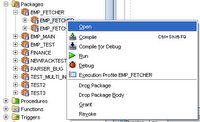
or you can switch to the PL/SQL editor and run the Package from there.
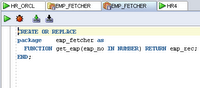
Step 5. Now this is where we are headed. Oracle SQL Developer (and JDeveloper, if you are interested) creates an anonymous block for you. It provides a place to add "IN" parameters and the DBMS_OUTPUT for "OUT" parameters.
Here is the window before you add the parameters:
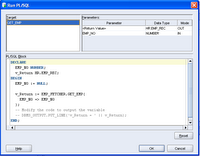
You can see the EMP_NO is a NULL. Update this with the employee number as required.
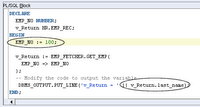
Note the DBMS_OUTPUT statement is commented out. Remove the comments and specify which of the values in the record you are interested in. The example I have given is "LAST_NAME", but if you refer to the record type we created, "SALARY" would also do, as would "hire_date" .
This is where you'd run into the error specified above. If you uncomment the DBMS_OUTPUT command, you must then pass the correct value.
Have fun with your PL/SQL.
Here is some code for you. Assume I am using the HR schema and the EMPLOYEES table in Oracle 9i or 10g or Express Edition. In this instance we'll create a Package, but the principle is the same for functions and procedures. I'll give you some code to play with. (We have this same example in one of the JDeveloper tutorials on OTN if you are a JDeveloper user.)
Using SQL Developer 1.0:
Step1. Create a new Object TYPE. Here is the code:
create or replace type EMP_REC as object
(
employee_id number(6),
last_name varchar2(25),
job_id varchar2(10),
manager_id number(6),
hire_date date,
salary number(8,2),
commission_pct number(2,2),
department_id number(4)
);
You can copy and paste the code into the SQL Worksheet or use the dialog for Types, in the Connections Navigator.
Step 2. Create the package spec. Here is the code:
create or replace package emp_fetcher as
FUNCTION get_emp(emp_no IN NUMBER) RETURN emp_rec;
END;
Step 3. Create the package body. Here is the code:
CREATE OR REPLACE PACKAGE BODY emp_fetcher AS
FUNCTION get_emp(emp_no IN NUMBER) RETURN emp_rec IS
emp_found employees % rowtype;
emp_rtn emp_rec;
BEGIN
SELECT *
INTO emp_found
FROM employees
WHERE employees.employee_id = emp_no;
emp_rtn := emp_rec(emp_found.employee_id,
emp_found.last_name,
emp_found.job_id,
emp_found.manager_id,
emp_found.hire_date,
emp_found.salary,
emp_found.commission_pct,
emp_found.department_id);
RETURN emp_rtn;
END;
END;
Step4.
Now we are ready!
You can either select the package spec in the Navigator and use the context menu to run it.

or you can switch to the PL/SQL editor and run the Package from there.

Step 5. Now this is where we are headed. Oracle SQL Developer (and JDeveloper, if you are interested) creates an anonymous block for you. It provides a place to add "IN" parameters and the DBMS_OUTPUT for "OUT" parameters.
Here is the window before you add the parameters:
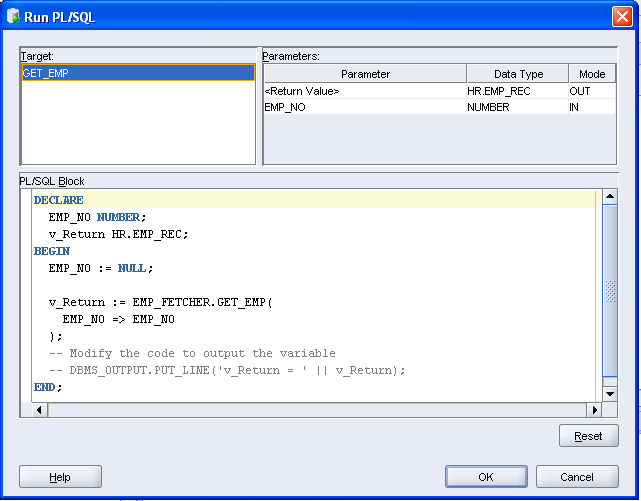
You can see the EMP_NO is a NULL. Update this with the employee number as required.
Note the DBMS_OUTPUT statement is commented out. Remove the comments and specify which of the values in the record you are interested in. The example I have given is "LAST_NAME", but if you refer to the record type we created, "SALARY" would also do, as would "hire_date" .
This is where you'd run into the error specified above. If you uncomment the DBMS_OUTPUT command, you must then pass the correct value.

Have fun with your PL/SQL.
18 September 2006
Count and Filters...
I'm still testing and working with SQL Developer 1.1, so have neglected this blog for a while. I am sure you're out and about doing the last of summer things, assuming you live north of the equator, or looking forward to spring, if you're down south! Either way, I doubt you'll have missed this too much.
I'm working through my morning tasks and today, that includes reviewing my bugs that have been closed. Here's one I've just looked at.
Users on the forum were frustrated that when you apply a filter to your data, in SQL Developer 1.0 and then tried to Count the records, the response was a count of all the records. So apart from writing the SQL, the request was to know how many records are returned, with a filter applied. Here you go, a simple context menu option:


05 September 2006
Quick Sneak Peak...Setting NLS parameters
How quickly a week passes and I've not written up any news. It seems there is no time for blogging... (that, or there is no news)
Anyway, I'm working through a new drop of SQL Developer and thought I'd mention this set of preferences very briefly. The preference category is NLS Parameters and the screen shot says it all.

In case it doesn't, there have been a number of queries about the date format and being able display the time portion in a date field. Other users have configured the .cfg file to add in other NLS settings. Now you'll be able to handle these from the preferences window, using the NLS Parameter settings.
Anyway, I'm working through a new drop of SQL Developer and thought I'd mention this set of preferences very briefly. The preference category is NLS Parameters and the screen shot says it all.
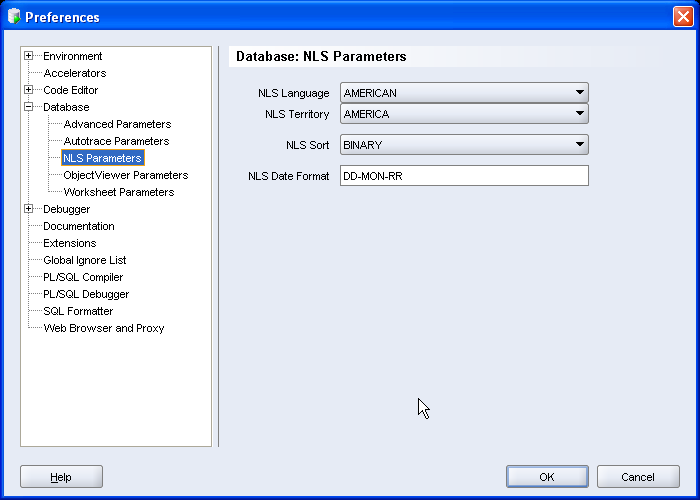
In case it doesn't, there have been a number of queries about the date format and being able display the time portion in a date field. Other users have configured the .cfg file to add in other NLS settings. Now you'll be able to handle these from the preferences window, using the NLS Parameter settings.
25 August 2006
A JDeveloper Tip that Might be Handy for SQL Developer
There is a blog that might be a handy one to dip into every so often. The site is DuffBlog. Brian Duff is a developer in the JDeveloper team. He is one of the JDeveloper developers who works closely with the SQL Developer development team. Brian is works on the IDE and framework and so is an important chap for us. Anyway Brian blogs from time to time and if you're a SQL Developer user, there may be a few useful gems for you among his entries.
Take a look at Seriously Customizing JDeveloper. The basic premise in the entry is about how to disable any extension in JDeveloper. The very last paragraph of that blog entry says "As an added bonus, you can also do this in SQL Developer..."
Then he did it again this week...just a little piece of useful information on opening files....
Just thought you might be interested.
22 August 2006
SQL Developer Exchange is Launched!
Over the years the Oracle users have often asked for some way of logging feature requests. It's part of what I do, collect feature requests and take them to development and present the business case. The thing is, which request is important? Is it the guy who shouts loudest and longest? Is it the eloquent chap who puts forward a good business case or is it the big spender? If it is any of these, no luck then for the quiet guy in the small company, who might have a very sound idea. Even when we have a list of features, does it make sense, for Oracle, for the product, for the broader community, to add this particular feature to a particular product? It's not worth getting bogged down in the possible negatives, product feedback and feature requests are important.
The SQL Developer team launched the web site SQL Developer Exchange this week, to support the SQL Developer user community. The Exchange has a few sections, they include:
Reports
SQL Developer has a bunch of shipped reports. They're great. They are the kind of reports I used to run when I was steeped in doing SQL and PL/SQL stuff in the good ole days. They're the reports we all have in scripts and carry around with us. The tool also offers you the ability to add your own reports. So if the scripts you carry around have more reports than we ship, then just add your reports to SQL Developer. This reports.xml file, of user defined reports, can be saved on the network and you can share this file. (see earlier blog entries on creating reports) What's useful about the Exchange is that you almost certainly have a few fab reports that others might find useful. Next time you run a report that you run daily or weekly, consider sharing it on the Exchange. I'm sure others will find it very useful too.
Snippets
I've recently blogged on adding snippets, now you should share the snippets you have added! Remember, not every function, date conversion etc from the Oracle online database doc is in our list of snippets, so you can just use the code from the online doc and add these to your snippets file. Perhaps you and your team use bits of code regularly, add them to the snippets section in the Exchange.
Tip and Tricks
You know how sometimes when you watch someone else using a program and you see them do something quick and easy, something that you never knew about, something that causes you to say "oh wow". That's what we want added. You know the "hey, did you know that you can rerun any report for any user, by toggling the user in the drop list to the right of the screen?" type of comment.
And if you like a tip, which has been added, then rate it!
Feature Requests
To bring you back to where I started. You can request features in SQL Developer. Once a feature request has been added, you can rate the features. So you might think the feature warrants a "must have" (score = 10), but someone else might rate it 3 or 4. The more votes we get, the better we get a feel for whether something is really wanted or if it's a lone voice in the dark. Our main concern is that while we have tracked many feature request on the forum, we're concerned that some smaller enhancements may have become lost in threads.
I should warn you that this does not guarantee a feature will make the product as there are a lot of reasons why something does not make the cut, but we want to build a product that the community loves, so your feedback is key.
The site is built using Application Express, referred to as APEX in the corridors of Oracle and probably known to you as HTMLDB! ;-) So as soon as you type in http://sqldeveloper.oracle.com you'll be flicked through to an APEX URL for the SQL Developer Exchange
Have fun, and do send us feedback
21 August 2006
Conferences, conferences, conferences...
Oracle Open World
I know, it's only August, but if you've not booked your hotel for Oracle Open World in San Francisco yet, you're probably not going to get your first choice...That's for the end of October and should be a cracking event. It looks like it'll be bigger than ever and, for a change, there'll be lots of technology sessions on the go. (We have a couple for SQL Developer) Check it out if you're in a quandary about going. What's more, you'll get to meet some of the developers!
OUG Scotland
I'm going to run into a deadline in a few days for my material for the Scottish User Group. That's September, in Glasgow. I have a small workshop running on the first day and a paper on the second. It should be good fun.
I should mention that the UKOUG conference is also going to be a big event this year. It's November, so we have time to book hotels.
AUSOUG
Then, this morning my feedreader rolled over Doug Burn's latest blog entry, with loads of details on the Australian User Group and I see there a few top names speaking. What's more I see that Chris Muir is doing a SQL Developer workshop...
So, whether you are on the map to the left of Greenwich, or to the right or in the middle... you should find a conference near you (well more or less).
17 August 2006
Add Your Own Snippets Today in SQL Developer 1.0
Earlier this week I showed you some screens shots for adding snippets using a menu in 1.1, that's no good to you today, so this entry is devoted to adding snippets manually in 1.0.
I'm using SQL Developer 1.0
Kris has blogged on this before in a few places. His initial entry on this, back in January, referred to raptor files and extensions. The blog entry is still accurate, just that file names have changed, which is why I thought I'd update this manual step for SQL Developer 1.0. Kris goes on later to talk about an extension that he put on SourceForge that "enables support for read only XMLTypes and adds export to excel in native excel in the worksheet". He updated this extension (blog entry 8th March) to support highlighting some text and then adding it to the snippets file through the extension.
So this entry is not about adding an extension, but creating a snippets file and hooking that into your SQL Developer install. I'll break this down into steps.I'm using SQL Developer 1.0
Step 1. Create a directory for your snippets. I have created a "mysnippets" directory. I have chosen to keep it with my product installation, but there is no reason why you can't keep this file centrally on a separate file server, you just need to direct SQL Developer to where you have placed it.
Step 2. Create a snippets.xml file. If you have a favorite XML editor, use that. I used Textpad!

Step 3. Add the snippet code.
The XML is pretty straight forward. Here is a skeleton of code:

I know, Textpad does not highlight code like that! I used JDeveloper's XML editor, it uses code highlighting and so it's easier to see the structure.
Here is an example of a small snippet file. Once again, I used JDeveloper's XML editor, for the code highlighting. Notice within one Category, i.e.XML tag

The piece of code between the CDATA [] is what is dragged onto the worksheet. Below is that same piece of code to cut and paste into Textpad:
<?xml version = '1.0' encoding = 'UTF-8'?>So now you have the snippets.xml file. The last step is to tell SQL Developer about it.
<snippets>
<group category="Sue's Repeated Queries" language="PLSQL">
<snippet name="ALLEmployees"
description="This is just selecting columns from EMPLOYEES">
<code>
<![CDATA[SELECT employee_id, first_name, last_name, email,
phone_number,hire_date, job_id, salary,
commission_pct, manager_id, department_id, last_name_id
FROM hr.employees;]]>
</code>
</snippet>
<snippet name="Sue's Locations Countries Regions Join"
description="This does the inner join">
<code>
<![CDATA[SELECT COUNT(locations.city) "Number of Cities",
regions.region_name regions
FROM(locations INNER JOIN countries USING(country_id))
INNER JOIN regions USING(region_id)
GROUP BY regions.region_name ORDER BY 1;]]>
</code>
</snippet>
</group>
<group category="More Character Functions" language="PLSQL">
<snippet name="REPLACE"
description="REPLACE lets you substitute one string
for another as well as to remove character strings.">
<code>
<![CDATA[REPLACE(expr,search_string,replacement_string)]]>
</code>
</snippet>
</group>
</snippets>
Step 4. Update the sqldeveloper.conf file. You'll find this in the sqldeveloper/jdev/bin directory.

Once again, using Texpad to edit the sqldeveloper.conf file, add the line of code below to point to your snippets file.
AddVMOption -Draptor.user.snippets=../../mysnippets/snippets.xml
It's important to note that the path depends on where you have the file. You can put the full path here. Note too that any path separators must be # UNIX style forward slashes '/', even on Windows.Step 5. Test it!

15 August 2006
Handling Snippets: Sneak Peak into 1.1
Here's another sneak peak into what's coming in SQL Developer 1.1.

In 1.0 you can add your own snippets. Kris gives some suggestions on his blog on how to go about it. There are a other notes about suggesting alternative approaches. We're not happy about some of these i.e. The suggestion to yank the XML file from the jar, update it with the snippet and replace the file in the jar. I have done it myself and it works and is easy. It's not recommended, because if you get into the habit of essentially hacking the jar files you can break stuff. Simpley out, editing the .jar files is not supported. Kris does give you a way to do it legally.
Anyway, to save all that hassle, we've given you a small menu and dialog


So you can use the drop list and add a new snippet to any existing category, or you can create your own category by just typing it in.
11 August 2006
I didn't know you could do that!
Have you ever used a tool for a while and then suddenly stumbled across something new? It's like opening a surprise gift or opening the window in the morning and seeing unexpected snow outside! Pure fun.
361,Mark,Jasper,SA_REP,145,17-MAY-2001,8000,.1,80,mjasper
362,Brenda,Starr,AD_ASST,200,17-MAY-2001,5500,0,10,bstarr
363,Alex,Alda,AC_MGR,145,17-MAY-2001,9000,.15,80,aalda So now we need to create the external table for our HR schema. First, switch to the schema HR and then, using the context menu, invoke the Create Table dialog. This is the initial screen:
required. (The full code is below)
CREATE TABLE admin_ext_employees
(employee_id NUMBER(4),
first_name VARCHAR2(20),
last_name VARCHAR2(25),
job_id VARCHAR2(10),
manager_id NUMBER(4),
hire_date DATE,
salary NUMBER(8,2),
commission_pct NUMBER(2,2),
department_id NUMBER(4),
email VARCHAR2(25)
)
ORGANIZATION EXTERNAL
(
TYPE ORACLE_LOADER
DEFAULT DIRECTORY admin_dat_dir
ACCESS PARAMETERS
(
records delimited by newline
badfile admin_bad_dir:'empxt%a_%p.bad'
logfile admin_log_dir:'empxt%a_%p.log'
fields terminated by ','
missing field values are null
( employee_id, first_name, last_name, job_id, manager_id,
hire_date char date_format date mask "dd-mon-yyyy",
salary, commission_pct, department_id, email
)
)
LOCATION ('empxt1.dat', 'empxt2.dat')
)
PARALLEL
REJECT LIMIT UNLIMITED;
I started my day as normal by sorting out the bits of work I need to do and trashing unwanted mail and spam when I was distracted by a message about another product. I broke 2 'personal rules' one was to start playing with the piece of code and the other was to start working on something not on my list of things to do for the day! Well, it's Friday - that'll be my excuse.
The note was about handling external tables, so I thought I'd run the supplied code through SQL Developer, to see how well we handle it, and I found a whole new dialog! Maybe I shouldn't be admitting that, but I wondered if you'd like this little gem.
Creating an External Table and Loading Data
Here's some background first. Verbatim from the Oracle Documentation: "You create external tables using the ORGANIZATION EXTERNAL clause of the CREATE TABLE statement. You are not in fact creating a table; that is, an external table does not have any extents associated with it. Rather, you are creating metadata in the data dictionary that enables you to access external data."
In order for you to be able to replicate this exercise, I used the example offered by the Oracle database doc.
First you need these two files created and stored somewhere in a directory.
The file empxt1.dat contains the following sample data:
360,Jane,Janus,ST_CLERK,121,17-MAY-2001,3000,0,50,jjanus361,Mark,Jasper,SA_REP,145,17-MAY-2001,8000,.1,80,mjasper
362,Brenda,Starr,AD_ASST,200,17-MAY-2001,5500,0,10,bstarr
363,Alex,Alda,AC_MGR,145,17-MAY-2001,9000,.15,80,aalda
The file empxt2.dat contains the following sample data:
401,Jesse,Cromwell,HR_REP,203,17-MAY-2001,7000,0,40,jcromwel
402,Abby,Applegate,IT_PROG,103,17-MAY-2001,9000,.2,60,aapplega
403,Carol,Cousins,AD_VP,100,17-MAY-2001,27000,.3,90,ccousins
404,John,Richardson,AC_ACCOUNT,205,17-MAY-2001,5000,0,110,jrichard
What we want to do is create a table that accesses this external data. i.e. an external table. Once created, the Oracle doc then moves the data from the external table into a table in the schema, to complete the exercise.
First we set up the directories. This syntax is not quite straight from the doc, but nearly. The only changes I made was to use my own directory structure and of course I'm using SQL Developer:
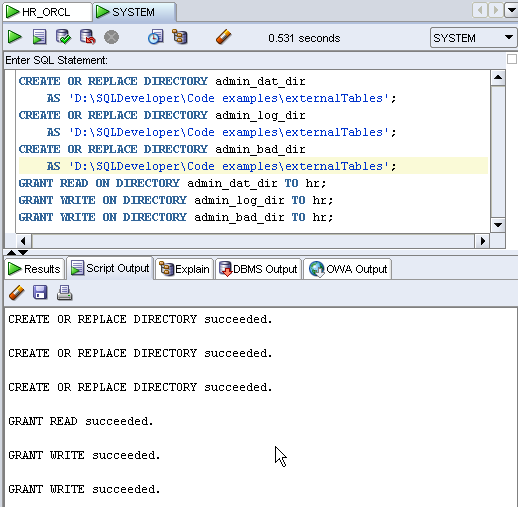 So now we need to create the external table for our HR schema. First, switch to the schema HR and then, using the context menu, invoke the Create Table dialog. This is the initial screen:
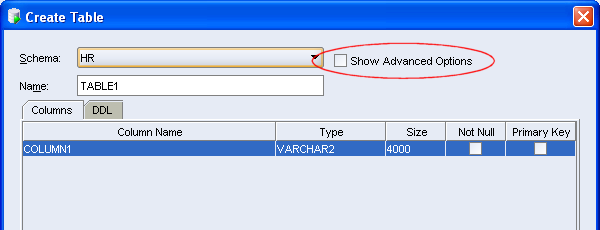
You can fill in the columns here, or just switch directly to the advanced dialog. Once you've switched you'll see the Table Types property. When I demo SQL Developer, I always highlight these options for users, but as I don't use external tables, I typically continue the demo by creating a regular table with constraints etc.

required. (The full code is below)

CREATE TABLE admin_ext_employees
(employee_id NUMBER(4),
first_name VARCHAR2(20),
last_name VARCHAR2(25),
job_id VARCHAR2(10),
manager_id NUMBER(4),
hire_date DATE,
salary NUMBER(8,2),
commission_pct NUMBER(2,2),
department_id NUMBER(4),
email VARCHAR2(25)
)
ORGANIZATION EXTERNAL
(
TYPE ORACLE_LOADER
DEFAULT DIRECTORY admin_dat_dir
ACCESS PARAMETERS
(
records delimited by newline
badfile admin_bad_dir:'empxt%a_%p.bad'
logfile admin_log_dir:'empxt%a_%p.log'
fields terminated by ','
missing field values are null
( employee_id, first_name, last_name, job_id, manager_id,
hire_date char date_format date mask "dd-mon-yyyy",
salary, commission_pct, department_id, email
)
)
LOCATION ('empxt1.dat', 'empxt2.dat')
)
PARALLEL
REJECT LIMIT UNLIMITED;
Checking the Data
Is the data there? Can you query it and access it as usual? Yes, yes and yes! Try this: Expand the Tables node in the Navigator and drag the ADMIN_EXT_EMPLOYEES table onto the SQL Worksheet and execute your query.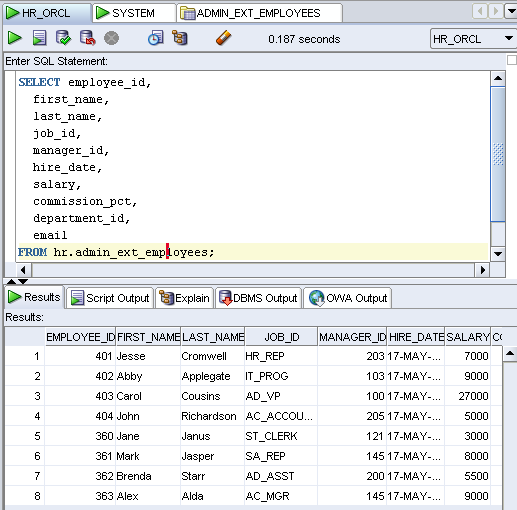
The Oracle doc finishes the exercise by copying the data from the external table into EMPLOYEES with the following command:
INSERT INTO employees (employee_id,
first_name, last_name, job_id, manager_id,
hire_date, salary, commission_pct, department_id, email)
SELECT * FROM admin_ext_employees;
Now, back to work.
Subscribe to:
Posts (Atom)