


 Posts
Posts



I'm an old timer... when I started in the industry years ago, I learned how to create Data Models and write SQL. Yes, yes, I admit, it wasn't the first thing, and it was after I dropped the punch cards on the floor at university...! Didn't we all? In fact I taught SQL for quite a few years before I moved on to teaching application development using the various tools offered by Oracle. By the time I left Oracle, nearly 20 years on, the developers were all learning Java, but we all still need SQL.
Generally, if we're putting data into a relational, SQL-based, database and then querying the results, we probably need to know some SQL. I know that's a pretty broad statement, but if you're an application developer and you need to get at data by writing ad hoc queries, it's key to be able to write good SQL.
Most of the people I know in the tech industry are old timers too, by that I mean they've been writing SQL for so long they can't remember when they started and it's easy for them, but what about those new to the technology? How do you get up to speed? How do you learn SQL? Do you know the data model of the tables you are querying? Do have access to tools that help you look at the data model? What about tools that help you learn to write SQL?
Yup, you know what's coming - if you're starting out, we have a tool that can help you learn SQL. The graphical interface in DBClarity Developer allows you to create, what we call SQL Rules to interact with the database, by building a visual structure of the query. You don't need to know SQL. The great news is, that you can see the SQL created and reuse the SQL once its created and the feedback we've had is that new users are learning SQL.
Why not download the product today and see what you can do? There lots of shorts videos on the website to help yo get started and on Tuesday the 17th April, we're running a webinar showing you how to create SQL Rules. Register and learn!
I'd love to hear your thoughts and feedback - I'm on twitter @MCGN_DBClarity or @SueHarps
Showing posts with label Data Models. Show all posts
Showing posts with label Data Models. Show all posts
13 April 2012


19 October 2011
Updates, News and Beta Software
Those of you who follow my blog, know that I write from time to time. I started blogging back in the day when I was working on modeling and the SQL support offered in Oracle JDeveloper and then in 2006, started this blog with the launch of Oracle SQL Developer and then later to SQL Developer Data Modeler. Recently my blogging dropped right off because, after 19 years at Oracle, I decided to “hang up my boots” and try something new. Although taking photos in Cornwall really appeals, it seems that when we decide to start fresh, perhaps we don’t venture too far from where we’ve been before- well, it is true for me.
After a restful, technology–free 2 month break, I started in a new position at Microgen, a company based in the City of London. (I can see St Paul’s Cathedral from the window!) I’m in the Microgen Aptitude Solutions Division; so still in technology, still working with products that build applications and still talking to databases. My new laptop has SQL Developer on it and I can connect to an Oracle Database!
Microgen DBClarity Developer is Beta
I’ll talk a little about the tools and technology I’m now involved with, in the weeks and months to come; today I want to tell you about a beta program we’re running for Microgen DBClarity Developer. This new product is focussed on people who want to query the database, by writing SQL queries and procedures, but who are not necessarily familiar with SQL syntax. The idea is that through the graphical interface IT and Business users can work together on gathering data. There is an overview on the website: http://www.microgen.com/dbclarity/
Consider writing a SELECT statement for a correlated query; if you’re a DBA, SQL or PL/SQL developer you can do this faster than I type these sentences, but if you’re with someone who knows what information they want from the tables they have access to, more complex SQL Queries may be daunting to them. If you can represent your queries graphically to them, then the whole discussion may become much easier. This tool is not a SQL Developer replacement, so why not download it, take a look and see what you think? I’d love to hear your feedback. I’ll be back soon with tips on how to get started and how to build a few basic queries. The software is shipped with a set of tutorial examples, so you can see what I mean quite quickly. Here’s how:
1. Download the software from here: http://www.microgen.com/dbclarity/
2. Expand “My Projects” and double-click to select the DBClarity Tutorial of your choice. (This opens a new tab set with the project selected.)
3. The tutorial projects are seeded with a number of defined objects. (I prefer to use the Dictionary View. You can switch to this by selecting the view choice icon just above the project. Once you have switched views, you’ll see a list that includes SQL Rules, SQL Expressions etc.)
4. Whether you switch views or not, expand the SQL Rules, select and double-click to open the rule. This displays a visual representation of your SQL Query.
5. To see the SQL Query, select the Show SQL icon.
For more help and information, take a look at the set of tutorial slides related to the examples on the website.
SQL Developer Data Modeler 3.1
As for my history…I see that SQL Developer Data Modeler 3.1 is now beta. Have fun with that!
After a restful, technology–free 2 month break, I started in a new position at Microgen, a company based in the City of London. (I can see St Paul’s Cathedral from the window!) I’m in the Microgen Aptitude Solutions Division; so still in technology, still working with products that build applications and still talking to databases. My new laptop has SQL Developer on it and I can connect to an Oracle Database!
Microgen DBClarity Developer is Beta
I’ll talk a little about the tools and technology I’m now involved with, in the weeks and months to come; today I want to tell you about a beta program we’re running for Microgen DBClarity Developer. This new product is focussed on people who want to query the database, by writing SQL queries and procedures, but who are not necessarily familiar with SQL syntax. The idea is that through the graphical interface IT and Business users can work together on gathering data. There is an overview on the website: http://www.microgen.com/dbclarity/
Consider writing a SELECT statement for a correlated query; if you’re a DBA, SQL or PL/SQL developer you can do this faster than I type these sentences, but if you’re with someone who knows what information they want from the tables they have access to, more complex SQL Queries may be daunting to them. If you can represent your queries graphically to them, then the whole discussion may become much easier. This tool is not a SQL Developer replacement, so why not download it, take a look and see what you think? I’d love to hear your feedback. I’ll be back soon with tips on how to get started and how to build a few basic queries. The software is shipped with a set of tutorial examples, so you can see what I mean quite quickly. Here’s how:
1. Download the software from here: http://www.microgen.com/dbclarity/
2. Expand “My Projects” and double-click to select the DBClarity Tutorial of your choice. (This opens a new tab set with the project selected.)
3. The tutorial projects are seeded with a number of defined objects. (I prefer to use the Dictionary View. You can switch to this by selecting the view choice icon just above the project. Once you have switched views, you’ll see a list that includes SQL Rules, SQL Expressions etc.)
4. Whether you switch views or not, expand the SQL Rules, select and double-click to open the rule. This displays a visual representation of your SQL Query.
5. To see the SQL Query, select the Show SQL icon.
For more help and information, take a look at the set of tutorial slides related to the examples on the website.
SQL Developer Data Modeler 3.1
As for my history…I see that SQL Developer Data Modeler 3.1 is now beta. Have fun with that!
11 February 2011
Data Modeler: Working with Different Database Sites
SQL Developer Data Modeler supports the option to create different implementations (physical DDL scripts) based on the same relational model (tables, columns and constraints). The Data Modeler itself can be visualized as a model! Your complete design can be made up of logical (ERD) models, relational, physical models and indeed datatype and process models. If we just think of the logical, relational and physical, then one logical model can be transformed or forward engineered into one or more relational models. (i.e your entities can be transformed to tables) and then each of those relational models can have many physical models.
So you may, for example, do a generic logical model for an airline application, but transform it to a number of slightly different relational models (applying different transformation rules or perhaps different glossaries. Now once you have that relational model set, you can have a number of different physical models. Often we have a test, development and production environment and want to have slightly different physical settings for these. We can do that in the physical model.

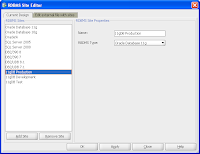 So let's assume you have the relational model all set. Add new database sites using the Tools > RDBMS Site Administration as shown above. This invokes the RDBMS Site editor. Here you can add as many new sites as you need. They can be reused, so there is no need to be too specific, you only need to add new sites if you want more than one, say Oracle Database 11g, physical model in a design. In the next image we show that three additional sites have been added for the Oracle 11g Database.(click on any of the images to see them in full size)

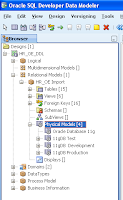 Now return to the relational model and create the new physical models. To do this, expand the Relational model and select the Physical Model node. Right-click for the context menu and select New. This allows you to choose the database site you wish to associate with the model. You can do this for each of you test, development and production sites. In the image shown above right, there are 4 different physical models.
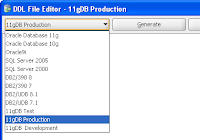 Once you have made the physical property updates for each physical database, you can start the DDL generation. Ensure you select the correct Physical model from the database sites in the DDL File Editor dialog before you start the generation.
Cloning Sites
Now each of these sites will have all the relational detail from the diagram, so the tables, columns, constraints will all be the same. You've created the different sites, so that you can have different tablespaces and possibly user definitions, but chances are you'll want your sequences and PL/SQL code to be the same. You can do this by adding that content to one of the physical models and then cloning the others from this. Select the new physical model and right-click, select Clone From. You can now select the model you want to clone.
So you may, for example, do a generic logical model for an airline application, but transform it to a number of slightly different relational models (applying different transformation rules or perhaps different glossaries. Now once you have that relational model set, you can have a number of different physical models. Often we have a test, development and production environment and want to have slightly different physical settings for these. We can do that in the physical model.

 So let's assume you have the relational model all set. Add new database sites using the Tools > RDBMS Site Administration as shown above. This invokes the RDBMS Site editor. Here you can add as many new sites as you need. They can be reused, so there is no need to be too specific, you only need to add new sites if you want more than one, say Oracle Database 11g, physical model in a design. In the next image we show that three additional sites have been added for the Oracle 11g Database.(click on any of the images to see them in full size)
 Now return to the relational model and create the new physical models. To do this, expand the Relational model and select the Physical Model node. Right-click for the context menu and select New. This allows you to choose the database site you wish to associate with the model. You can do this for each of you test, development and production sites. In the image shown above right, there are 4 different physical models.
 Once you have made the physical property updates for each physical database, you can start the DDL generation. Ensure you select the correct Physical model from the database sites in the DDL File Editor dialog before you start the generation.
 Cloning Sites
Now each of these sites will have all the relational detail from the diagram, so the tables, columns, constraints will all be the same. You've created the different sites, so that you can have different tablespaces and possibly user definitions, but chances are you'll want your sequences and PL/SQL code to be the same. You can do this by adding that content to one of the physical models and then cloning the others from this. Select the new physical model and right-click, select Clone From. You can now select the model you want to clone.
31 January 2011
SQL Developer Data Modeler 3.0 is Production
I'm please to say that SQL Developer Data Modeler 3.0 is now production. The latest release is now available for download from OTN. There are various demonstrations available for you to get to know the new features and remind yourselves of other features.
See the main SQL Developer Data Modeler page on OTN for download links, new feature pages and demonstrations.
See the Oracle Press Release for more.
See the main SQL Developer Data Modeler page on OTN for download links, new feature pages and demonstrations.
See the Oracle Press Release for more.
12 October 2010
SQL Developer Data Modeler 3.0 - Early Adopter Release
The news just keeps getting better. At Oracle OpenWorld, we announced that the Data Modeler is now a free product. This was very exciting for us and for the many customers who came to talk to us at the show. I'm really pleased as there is no excuse for not modeling your database, or at the very least to connect to a data dictionary and see how your tables are all connected - visually!
The news that the product is free means more than that to us, it now means that we can run a public early adopter program and so you can go, today, and download SQL Developer Data Modeler 3.0 Early Adopter 1. All the features that you used in SQL Developer 2.0 are still there, in addition there are a few new features that I think you'll like. The best bet is to go to the Data Modeler home page and take a look at the online demonstrations available. The first three walk through the new functionality in the product. They're about 12 - 15 mins each and I show the new features and explain as much as I can it he given time. The last two are short viewlets on two aspects of the current functionality. Of course if you know nothing of the product, then just look at the brief online Data Modeler 2.0 demonstration. This is for the current production release, but it'll get you started and the flow of work is the same.
The news that the product is free means more than that to us, it now means that we can run a public early adopter program and so you can go, today, and download SQL Developer Data Modeler 3.0 Early Adopter 1. All the features that you used in SQL Developer 2.0 are still there, in addition there are a few new features that I think you'll like. The best bet is to go to the Data Modeler home page and take a look at the online demonstrations available. The first three walk through the new functionality in the product. They're about 12 - 15 mins each and I show the new features and explain as much as I can it he given time. The last two are short viewlets on two aspects of the current functionality. Of course if you know nothing of the product, then just look at the brief online Data Modeler 2.0 demonstration. This is for the current production release, but it'll get you started and the flow of work is the same.
07 May 2010
Updating the Database with SQL Developer Data Modeler
This may be one of my most frequently asked questions - "How do I create the "alter" statements to update the database, using SQL Developer Data Modeler?" Most people know how to use the the Data Modeler to generate DDL scripts to create new objects, but not everyone knows how to create the DDL required to update the database. We have created a new online tutorial which walks you through this process. I did mention it recently when I wrote about the new Learning Library, and we have now also added the link to the the Data Modeler page on OTN.
06 May 2010
Data Modeler: Launches the First Public Classroom session
In March this year I attended the pilot of the Data Modeler (Instructor Led Training) class. It was fun because the course writer presented the class and the attendees came from various Oracle offices from around the US and Europe. We all attended for various reasons, but mostly because we'll be working with customers and SQL Developer Data Modeler. The group were/are experienced data modelers, familiar with other tools and getting to know the capabilities of the new tool. This meant a lively interaction throughout the week and feedback rolled into the final training product.
I was a bit nostalgic, as this was my old area, as I was first involved in training then writing courses and running these "train the trainer" events. Anyhow, I'm pleased to say that the course is now up and running and you can start registering for or requesting classes. It's a great class, covering all aspects of SQL Developer Data Modeler, including the Data Flow diagram, logical, relational and physical models, all in the context of designing and developing data models. There are lots of examples and we worked on and developed a number of different models, which kept it all interesting. I definitely recommend this event.
The easiest way to sign up for any Oracle University class is to go straight to http://www.oracle.com and click on the Education. (Alternatively use http://education.oracle.com)
Either way you end up on the education site and in the right hand corner you can search for the class you are after. If you start typing "Data Modeling" in the search list, then a drop list will allow you to select SQL Developer Data Modeling . The class is Oracle Data Modeling and Relational Database Design and the next available event is May, 10th in Chicago! It starts next week and so there is not much time to decide.
If you are not be able to make this one, you can watch out for future classes, or express your interest in a future date or location by providing feedback on the same course detail.
I was a bit nostalgic, as this was my old area, as I was first involved in training then writing courses and running these "train the trainer" events. Anyhow, I'm pleased to say that the course is now up and running and you can start registering for or requesting classes. It's a great class, covering all aspects of SQL Developer Data Modeler, including the Data Flow diagram, logical, relational and physical models, all in the context of designing and developing data models. There are lots of examples and we worked on and developed a number of different models, which kept it all interesting. I definitely recommend this event.
The easiest way to sign up for any Oracle University class is to go straight to http://www.oracle.com and click on the Education. (Alternatively use http://education.oracle.com)
Either way you end up on the education site and in the right hand corner you can search for the class you are after. If you start typing "Data Modeling" in the search list, then a drop list will allow you to select SQL Developer Data Modeling . The class is Oracle Data Modeling and Relational Database Design and the next available event is May, 10th in Chicago! It starts next week and so there is not much time to decide.
If you are not be able to make this one, you can watch out for future classes, or express your interest in a future date or location by providing feedback on the same course detail.
25 March 2010
Data Modeler Overview and Demo: Webcast Recording
Last week I did the first in the series of the webcast recordings I plan to do over the next few months. As product manager for both the Data Modeler and for SQL Developer, I have proposed alternating the monthly broadcasts between the two products . So I launched the series with the Data Modeler. Having trialed the webcast internally I was happy that the technology would stand up to the rigors of the international broadcast, as luck would have it, I must have done something wrong on the day and did not get the voice recorded. Technology - who'd have it? Actually - I would! After all these years, I still get a kick out of the fact that I can run a webcast, demonstrate a product and answer questions asked from locations all around the world.
Back to the Data Modeler demo and webcast - I reran the webcast this time recording the sound too. We now have a webcasts web site and the first recording is available for download. It might look a little lonely there now, because it is the first in the series, but this should grow.
This webcast introduces the SQL Developer Data Modeler and then I go into a high level demonstration and feature review.
Back to the Data Modeler demo and webcast - I reran the webcast this time recording the sound too. We now have a webcasts web site and the first recording is available for download. It might look a little lonely there now, because it is the first in the series, but this should grow.
This webcast introduces the SQL Developer Data Modeler and then I go into a high level demonstration and feature review.
07 August 2009
SQL Developer Data Modeler: Working with Domains
I hope you found the little demo about creating update scripts with the Data Modeler useful. Do you ever work with Domains? If this is a familiar topic for you, then here is a quick demo to show you how to work with domains in the Data Modeler. It does not tell you about why you'd use domains in great detail. I'm really trying to keep these demos to under 6 minutes. When I do the demos for OTN, I think I might even cut this in two. Anyhow, there is a quick demo on Domains:
Please note I added "Numeric" for one of the domains I added and should have entered the Precision and Scale. In this example, the DDL will only generate NUMBER, not NUMBER(8).
Please note I added "Numeric" for one of the domains I added and should have entered the Precision and Scale. In this example, the DDL will only generate NUMBER, not NUMBER(8).
04 August 2009
Listen to Customer feedback on the Data Modeler
Maggie Tompkins of the US Marine Corps, a long time member of ODTUG and well known advocate of Oracle Designer, has been speaking to Kimberly Billings, from Oracle, about her experiences with Oracle SQL Developer Data Modeler. Maggie talks about they felt about the new product and how they were able to move their data models from Designer to the Data Modeler.
The MP3 is available to listen to, from the www.oracle.com/podcasts pages, or directly from here.
The MP3 is available to listen to, from the www.oracle.com/podcasts pages, or directly from here.
31 July 2009
Data Modeler connects to the Database...(another online demonstration)
The last few demos I have done have been about creating models without the need for a database connection. In this next one you do need a connection to the database, as the demo is about connecting to and importing the detail from the data dictionary.
The demo talks about the diagram and the subviews created. It shows the logical model and details and then looks at the physical models that are created.
I do assume you have already created a connection and so if you're struggling with that, here's a screen shot of the connection dialog. Like SQL Developer, you can just make use of the thin JDBC driver to connect to the database, as I have in the example. You probably won't see the extra DB2 and SQL Server tabs I have, unless you've added the required drivers for those. If you want to connect to those databases, then you can add the drivers by using the Tools > General Options settings.
The dialog also supports connecting to your entries in the TNS file and you can add your own custom JDBC URL using the Advanced connection type.
Once you have your connection set up, watch the online demonstration to learn more about what you can import.
The demo talks about the diagram and the subviews created. It shows the logical model and details and then looks at the physical models that are created.
I do assume you have already created a connection and so if you're struggling with that, here's a screen shot of the connection dialog. Like SQL Developer, you can just make use of the thin
 JDBC driver to connect to the database, as I have in the example. You probably won't see the extra DB2 and SQL Server tabs I have, unless you've added the required drivers for those. If you want to connect to those databases, then you can add the drivers by using the Tools > General Options settings.
The dialog also supports connecting to your entries in the TNS file and you can add your own custom JDBC URL using the Advanced connection type.
Once you have your connection set up, watch the online demonstration to learn more about what you can import.
30 July 2009
The Data Modeler supports Partitions
So the snag with a new product is to try to show all the features in the product to everyone as quickly as possible. I'm working on the online demos and training internal teams and getting the message out in general, but it's not fast enough. I'm looking forward to the day when you all start blogging about the product. Until that happens I'm afraid we're going to be dipping and diving all over the place. Just wait until SQL Developer 2.1 comes out and this blog becomes a mix and match!
We've recently had the question asking when we'll start support for partitions. The answer is right now. The product already does.
You need to understand the difference between the relational table definition, and the physical definition.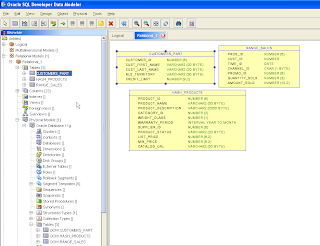
When you start creating the relational model, you create the tables that make up the diagram. The details are listed under tables under the relational node, as shown in this first image. (Click the image to see a full screen shot)
Invoking the properties here for the table, provides a database independent view of the table. So you can specify columns and datatypes and make use of domains at this point. What you can't do is specify the schema details or the other physical properties, like the tablespaces or partitions. This is because not all databases support the same set of physical properties.
The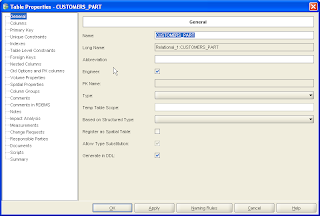 second screen shot shows the property dialog for the table in the relational model. Here you can add columns, set primary or foreign key properties, the datatypes and domains. There are entry point for indexes and a variety of additional features. But you do not set any database specific implementation details.
If you expand the physical model under the main relational model, (select Open from the context menu and select the database you want to support) and then expand the node. This is also shown in the first image above. Now you can view or add partitioning details.
Below are two illustrations, one showing the partition order in the Sales table, which is partitioned by range.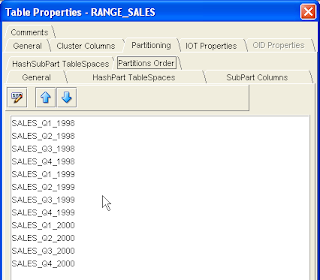
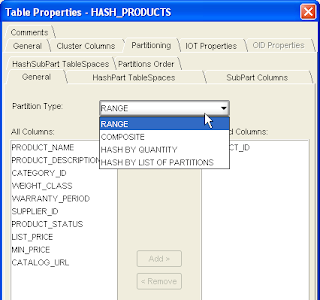
The last of the screen shots displays another partitioned table. The illustration here shows the drop list to show the types of partitioning supported.
The mantra is: The logical model is central, if you like is the core of the product. Each logical model supports one or more relational models. These visual models are database independent. Each relational model supports one or more physical models.
What the next demo to come out later this week, where we import for the data dictionary. That demonstration shows the multiple physical database support.
We've recently had the question asking when we'll start support for partitions. The answer is right now. The product already does.
You need to understand the difference between the relational table definition, and the physical definition.

When you start creating the relational model, you create the tables that make up the diagram. The details are listed under tables under the relational node, as shown in this first image. (Click the image to see a full screen shot)
Invoking the properties here for the table, provides a database independent view of the table. So you can specify columns and datatypes and make use of domains at this point. What you can't do is specify the schema details or the other physical properties, like the tablespaces or partitions. This is because not all databases support the same set of physical properties.
The
 second screen shot shows the property dialog for the table in the relational model. Here you can add columns, set primary or foreign key properties, the datatypes and domains. There are entry point for indexes and a variety of additional features. But you do not set any database specific implementation details.
If you expand the physical model under the main relational model, (select Open from the context menu and select the database you want to support) and then expand the node. This is also shown in the first image above. Now you can view or add partitioning details.
Below are two illustrations, one showing the partition order in the Sales table, which is partitioned by range.

The last of the screen shots displays another partitioned table. The illustration here shows the drop list to show the types of partitioning supported.

The mantra is: The logical model is central, if you like is the core of the product. Each logical model supports one or more relational models. These visual models are database independent. Each relational model supports one or more physical models.
What the next demo to come out later this week, where we import for the data dictionary. That demonstration shows the multiple physical database support.
25 July 2009
Still no Database? Build a Data Model from a DDL script
In my last post I said that you can use the SQL Developer Data Modeler to build a data model without needing a database, all you need to do is start drawing. Well, you can also create a data model, without a database, but with a DDL script. The Data Modeler page on OTN has a number of the DDL scripts that you can use for this purpose. On OTN they're in zip files for easy download; all you need to do is extract the DDL file and then using the Data Modeler, import the DDL file.
This quick online demo shows you how you can import one DDL script to create an initial relational model and then use the Data Modeler to add the contents of a second file.
Next week we'll start work with a database, so if you haven't got access to one, now is the time to download and install Oracle Express Edition, to use as your sandbox. The next two demos I plan are to connect to the database and import a model and of course the one that follows has to be how to create those update scripts.
This quick online demo shows you how you can import one DDL script to create an initial relational model and then use the Data Modeler to add the contents of a second file.
Next week we'll start work with a database, so if you haven't got access to one, now is the time to download and install Oracle Express Edition, to use as your sandbox. The next two demos I plan are to connect to the database and import a model and of course the one that follows has to be how to create those update scripts.
24 July 2009
Data Modeler: Getting Started - You don't need a database!
If you are new to the latest tool from the SQL Developer team, then a short live demo might be just the thing you need. The great thing about the Data Modeler is that once you have downloaded and unzipped the product, you can just get going. No need for a database or a connection, just unzip and click the datamodeler.exe to start the product.
Now once the product is started, there is no need to create a project, you can start drawing. Click the tool bar button to create a table and you're off and creating.
Watch this 5 minute online demo to see a few extra tidbits of detail, such as controlling the naming of primary and foreign keys and a brief look at interacting with Design rules.
Now once the product is started, there is no need to create a project, you can start drawing. Click the tool bar button to create a table and you're off and creating.
Watch this 5 minute online demo to see a few extra tidbits of detail, such as controlling the naming of primary and foreign keys and a brief look at interacting with Design rules.
19 June 2006
ODTUG and Quality Data Models through Humiliation?!
This week I'm in Washington DC at the ODTUG annual conference. For those of you who don't know, this is a well established Oracle Developer's User Group, originally focused primarily on Oracle Designer (then CASE) with a close second in Oracle Forms.
Today's keynotes saw two old familiar faces; Marco Tilli and Sohaib Abassi, both long time friends of the conference and in their time, were Volley Ball players on whichever beach or piece of sand wherever that year's ODTUG conference was being held. Back, this time not talking about Forms, Portal or Designer, but how we should all by now be more aware of SOA, of how business services can be reused, of integration and of the whole importance of data integration and its importance in the industry today.
With Java and the whole J2EE explosion, ODTUG have had to reinvent themselves. Something I was not sure they'd do with success, but I think they have cracked it. The halls are buzzing with old familiar faces. Some developers are not currently working with Oracle technology, yet still they return, the contacts and friends made at this event too important to lose. Other developers are reinventing themselves, learning new technology and bringing wisdom and experience to the table. This year, not too many grumpy old men!
Interesting too was the large number of first timers at the conference this year. I'm always amazed at this, the number of newbies arriving at the various conferences I attend. It's always a healthy percentage.
This year's ODTUG conference offers half day hands-on sessions alongside regular presentations. The weekend prior to the event, they ran a full day Web Architecture Symposium, which I have only heard highest praise for, and a couple of full day hands on sessions. I'd say attendees can get their monies worth if they participate in all on offer, specially if they get involved and mingle and talk, listen and learn!
Peer Reviews
The first talk I attended was Kent Graziano's talk, "Data Design Reviews: Using Extreme Humiliation to Ensure Quality Data Models". What a title!
Using the peer reviews they use within his department as a basis for his talk, he told us about building effective data models. They have a fixed set of standards, build logical models, which must conform to those standards, and have rigorous peer reviews. Once accepted, these logical models are then transformed to physical models, which have to conform to standards, and then have rigorous reviews of these. If and when these all pass and are accepted, the DDL is generated and reviewed before being passed on to the department that consumes them. They do not spend months on building models before reviews, but have incremental builds, so the review is brief, less than an hour, and they have them often.
I think the rigorous could be scary, specially for new folk, but the peer to peer knowledge transfer and the team work must outweigh any disadvantages. I loved the sound of the approach. (Specially having seen a few sick models in my time) I also think this practice can and should be translated to any part of a company - from those writing coding, to those writing papers and producing power point presentations. You might think this would slow down the pace, but I suspect teams would be more efficient, and the resulting work of a much higher quality.
Today's keynotes saw two old familiar faces; Marco Tilli and Sohaib Abassi, both long time friends of the conference and in their time, were Volley Ball players on whichever beach or piece of sand wherever that year's ODTUG conference was being held. Back, this time not talking about Forms, Portal or Designer, but how we should all by now be more aware of SOA, of how business services can be reused, of integration and of the whole importance of data integration and its importance in the industry today.
With Java and the whole J2EE explosion, ODTUG have had to reinvent themselves. Something I was not sure they'd do with success, but I think they have cracked it. The halls are buzzing with old familiar faces. Some developers are not currently working with Oracle technology, yet still they return, the contacts and friends made at this event too important to lose. Other developers are reinventing themselves, learning new technology and bringing wisdom and experience to the table. This year, not too many grumpy old men!
Interesting too was the large number of first timers at the conference this year. I'm always amazed at this, the number of newbies arriving at the various conferences I attend. It's always a healthy percentage.
This year's ODTUG conference offers half day hands-on sessions alongside regular presentations. The weekend prior to the event, they ran a full day Web Architecture Symposium, which I have only heard highest praise for, and a couple of full day hands on sessions. I'd say attendees can get their monies worth if they participate in all on offer, specially if they get involved and mingle and talk, listen and learn!
Peer Reviews
The first talk I attended was Kent Graziano's talk, "Data Design Reviews: Using Extreme Humiliation to Ensure Quality Data Models". What a title!
Using the peer reviews they use within his department as a basis for his talk, he told us about building effective data models. They have a fixed set of standards, build logical models, which must conform to those standards, and have rigorous peer reviews. Once accepted, these logical models are then transformed to physical models, which have to conform to standards, and then have rigorous reviews of these. If and when these all pass and are accepted, the DDL is generated and reviewed before being passed on to the department that consumes them. They do not spend months on building models before reviews, but have incremental builds, so the review is brief, less than an hour, and they have them often.
I think the rigorous could be scary, specially for new folk, but the peer to peer knowledge transfer and the team work must outweigh any disadvantages. I loved the sound of the approach. (Specially having seen a few sick models in my time) I also think this practice can and should be translated to any part of a company - from those writing coding, to those writing papers and producing power point presentations. You might think this would slow down the pace, but I suspect teams would be more efficient, and the resulting work of a much higher quality.
Aah, by the way, Kent stressed, "it's business, it's not personal" For example in a peer review, when you criticize the name of entity, it's not because you don't like it, it's because it doesn't comply to the standard. I think so often we are too defensive, we assume someone is critiquing us, our approach, but if you have a set of standards, then things are less subjective and in the end, better for the good of the project and in the end, the company.
If you can, take a look at Kent's paper on the ODTUG site. It should be up after the conference. Kent is also author of a few books on data models, if you are on the lookout for one.
If you can, take a look at Kent's paper on the ODTUG site. It should be up after the conference. Kent is also author of a few books on data models, if you are on the lookout for one.
Subscribe to:
Posts (Atom)