
11 August 2006

I didn't know you could do that!

Have you ever used a tool for a while and then suddenly stumbled across something new? It's like opening a surprise gift or opening the window in the morning and seeing unexpected snow outside! Pure fun.

I started my day as normal by sorting out the bits of work I need to do and trashing unwanted mail and spam when I was distracted by a message about another product. I broke 2 'personal rules' one was to start playing with the piece of code and the other was to start working on something not on my list of things to do for the day! Well, it's Friday - that'll be my excuse.

The note was about handling external tables, so I thought I'd run the supplied code through SQL Developer, to see how well we handle it, and I found a whole new dialog! Maybe I shouldn't be admitting that, but I wondered if you'd like this little gem.

Creating an External Table and Loading Data

Here's some background first. Verbatim from the Oracle Documentation: "You create external tables using the ORGANIZATION EXTERNAL clause of the CREATE TABLE statement. You are not in fact creating a table; that is, an external table does not have any extents associated with it. Rather, you are creating metadata in the data dictionary that enables you to access external data."

In order for you to be able to replicate this exercise, I used the example offered by the Oracle database doc.

First you need these two files created and stored somewhere in a directory.

The file empxt1.dat contains the following sample data:

360,Jane,Janus,ST_CLERK,121,17-MAY-2001,3000,0,50,jjanus
361,Mark,Jasper,SA_REP,145,17-MAY-2001,8000,.1,80,mjasper
362,Brenda,Starr,AD_ASST,200,17-MAY-2001,5500,0,10,bstarr
363,Alex,Alda,AC_MGR,145,17-MAY-2001,9000,.15,80,aalda

The file empxt2.dat contains the following sample data:

401,Jesse,Cromwell,HR_REP,203,17-MAY-2001,7000,0,40,jcromwel
402,Abby,Applegate,IT_PROG,103,17-MAY-2001,9000,.2,60,aapplega
403,Carol,Cousins,AD_VP,100,17-MAY-2001,27000,.3,90,ccousins
404,John,Richardson,AC_ACCOUNT,205,17-MAY-2001,5000,0,110,jrichard

What we want to do is create a table that accesses this external data. i.e. an external table. Once created, the Oracle doc then moves the data from the external table into a table in the schema, to complete the exercise.

First we set up the directories. This syntax is not quite straight from the doc, but nearly. The only changes I made was to use my own directory structure and of course I'm using SQL Developer:
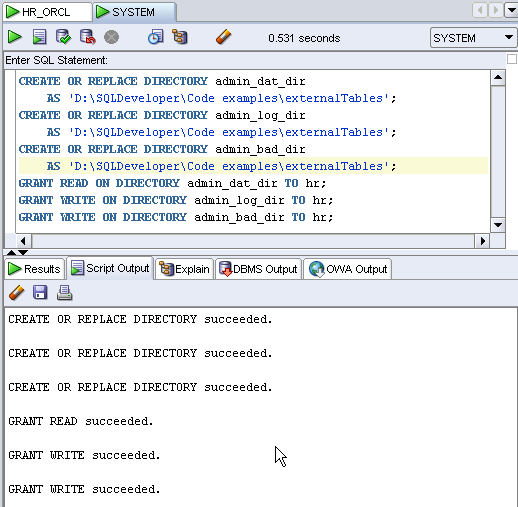
So now we need to create the external table for our HR schema. First, switch to the schema HR and then, using the context menu, invoke the Create Table dialog. This is the initial screen:
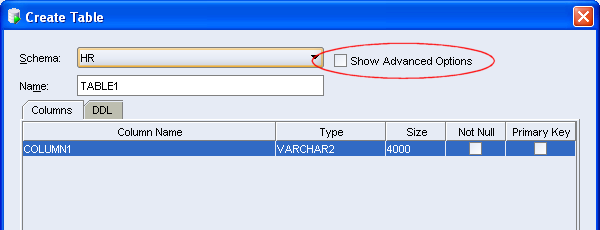
You can fill in the columns here, or just switch directly to the advanced dialog. Once you've switched you'll see the Table Types property. When I demo SQL Developer, I always highlight these options for users, but as I don't use external tables, I typically continue the demo by creating a regular table with constraints etc.

Once you select the Type External, your dialog changes. Now you can populate all the properties as
required. (The full code is below)

You can of course just copy and paste this code into the SQL Worksheet and execute it, but I challenge you to use the dialog, just this once. Here's the code:

CREATE TABLE admin_ext_employees
(employee_id NUMBER(4),
first_name VARCHAR2(20),
last_name VARCHAR2(25),
job_id VARCHAR2(10),
manager_id NUMBER(4),
hire_date DATE,
salary NUMBER(8,2),
commission_pct NUMBER(2,2),
department_id NUMBER(4),
email VARCHAR2(25)
)
ORGANIZATION EXTERNAL
(
TYPE ORACLE_LOADER
DEFAULT DIRECTORY admin_dat_dir
ACCESS PARAMETERS
(
records delimited by newline
badfile admin_bad_dir:'empxt%a_%p.bad'
logfile admin_log_dir:'empxt%a_%p.log'
fields terminated by ','
missing field values are null
( employee_id, first_name, last_name, job_id, manager_id,
hire_date char date_format date mask "dd-mon-yyyy",
salary, commission_pct, department_id, email
)
)
LOCATION ('empxt1.dat', 'empxt2.dat')
)
PARALLEL
REJECT LIMIT UNLIMITED;


Checking the Data

Is the data there? Can you query it and access it as usual? Yes, yes and yes! Try this: Expand the Tables node in the Navigator and drag the ADMIN_EXT_EMPLOYEES table onto the SQL Worksheet and execute your query.
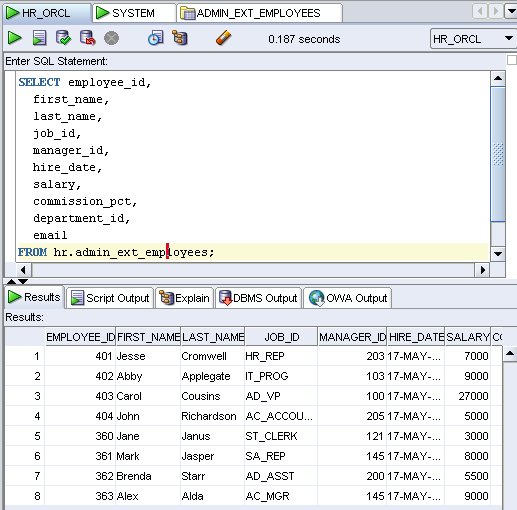
The Oracle doc finishes the exercise by copying the data from the external table into EMPLOYEES with the following command:

INSERT INTO employees (employee_id,
first_name, last_name, job_id, manager_id,
hire_date, salary, commission_pct, department_id, email)
SELECT * FROM admin_ext_employees;

You can finish off the exercise with that too if you fancy. Either way, you'll have done a small walk through External tables.

Now, back to work.
10 August 2006

Another Peep into the Future...F4 and Filters

A quick entry today. There are 2 small features I said I'd show you, the first is the much requested 'Describe' (F4) feature.

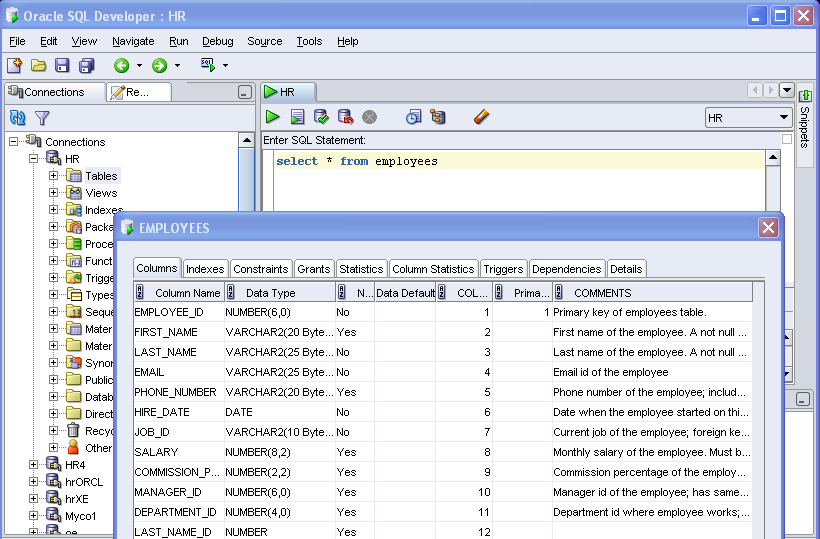
The problem we're solving is that you might be halfway through writing a statement in the worksheet and you want to have more detail about a table or view. You can of course expand the object in the navigator to see the columns. Sometimes that is not enough, so you can click on the table or view and click through the tabs, but what you really want is to be able to describe any object and have the definition show up in a modeless window. If you're lucky enough to work with two monitors, or even have a really big monitor, you can move this window off to one side and carry on with your SQL, while the window describing the object stays visible. The image below shows the dialog describing the table selected.

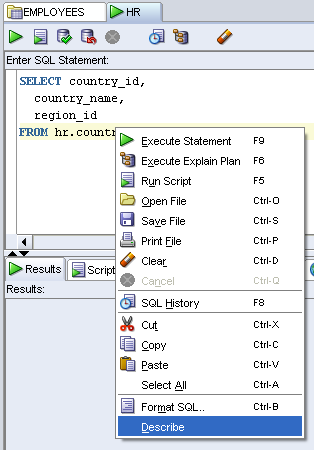
There will be two ways to access this Describe feature; one is through a short cut key, currently F4, which is configurable, as are your other shortcut keys.The other is through a context menu as shown below:

The second is a brief look at the filtering option. In SQL Developer 1.0, when you filter objects in the Navigator, you are really only limited to searches for objects that start or end with a letter or letters, or those that contains a letter or letters. e.g. E%. or %EMP% pr %ING. Here is the old filter:

The new allows for a combination of requests. Here is an example of the new...

08 August 2006

Let's Get Started with an Extension for SQL Developer (in 10 Steps)

So apparently it's possible, but have you seen it done? You've heard about it. They say..."If there is other stuff you want in SQL Developer just build an extension..." Huh, it's as easy as that ?

So let's do it. Let's add an extension to SQL Developer, starting at the very beginning. Getting started, from scratch...installs and all.
I'll be using JDeveloper. If you're an Eclipse user, then you should check out Kris Rice's blog.

For this exercise, I created a fresh directory and did fresh installs, to keep things uncluttered and so that the directory can just be deleted when I'm done. If you have the products installed, you can use them, just skip to Step 4. If you want to follow along, then create a separate, fresh directory. If you use your existing products, the extensions can all be deleted, so you can tidy up afterwards. I did the full exercise over broadband connection, and none of the installs or downloads take long.

STEP 1. Getting JDeveloper
Download JDeveloper from OTN. [If you already have JDeveloper 10.1.3, you can use that.] If you are downloading JDeveloper for this purpose, then all you need is the Java install. (The others are bigger downloads and installs. The process that follows is the same.)

I chose the Complete Install (i.e. with JDK 5.0.5). This is a 111MB download. If you already have the JDK 5.0 on your machine you do not need this. I did this install for completeness. When I install SQL Developer I'll install without the JDK, as I only need it once.
Step 2. Getting SQL Developer
Download SQL Developer (or use what you have)

Please note, the SQL Developer site talks about JDK 1.5. Well, this is JDK 5.0. Go figure. There was a name change, so they're the same. The J2SE latest release is 5.0. The name and version changed from 1.5.0 to 5.0. So where you see 1.5, read 5.0! The short of it is that all you need is the smaller SQL Developer install. (28.9MB) if you've already downloaded and installed JDeveloper with JDK 5.0.

Step 3. Installing the Software
Unzip both files. ( I like to keep things clean, so have a JDeveloper folder and a SQL Developer folder)

Step 4. Getting Started
Start JDeveloper ( Double click jdeveloper.exe)

Step 5. Setting up the SDK

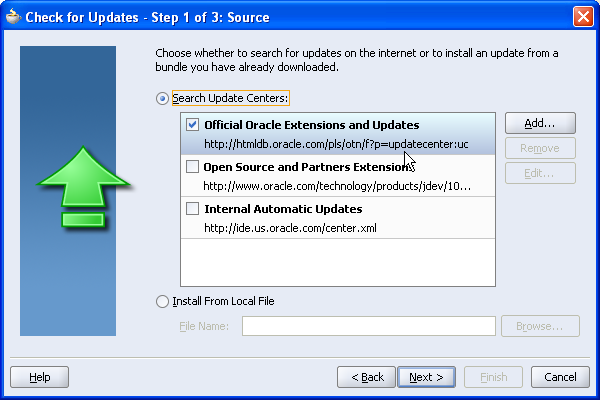
5a. In JDeveloper, use the menu Help -> Check for Updates...

5b. Select the Official Oracle Extensions, you don't need any of the others, so deselect them if they are already checked. Click Next.

5c. Select the Extension SDK from the list. Deselect any others that might be checked. You can always come back and get other updates later. Click Next.
When you select the SDK and click next, the Check for Updates utility will go to OTN to get the required update.The installation is 15.95 MB. Before the download starts, you'll be prompted for your username and password. This is your OTN account, the same as the sign on you use for the Forums. If you are new to this, just create a sign on at this point. It's free.

5d. Once the updates are installed, you'll need to restart JDeveloper. You'll be prompted to upgrade from a previous version, because you have installed the SDK updates, which will bring in your database connections and other preference settings. As I am working with a clean install, I do not want to do this.

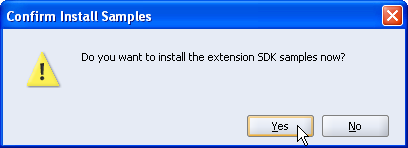
5e. As JDeveloper restarts, you'll be prompted to install the SDK Samples. I'll be using the samples in this walk through, so if you want to follow along, say Yes.
You do not need the samples to create your own extension. You only need the SDK which has now been installed.Step 6. Finding the New Workspace

A new Application Workspace, extensionjdk.jws is created. It has a long list of projects, all of which are a sample extensions in varying degrees of complexity. They are all documented in the SDK help.

If you are using an existing JDeveloper install and you already have a number of workspaces, you might not be aware that this new application workspace has been created for you. It's easy to see if you have started the process from scratch and have nothing else built yet!

Either way, find the extensionjdk.jws application workspace.

Step 7. Working with the Samples

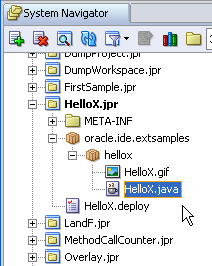
There are loads of samples, but let's start with something easy. What I want to do is install the HelloX.project into my SQL Developer setup. Find HelloX.jpr and expand the project. Expand the packages oracle.ide.extsamples and hellox. You'll see an image file and a .java file. If you double click the java file you'll see the java code. That's what you will need to write when you get down to it. What we're going to do is assume we wrote that fab code and just deploy it.

Step 8. Changing the Deployment Profile

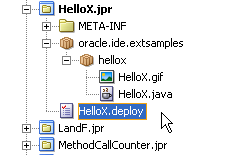
8a. What we want to do is deploy this project to SQL Developer. By that I mean, having "written my extension", I want to run it from SQL Developer. To do this we need to change the deployment profile for the project. Select HelloX.deploy

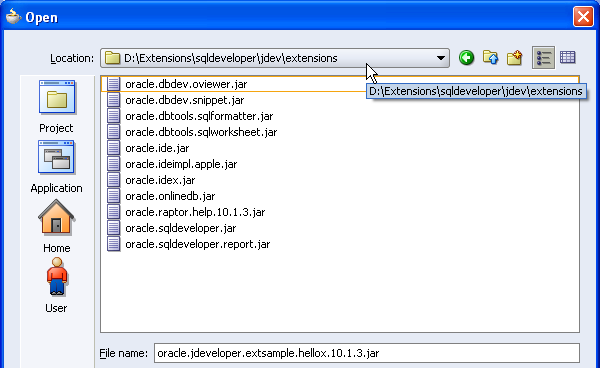
8b. Double-click, or select Properties from the context menu, to invoke the profile properties dialog.8c. You want to change the location of the .jar file. (That's the 'zipped' version of all your files for the extension) Browse to your SQL Developer folder and find jdev\extensions (This 'jdev' folder name will change in SQL Developer 1.1.)
8d. Click OK to apply the changes.

Step 9. Deploying the Updated File
9a. You'll see the HelloX.deploy is now in italics. It means you have changed the file. Click Save.

9b. You can now deploy the file. Use the context menu and select Deploy to Jar.The Deployment Log window should display a message indicating the file was deployed to your SQL Developer folder.


Step 10. Now to Run the Extension in SQL Developer

Start SQL Developer!

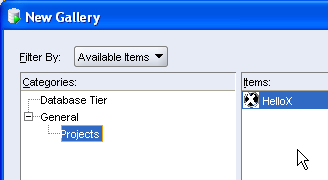
This particular piece of Java Code adds a new item to the New Gallery (trust me on this one) So, in SQL Developer use the File -> New... menu option to invoke the New Gallery. Expand General -> Projects. You should see the HelloX option displaying in the New Gallery.

Double-click HelloX to invoke and use the extension.


There you go.

In a while I'll do a blog entry on building a small extension from scratch.

In the meantime, have a think about a few extensions you might like to build! Or play with more of the Samples in the SDK. Remember, if you're a PL/SQL junkie, and not a Java junkie, then buy your Java buddie some coffee in exchange for a few suggestions here or there.

...and I loved this book....Head First Java by Kathy Sierra - Now she knows how to write a great techie book...

03 August 2006

SQL Developer Reports: Sneak Peak 2

More in the Sneak Peak series...I'll try to alternate with current and next release blog entries, so that you are not frustrated by future features. As the last entry was on running files in SQL Developer today, it means this entry is a piece about what's coming down the line. (It's mostly screen shots - as before, click each image for larger view.)

I am sure by now you have read and absorbed LewisCunningham's fab article, previously mentioned, covering all SQL Developer reports, shipped and user defined.

In release 1.1 we bring you the same functionality and more. In 1.1, you'll be able to create master/detail reports anduse the new charting capabilities. Also, users will be able to query and kill sessions using this reporting functionality. This latter, a much requested feature. I hasten to add, this is all subject to change, but will give you an idea of what's coming down the line. For more information of planned features, please read the statement of direction on OTN.

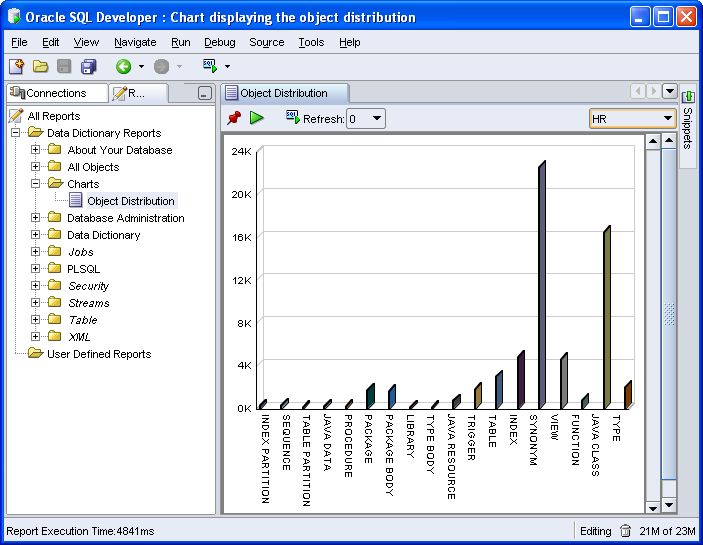
The first screen shot illustrates a new report in SQL Developer; a chart displaying the object distribution for a user. You'll also have access to this charting capability, when creating user defined reports.

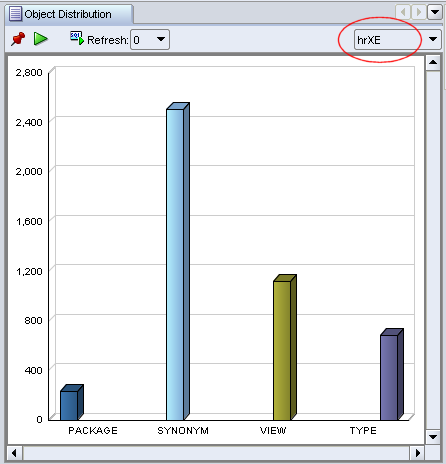
Of course you'll still have the option of switching users to run the report for another user, without too much difficulty. Below is the same report, but I've switched from HR in my Enterprise database to HR in my XE database, who's not a busy user!

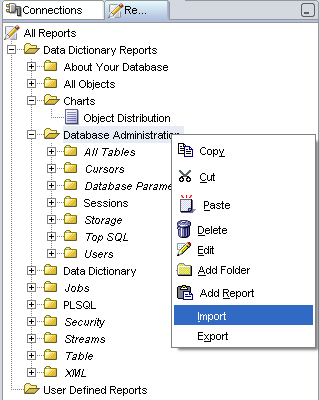
The context menu on this section of reports has also changed. There are a few useful options, including offering you the ability to import or export reports. Notice too that you'll be able to create your own folders and add reports in this section, thus giving you the added benefit of keeping all your Data Dictionary reports together.

Now for a little change to a report you know...

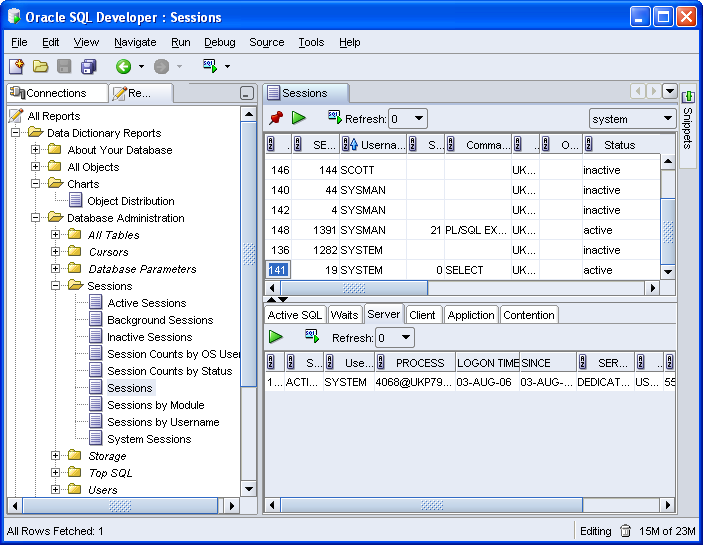
Under the Sessions node, you currently have a Sessions report. In SQL Developer 1.1, this has been changed to a master/detail report, as illustrated in the image below. It would be tedious here to go through each of the tabs, but you can see for the active SYSTEM session selected, more detail is displayed below.

Users with the privileges to do so...

...can kill a session.

Let's briefly look at creating a user defined master/detail report.

I'll do a basic EMP and DEPT report for SCOTT. In the image below, note the ability to test your query. When testing, initially you select and run for a particular database connection. The test feature is all the more useful when you have a more complex report, with a few more clauses, driving the data selection.

I could have chosen to display this as a chart instead. Having selected Chart for the report style, I get more options for defining the chart. See the Chart Details tab to the bottom left.

Now to add the detail (child) report. Note the bind variable matches the column name in the master report.

Before you save the report, you can test it again. This time you'll be testing the full master/detail report and can verify that not only do your queries work, but that you do indeed have the correct binds. I won't show you that test, instead have just shown you the executed report below. Notice the same column ordering ability I mentioned in SneakPeak1.

More sneaks peaks next week.
01 August 2006

Run a File in SQL Developer: Easing the Pain

At some point in your working day, assuming you potter with databases, you're probably going to want to run a script. Typically we might use SQL*Plus for this and copy and paste the full directory path. I tend to start the SQLPLUS.exe, and once logged in locate and drag the file to the SQL> prompt and run it. (By using drag n drop, I get the full path and file name.) If I start SQLPLSW.exe, either I type in the full path and file name or resort to various copy and paste steps.

A colleague sitting nearby made one of those "Hey Sue, I really like this feature" comments today. So I wandered over to see her 'feature of the moment'. She was in SQL Developer and running a bunch of SQL scripts. SQL Developer has really eased the pain of doing this task. Maybe the following will help you to.

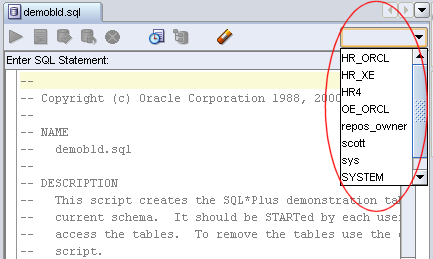
Start with SQL Developer and open the file you want to run. I'll use demobld as it's short and sweet and pretty safe to execute. (demobld drops and creates EMP and DEPT and is typically used to refresh SCOTT's tables. To find demobld.sql, do a search on your database directory or find another simple script to run.) If you look at the image below, I have circled File ->New, as this is where you can start to open a file. You can see that I have previously opened demobld and so can use the "reopen" menu option. [click image for larger view]


Of course, if you have associated SQL Developer with .sql files, then just double click the file and it'll open in SQL Developer.

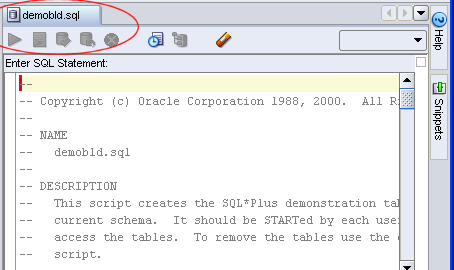
Now the first thing to notice is the name of the tab, is the file name. If you have a bunch of tabs open this is useful. The next thing, which is often a great frustration to our users, is the Run related commands are all grayed out.

That's because you have not yet associated the file with a user! Use the droplist on the right-hand side to select your user.

I selected the SCOTT connection. As soon as a connection is selected, the run commands are available. You should use Run Script (F5), as F9 only executes a single statement. This will run the file for your selected user.

By running the script using F5, you run all the commands as the connected user and the output is printed to the window below. If it's a long script with lots of feedback, you can scroll up and down through the window. SQL*Plus can be maddening like that if you don't spool everything out to a file.
...and of course, if you want to rerun the script for another user? Just change the user by using the droplist!

31 July 2006

Something to Whet the Appetite: Sneak Peak 1

Have you been to the SQL Developer home page on OTN recently? Did you spot the Statement of Direction? We have just released this document on OTN and hope it'll give you an idea of the features planned for next few releases.

A statement of direction typically does not drill down to the finer level of the features, so as I was tracking forum issues and the progress of bugs and enhancements logged in the latest developer build, I thought you might be interested in a sneak peak at a few little bits you've been asking for. You won't see these until SQL Developer 1.1, and I'm not a great fan of 'vaporware', so I won't do too many of these, but in the next few weeks I'll do a few little blog entries to show a few things to look out for in SQL Developer 1.1.

Take a look at the Table Definition Tabs:


The illustration shows one of the most frequently requested features, which is to be able to sort on column headers. This feature is throughout the product now on any grid of data, whether it's instance data or the object definitions. Notice that once you've clicked on the column header, in this case Column Name, the direction of the sort is also indicated.

(Just click on the image for a larger view)


The second illustration shows another frequently asked for feature, which is to display a single record on a form layout. This is particularly useful if you have great chunks of text that you need to read.


More later this week.


17 July 2006

Reporting with SQL Developer

Know nothing about the Reports available in SQL Developer? Want to know how to create drill down reports? Oracle Ace Lewis Cunningham (blogs on ITtoolbox ) has written and published a great article about all the reports you can run using SQL Developer. He also goes on to show you how to create your own reports, even your own drill down reports and he gets into the nitty gritty of fixing the titles of parameters for your user defined reports that require parameter screens.

For a few weeks this article will be easily accessible from the front page of OTN, after that we'll link to the article from the SQL Developer home page, so you'll be sure to continue to have access to this detail.

13 July 2006

Remote Debugging with SQL Developer

It occurs to me that while we talk about using the remote debug facility in SQL Developer that you may not know how to use it. So in a few steps and with a few screen shots, I'd like to show you how it's done.
(Please note, to see any of the images clearly, just double click on them.)
1. Let's start with a connection to the database. Create a database connection. (File -> New Connection) and complete the details. I only use the basic tab, so don't need to set up tnsnames or anything else. You'll see the database is on my own machine in this example, but it need not be.


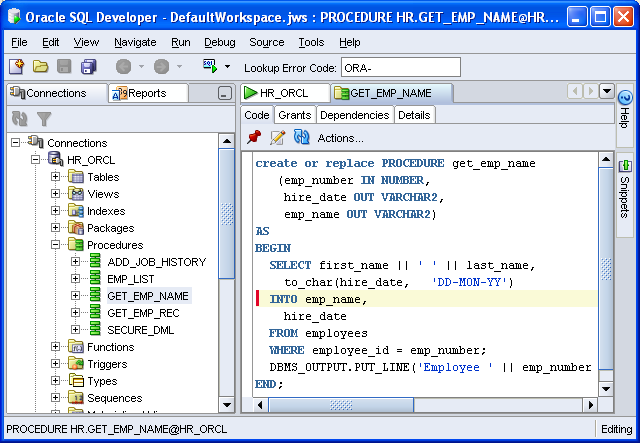
2. Now you can connect to any objects this user owns, using SQL Developer. You can browse the various objects the user has access to. I'm only interested in this procedure, which my user HR owns.


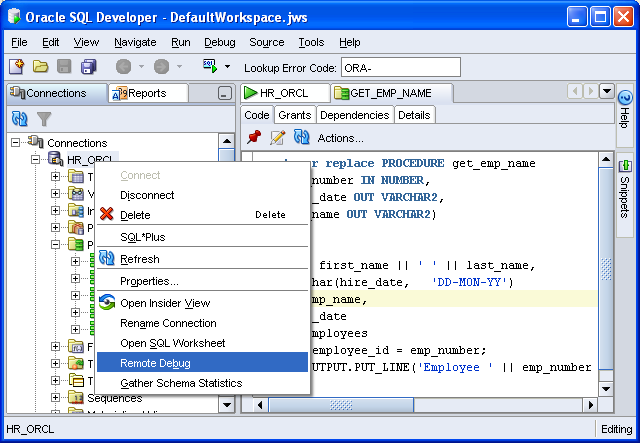
3. You can run and debug this procedure in SQL Developer, but that's not the purpose of the exercise. What we want to do is debug the procedure when it is executed from elsewhere, such as another programme or application. The starting point is to start a remote debug session in SQL Developer. You do this from the Database Connection as shown.


4. A dialog will display, requesting the listening port number and the IP address of the machine running SQL Developer - effectively it's your computer, listening for the database to connect and using that port range to do so.
You can set the range of ports through a Preference in SQL Developer. If you run into issues, look out for firewalls between the machines, blocking these ports.


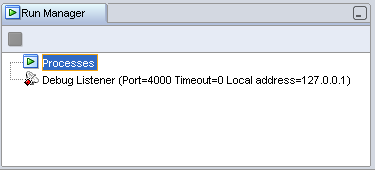
5. Once you have set the remote debug details, you should see the run manager display these.


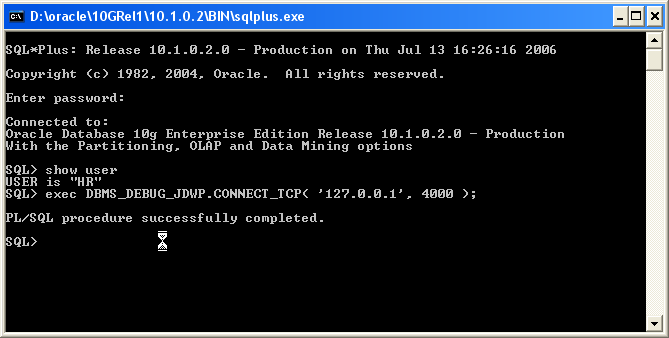
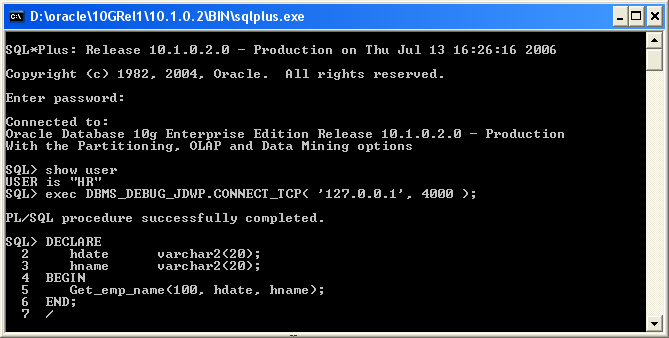
6. Now you should start a remote session. Using a SQL *Plus command line session will do.

* Invoke SQL *Plus for this user
* In the SQL *Plus session enter the following command:
exec DBMS_DEBUG_JDWP.CONNECT_TCP( '127.0.0.1', 4000 );

You should recognize the parameters from the previous dialog.

If you are debugging an application remotely, then this PL/SQL procedural call will need to go into that application, just for the debug purposes. You'll remove it afterwards.


7. Return to SQL Developer and set a breakpoint in the procedure.
Note: If you are debugging a procedure, you must remember to Compile for Debug, before you can start debugging.


8. Now you need to return to the SQL*Plus session and execute your procedure. If you debug in SQL Developer, an anonymous block is created for you to execute the procedure. In this case you'll need to write one to execute the procedure from SQL*Plus.

Note: In the procedure we have a DBMS_OUTPUT command, so you should also add the 'Set Serveroutput on' command.


9. As soon as you execute the anonymous block, you'll be returned to SQL Developer to debug the session there. Step into the code as you would in a usual debug session.


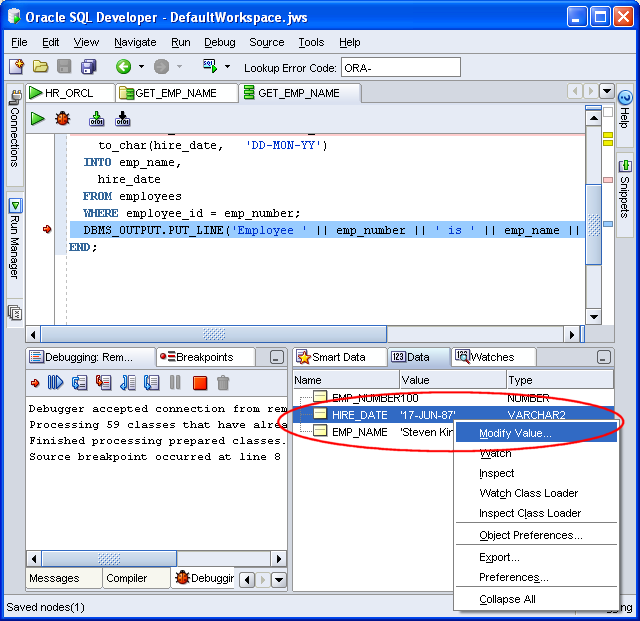
10. You can watch data and modify values in the same way as a normal debug session.


In this example, I'll modify the hire date.


11. Once you have reviewed the data, or made the modifications you want, resume debugging. Once the debug session is complete the control is returned to your remote session. In this case, SQL*Plus. You'll notice the modified date reflected in the output.


Quite a long piece, I know, but I think we often veer away from the unknown or untried. Hopefully once you have walked through an example, you might be able to make more use of this very useful feature.

28 June 2006

ODTUG's new Website

Following my last post, Kent has now posted a comment on how you can find his presentation on the new ODTUG site. You can download his talk on the site here:

If you look at the URL...http://www.odtug.com/pls/htmldb/f?p=500:...
you'll note the htmldb format. This is because the site has been redeveloped using Application Express (htmldb). It's worth noting this on 2 fronts. One is that many folk think that an Apex (affectionate abbreviation for Application Express) is not capable of producing complex or interesting sites and the other is that the redesign makes getting to articles much easier.
You'll see that some articles are for members only (Kent's is public). Not sure what drives the decision as to which articles are public and which are for members only, so you'll need to watch for that. There are certainly a good number of public articles and presentations available on the site.

19 June 2006

ODTUG and Quality Data Models through Humiliation?!

This week I'm in Washington DC at the ODTUG annual conference. For those of you who don't know, this is a well established Oracle Developer's User Group, originally focused primarily on Oracle Designer (then CASE) with a close second in Oracle Forms.
Today's keynotes saw two old familiar faces;
Marco Tilli and Sohaib Abassi, both long time friends of the conference and in their time, were Volley Ball players on whichever beach or piece of sand wherever that year's ODTUG conference was being held. Back, this time not talking about Forms, Portal or Designer, but how we should all by now be more aware of SOA, of how business services can be reused, of integration and of the whole importance of data integration and its importance in the industry today.
With Java and the whole J2EE explosion, ODTUG have had to reinvent themselves. Something I was not sure they'd do with success, but I think they have cracked it. The halls are buzzing with old familiar faces. Some developers are not currently working with Oracle technology, yet still they return, the contacts and friends made at this event too important to lose. Other developers are reinventing themselves, learning new technology and bringing wisdom and experience to the table. This year, not too many grumpy old men!

Interesting too was the large number of first timers at the conference this year. I'm always amazed at this, the number of newbies arriving at the various conferences I attend. It's always a healthy percentage.

This year's ODTUG conference offers half day hands-on sessions alongside regular presentations. The weekend prior to the event, they ran a full day Web Architecture Symposium, which I have only heard highest praise for, and a couple of full day hands on sessions. I'd say attendees can get their monies worth if they participate in all on offer, specially if they get involved and mingle and talk, listen and learn!

Peer Reviews
The first talk I attended was Kent Graziano's talk, "Data Design Reviews: Using Extreme Humiliation to Ensure Quality Data Models". What a title!
Using the peer reviews they use within his department as a basis for his talk, he told us about building effective data models. They have a fixed set of standards, build logical models, which must conform to those standards, and have rigorous peer reviews. Once accepted, these logical models are then transformed to physical models, which have to conform to standards, and then have rigorous reviews of these. If and when these all pass and are accepted, the DDL is generated and reviewed before being passed on to the department that consumes them. They do not spend months on building models before reviews, but have incremental builds, so the review is brief, less than an hour, and they have them often.
I think the rigorous could be scary, specially for new folk, but the peer to peer knowledge transfer and the team work must outweigh any disadvantages. I loved the sound of the approach. (Specially having seen a few sick models in my time) I also think this practice can and should be translated to any part of a company - from those writing coding, to those writing papers and producing power point presentations. You might think this would slow down the pace, but I suspect teams would be more efficient, and the resulting work of a much higher quality.
Aah, by the way, Kent stressed, "it's business, it's not personal" For example in a peer review, when you criticize the name of entity, it's not because you don't like it, it's because it doesn't comply to the standard. I think so often we are too defensive, we assume someone is critiquing us, our approach, but if you have a set of standards, then things are less subjective and in the end, better for the good of the project and in the end, the company.
If you can, take a look at Kent's paper on the ODTUG site. It should be up after the conference. Kent is also author of a few books on data models, if you are on the lookout for one.

07 June 2006

Storing Images in the Database, the Scottish User Group and Mod PL/SQL

Yesterday I had an earlier than usual start. I was off to Scotland for the Scottish User Group SIG and had planned to fly up and back in the day. This is easy. The early bit is because I have a mutt (said mutt) and I take him for a walk every day, rain or snow. I am also pretty determined not to short change him, so yesterday we did our regular 50 mins starting at 5am. Now I realise for many of you that this is not a big deal, but it's earlier than my regular start. It was incredibly beautiful out and I'd recommend it to you all. But I digress - the Scottish OUG...

This was my first venture up to North for a SIG, and I was very impressed. They ran two streams, BI and Development, and had a nice attendance. The only snag was the very fine weather. When it's that good, the attendance can peter off as the day progresses. If you live in one of those places in the world where every day provides clear blue skies, you might have no understanding of this. But if you come from a spot where recognising the sun is not always easy, then you'll know what I mean!

I was impressed by the both the variety of talks, the variety of topics covered and that they weren't all Oracle presenters. More recently, Oracle speakers have dominated the SIGs I have attended. As these are Oracle USER Groups, I find it refreshing to hear user experiences and input. When I pointed this out to Thomas Presslie, one of the SIG chairs, he said it was actually unusual to have as many as 2 Oracle presenters at one event, as he avoids this as a rule. Grant Ronald spoke about JDeveloper and ADF and I did a SQL Developer

One of the more refreshing talks I'd been to in a while was by Marcel Kratochvil, from Australia. He is in Scotland doing some work locally and Thomas persuaded him to come along. He works for Piction in Australia. Marcel doesn't have a blog, but there is this article on OTN about storing images on the database. Their area is multimedia and they help companies with content and managing their digital resources. They use Oracle, mod_pl/sql and hence PL/SQL, because it's fast, scalable (up and down...) and he can use the power of the Oracle database. He threw a lot of curve balls into the group, asking questions that maybe people have stopped thinking about. I can't write out his whole talk, but like Tom Kyte, he seems to have a "question everything" philosophy. I like that. We can slip into taking things at face value too quickly. I am not suggesting cynical, I suggesting thinking about what's been proposed, before just accepting, regardless of the 'authority' proposing it.

I was also impressed with the piece of news that they use mod_pl/sql and he repeated, "PL/SQL is FAST" (read with Aussie accent) a number of times. I used to love that technology when I worked with it. One of the first courses I wrote many years back, after "Oracle Designer New Features", was the Web Server Generator course (or WSG as it is/was affectionately called). We generated PL/SQL, used owa and htp etc and of course mod_pl/sql. Very performant. Of course this is the architecture for Application Express (HTMLDB) and you may know that many Oracle sites (See Apex Studio and Apex References), are built using this technology. I know, from past experience that many, many companies out there have used this technology, very successfully. Many are hand coded, i.e. not using Application Express or Generating from Designer. It was refreshing to see there are still folk out there, very happy with this technology.

It was quite fitting then this morning to see Pete Finnigan's blog picking up on Laurent's article on mod_pl/sql. While Laurent talks of how easy it is to get started, Pete is a security man, so you should think about them both. This had me do a little search and Roland Bouman does a piece on setting yourself up on XE. So now you have enough links to get lost in the web for at least a morning!

Of course, sitting behind all of this PL/SQL stuff, is the need for a nice little tool to help you edit and debug and review... so do download SQL Developer and give it a go. When I talk about SQL Developer, I end up demonstrating a lot of the functionality and as with any product, there are things I do, that others are not aware of. So not only did that part of the audience who've not yet ventured into using the product say they would be downloading it now, but those who are using it found a few more features.

Go on - give it a go -

I'd like to hear from you.

30 May 2006

Write Your Own Extension to SQL Developer

SQL Developer is not yet 6 months old, whether you are talking first appearance on OTN in the Early Adopter in late December 2005, or initial production release in March 2006. Already there are four extensions available on external sites. Take a look at the new Extensions Exchange for SQL Developer on OTN and see if there is something there that interests you.

Why not write one of your own? You might have a utility that you use all the time or some functionality that would make your daily tasks easier.

Kris Rice has a few entries on his blog on writing extensions, so take a look there and see if there is something that might trigger an idea or offer some advice. Of course you can also take a look at the extensions written by the JDeveloper team and user-base, as their exchange has been running for a few releases now.

Here are the links to Kris's extension entries:
Have fun.

...and let me know if there is anything you've written that we can add to the site.


25 May 2006

SQL Developer is Free, so how is it supported?

Following my last post I was asked a very important question. "...care to comment about the support process for SQL Developer?"

Yes, absolutely, I'll comment. Firstly though, I'm going to point you the Pricing FAQ. Ahem..., how is it we have a Pricing FAQ if the product is FREE? It's because we have so many questions on what FREE really means that we put a small note onto OTN.

FREE means it's free to download and use. We have every intention of keeping things that way. On that point, just the other day someone said, while it's free, no-one will take us seriously... That's another can of worms I'm not going into just yet.
When it comes to support, many users are using the forum to ask questions and post comments, which is fine. Actually it's great. The snag with a forum is that, as the poster, you have no guarantee your questions will be answered in a timely fashion. The wonderful thing about the forum is that not only are the Oracle SQL Developers responding, more and more of the user community are also responding. This is good, because it means the developers can get on with adding functionality to the product!
But, as the comment states, if you log an issue on the forum, be it a bug, enhancement or feature request, how can you be sure it's tracked? You can't. We have many posts to the forum each day and we're tracking as many as we can.
You might be interested to know that a group of forums have an application as a front end to list those questions that have remained unanswered. Due to the huge volume of posts on our SQL Developer forum, we have joined this group to ensure, where possible, all questions and comments are attended to either by us or the community. Where there are issues or requests, we add them to our bug and task lists. So we are pretty confident that we have a good grasp of the feature requests and issues.

Another route is Oracle Support. In this instance, even though the product is FREE, you ARE supported through Oracle Support if you have a valid Database support license. So you can create a ticket (iTAR, or online Service Request...Technical Assistance Request (TAR) via MetaLink. ;-) ) and the issue is tracked. Members of the development team work with Support on these tickets too.

I must mention that Oracle Express Edition (XE) is only supported through its forum. So if you are using XE and SQL Developer, Oracle Support will direct you back to the SQL Developer forum for your questions.

I hope that helps!

17 May 2006

Just What is SQL Developer?

I've noticed this over the years, that as people become more and more familiar with a topic or subject area, they assume the rest of the world is right there with them and rattle on in terminology and concepts that would boggle most brains. I think you can take most subjects and you'll find this to be so, it's not just an IT thing...

I remember sitting at a brown bag lunch at a user conference a few years back. The point of the gathering was that anyone with questions could come along and ask questions and other with experience in the product would help and answer. The intentions were well meaning, the idea being to grow a community of sharing experience. As I sat in the back listening, I realised the experts were so far advanced and so skilled in the subject area, that they couldn't (or didn't) answer the basic questions. They were so used to dipping into the API and their own additional code, they'd got beyond the basic product! They were so used to responding to deep technical problems, that they didn't really hear the question. The answer to "Mum, where do I come from?" might just be "Cape Town" !

I fall into the same trap too. When asked to write an article for a magazine recently, I said "What would I write about?" The response was that we need articles for entry level. I accept it's true we need to have advanced material and more technical articles both at conferences and in our journals, but we should not forget that there are so many levels in our knowledge and expertise. More often than not, when submitting a collection of abstracts to a conference, it's my introductory talks that are accepted from the selection.

I've only been involved with Oracle SQL Developer for a few months now and already I assume that everyone who uses an Oracle Database should have heard about it. But why should they? There is so much news and information coming from Oracle and other companies all the time, that we're all getting quite good at filtering spam. (Basically, just deleting messages which appear to be spam). I should also remember that even after 2 years of presenting on the Database support Oracle JDeveloper offers, I was still encountering significant percentages of folk in the audience who had no idea JDeveloper had this capability. So this kind of news takes time to filter into the general community. As with other information, it's only useful or relevant when you need it!

We've just added a brief "What is SQL Developer" article onto our site on OTN. If you've not heard of the tool, or are afraid to ask, because, like me, you might assume the rest of the world already knows, then check it out.

Of course if you know about SQL Developer, it doesn't harm to take a look and see if it does something you weren't aware of!

By the way, we released a patch to our production release, Oracle SQL Developer 1.0, so you can Check For Updates. If you are going to be using the check for updates capabilities, then do be sure you are on the production release. (See the FAQ if you're uncertain)

03 April 2006

Gathering Stats

Do you sometimes sigh when a speaker starts off by gathering a few bits of information about the audience. "What release of Software X are you using?" This can be tedious when you are at a conference and you go from room to room, being repeatedly asked the same question. Instead, do you think, "Hey, the speaker is going to re-focus the talk, to address our needs, for a change!", when you all put your hands up to acknowledge experience in a specific area, and so might be spared the tedium of having the same old stuff explained again.

While we, as speakers, can't always rewrite a talk in midstream, we can avoid mentioning bits of irrelevant material. In the same way, if there are features no-one uses or needs in a product, maybe we should be focussing our development energies elsewhere. So stats can be useful.
You know this. They can help people make decisions and they can be used to great advantage. Obviously they can be skewed, they can be harmful and used for the wrong reasons, and they can be used to misrepresent the true picture etc. etc. Let's not go there.

Well, we're after a few stats on our SQL Developer Forum. As you know it's pretty early days for SQL Developer and we're trying to establish the demographics of our audience. We want to use them for your advantage! So, if you use SQL Developer and you visit the forum, please take a look a the Forum Polls. We're hoping to update them every few weeks. What we'll be doing is running quick polls to pick up a few bits of useful detail.

Now our stats our a little skewed at the moment. With are only a few folk clicking at the polls, compared to the 1000's of downloads and visitors to the forum, the results aren't all that accurate. Once you've signed on to the forum, it's just a click. Help us ensure we get an accurate picture.