


 Posts



It's June, it's ODTUG time of year and it's New Orleans... Well, that's true for many old friends and colleagues. I'm still in London writing in the watery sunshine that should be summer.
ODTUG feels a little like a milestone for me. It was a conference I always loved and made many good friends over the years. Two years ago at ODTUG in LA, I announced my departure from Oracle after 19 years and in my blog Updates, News and Beta Software later that year, I said that I'd "decided to “hang up my boots” and try something new." This entailed taking a two month break and then starting a new job in the City. It was an interesting switch; still working with the Oracle database, and introducing new graphical software to a new customer base, I joined the craziness that is the rat run into London daily and joined a team in the City. Working in London was great, one can never tire of the view of St.Pauls nor the buzz that you feel when in the City.
The truth was that I wanted a break, a real break. Like so many, I'd started working from the moment I got my degree and hadn't stopped. Actually I started working while finishing my degree, so I have 25 years under the belt and really felt I was needed somewhere else. This was a head/heart decision. In my head, the right thing to do was stay in a good job; the economic climate says that, everyone looking for work says that and the job market is just not the place to mess with at the moment. (Besides... as some have pointed out...women over a certain age aren't employable ...! As a Christian, the heart decision was different. The heart decision was to get more involved in my local community, to help others more, to take a step back and let the right thing happen. Besides, I think I have 20 years more work left in me!
So that's what I did: Just before ODTUG last year, and with the blessing of my manager at Microgen, I took a deep breath and decided to take a year off, with the view to doing those things I'd wanted to do and get involved. I had no plans, except to let things evolve and to be back earning money by August 2013.
If you know me, I'm a frantic list maker and planner, so the lists went off the scale. Needless to say, I have not accomplished all of the hundreds of tasks I'd set out to do, like learning to speak Italian or French or German or even Hindi (one would have been good), but there are a few things I've had fun doing. I should mention that at no point have I been bored, every day is packed (when is there time for work?), but I've never quite shaken the advice from the head and hoping the heart will triumph!
Things started slowly by paring down the world I live in; plans for buying a new house went by the way, I sold my car and did lots of runs to charity shops and free cycle and even filled a skip! (Very freeing stuff!) For soul food and revival I went to the Art Academy in London and did a Summer School drawing class, following that with a class working with green wood at the Good Life centre. This was such fun that I enrolled on a 12 week carpentry course, even more fun and I still have all my fingers.
My other half and I switched to another church, as part of a Church plant, when our then current church sent a vicar and a small group of the congregation to start a new church in a multi-cultural community. Here they need "all hands on deck" to get the church and community up and running and we're loving it. I now read with a group of 6 & 7 year olds, at a local school and am involved in other aspects of the church community. Bentley, my beautiful mutt, is now approved at a Pets as Therapy Dog, although we have yet to do our first visit.
I have been framing my own photographs for sale on and off for a while and have taken that a step further and now have a shed that you can loosely describe as a workshop, where I'm framing pieces for others. I love to work with the wood and enjoy making bespoke items to suit the artwork.
Well, short of giving you my life history here, the final step is finding a new job, and one that will fit in with some of the voluntary work I'm involved with. So, ...I've decided to go it on my own. Some of the small steps have been taken and I'm working on a website, with help, using Joomla! Is there no getting away from technology? Once that's up and running I'll pop back here and let you know.
If you're reading this while at ODTUG - have fun. If you're not, stick it in your diary for next year - I can really recommend it, assuming you like technology.
Bye for now
Sue
25 June 2013


18 May 2012
Microgen DBClarity Developer: Introductions
Got a minute or two to spare and still not quite sure where DBClarity Developer fits in? Watch the brief introduction video posted on our website: http://www.microgen.com/uk-en/products/microgen-dbclarity-developer.
11 May 2012
DBClarity Webinar - Reusing SQL Queries
In my last entry I said that I'd watched Tristan's webinar on reusing a SQL query to create insert and merge statements. I enjoyed the re-usability aspect, so quickly created a video to show the feature, not having the patience to wait for Tristan's webinar to be published! The full webinar is now available; we've edited out the noise in the Q&A section, so it's all good content. There are few useful questions and answers on pricing and a snippet of news about the great feature coming in the next release. You can find the video on YouTube: http://www.youtube.com/watch?v=EbLEmZf79Hc.
If you missed these webinars, we're re-running the series to coincide with a SQL Server Relay, a 5-day event running in various cities and ending in London on the 30th May and we'll be there! Visit the Microgen/DBClarity website to register.
If you missed these webinars, we're re-running the series to coincide with a SQL Server Relay, a 5-day event running in various cities and ending in London on the 30th May and we'll be there! Visit the Microgen/DBClarity website to register.
04 May 2012
Learn to Reuse your SQL Queries: Working with Subqueries and Merge
This week we ran a new webinar for DBClarity Developer, focusing on creating SQL queries, first by creating a query and then reusing that query - using DBClarity Developer - to make things nice and easy. I go back and forth on this"nice and easy" because I started life writing SQL at the command line, so visual, graphical queries are still relatively new to me. As I watched the webinar this week, I felt that same twinge of excitement when I show anyone something new. Over the years I have loved teaching and presenting neat features in products. I have not been at a conference or event in over a year, but I couldn't wait to show you this piece of code - hence this little video. It's all easy stuff, and I'm sure you'll like the "reuse" aspect of the demo.
I'm stealing a bit of Tristan's thunder. He did the webinar and the demo and in the video below, I'm doing an exact rework of his demo. In the webinar he also talks of the benefits of the product and mentions an exciting new feature in the next release, so you'll have to watch the webinar to get all that news!
If your SQL is a little rusty, perhaps it takes a little while to build up a query or if you're wanting to learn new SQL syntax, then take a look at this demo.
More Information
- This is the link to previous webinars and other demos.
- Future webinars are listed under Events
- Download the product and try these queries: http://www.microgen.com/uk-en/products/microgen-dbclarity-developer
13 April 2012
Do You Need to Learn to Write SQL Queries?
I'm an old timer... when I started in the industry years ago, I learned how to create Data Models and write SQL. Yes, yes, I admit, it wasn't the first thing, and it was after I dropped the punch cards on the floor at university...! Didn't we all? In fact I taught SQL for quite a few years before I moved on to teaching application development using the various tools offered by Oracle. By the time I left Oracle, nearly 20 years on, the developers were all learning Java, but we all still need SQL.
Generally, if we're putting data into a relational, SQL-based, database and then querying the results, we probably need to know some SQL. I know that's a pretty broad statement, but if you're an application developer and you need to get at data by writing ad hoc queries, it's key to be able to write good SQL.
Most of the people I know in the tech industry are old timers too, by that I mean they've been writing SQL for so long they can't remember when they started and it's easy for them, but what about those new to the technology? How do you get up to speed? How do you learn SQL? Do you know the data model of the tables you are querying? Do have access to tools that help you look at the data model? What about tools that help you learn to write SQL?
Yup, you know what's coming - if you're starting out, we have a tool that can help you learn SQL. The graphical interface in DBClarity Developer allows you to create, what we call SQL Rules to interact with the database, by building a visual structure of the query. You don't need to know SQL. The great news is, that you can see the SQL created and reuse the SQL once its created and the feedback we've had is that new users are learning SQL.
Why not download the product today and see what you can do? There lots of shorts videos on the website to help yo get started and on Tuesday the 17th April, we're running a webinar showing you how to create SQL Rules. Register and learn!
I'd love to hear your thoughts and feedback - I'm on twitter @MCGN_DBClarity or @SueHarps
28 March 2012
Ask the Experts and Learn More about DBClarity Developer
This Thursday, 29th March 2012, we're running a webinar on Microgen DBClarity Developer. If you're in the US, then join us at either 13:00 EST or 10:00 PST. If you're is the UK and Europe, then join in at 18:00 BST. We do record our webinars, so if these times are a little inconvenient, then you can wait for the recording later, although a Q&A session after a recording won't happen(!) and of course, that's the benefit of joining a webinar, you can chat to the product manager and ask any questions you might have.
For more about this webinar and the next in the series, please visit the Events section on our website.
Hope to hear from you soon.
You can register for the webinar here:
https://microgen.webex.com/microgen/j.php?ED=206506177&UID=508006442&RT=MTgjMjE%3D
https://microgen.webex.com/microgen/j.php?ED=206506177&UID=508006442&RT=MTgjMjE%3D
If you have not yet tried DBClarity Developer, then this webinar is a great place to start, by showing you how to get started and how to use the environment to graphically
develop SQL queries and deploy them to the database. This is the first in
a series of webinars aimed at providing you with the knowledge and skills to
start rapidly developing modular, reusable SQL queries and procedures.
Webinar Agenda
1.
Product overview
2.
Introduction to the DBClarity Developer Studio
3.
Connecting to the database and viewing tables
4.
Creating your first graphical SQL Rule
5.
Deploying your Rule to the database
For more about this webinar and the next in the series, please visit the Events section on our website.
Hope to hear from you soon.
28 February 2012
What do we mean by Graphical, Visual SQL?
I have written a few entries about Microgen DBClarity Developer, the new graphical SQL tool we've just launched and would love to hear what you think. Have you taken a look yet? Have you read some of the material and said, "I already have a SQL tool" and gone on to read another blog? What does drag-and-drop SQL code conjure up in your head?
Just today I was looking at this code:
 I used another SQL tool too - I used Oracle SQL Developer to run my scripts and to populate and verify the data in the tables - why change old habits when they work well?! The fun thing is that I can use DBClarity Developer to produce that SQL by creating this diagram, using easy drag-and-drop...

When last did you write a more complex piece of SQL and scratch your head just a little to start with? How often do you execute the same piece of code? The graphical aspect of DBClarity Developer means that you don't need to worry about the code, the product does that. You build up the graphical flow and we create the code. The good thing is that you don't need to decide on the database at the outset; you can use this same graphical representation to produce the SQL for Oracle, SQL Server or Teradata. These graphical SQL rules are part of your project, so you can reuse them.
Visit the site today. DBClarity Developer is production, why not download and try it out?
Just today I was looking at this code:


When last did you write a more complex piece of SQL and scratch your head just a little to start with? How often do you execute the same piece of code? The graphical aspect of DBClarity Developer means that you don't need to worry about the code, the product does that. You build up the graphical flow and we create the code. The good thing is that you don't need to decide on the database at the outset; you can use this same graphical representation to produce the SQL for Oracle, SQL Server or Teradata. These graphical SQL rules are part of your project, so you can reuse them.
Visit the site today. DBClarity Developer is production, why not download and try it out?
13 February 2012
Microgen DBClarity Developer is now Production
I'm pleased to announce that Microgen DBClarity Developer is now production and available for download from the Microgen site, where you can also find an overview flyer and presentations, tutorials, short feature videos, and more.
For other news, read the following press release: Microgen releases DBClarity Developer.
You can also watch the full set of videos on YouTube.
Have fun! Let us know how it goes. All contact details are shown on the website.
For other news, read the following press release: Microgen releases DBClarity Developer.
You can also watch the full set of videos on YouTube.
Have fun! Let us know how it goes. All contact details are shown on the website.
04 January 2012
Welcome to 2012! Is it Spring in the Air?
I'm not sure we've had a winter here, well in the south eastern reaches of the UK at least. It's true that we're walking the dogs in the dark, which means it's winter, but my hands don't stick to the icy metal railings, instead we're walking in the dark to the tune of the dawn chorus! Yesterday a severe storm wrenched trees from their roots and blew things about the garden, but we're still in double digit degrees (that's Celcius) and so definitely too mild to really be called winter; or am I finally getting used to the weather in the UK?
Still we're back and at 'em now I hope the break was good, restful and fun. I'm back in London working with the team preparing for the launch of new software. To that end I have done a mini series of videos on how to do a number of activities in Microgen DBClarity Developer. Instead of listing each video, I have created a YouTube playlist - the videos include "Creating Database Connection", "Adding files to Projects" and "Deploying Projects".
Have fun!
21 December 2011
DBClarity Developer Beta 2 is Now Out
What a funny old world this is, the more things change, the more they stay the same..., more of that thought another day. What I can tell you is that Tristan's webinar introducing DBClarity Developer is now available to listen to and watch. This is just over 30 minutes and should show you where DBClarity Developer fits into the scheme of things - specially if you're still thinking it's another SQL Developer or TOAD tool. Go on try it.
For a tool new to this market, it's interesting to see which companies are looking at DBClarity Developer and why they are - the story is the same - They have loads of developers, building ad hoc reporting queries and they want them to be efficient. (that's both the developers writing the queries and the queries themselves!) Now we know we can't all be SQL gurus, so if we can use a tool to produce more efficient SQL Queries then why not? So if you have 100s of developers writing ad hoc SQL reports, have a look at DBClarity Developer. Today is as good as day as any as we have just released DBClarity Developer Beta 2!
I've spent the last few days recording more demo videos and will publish a few of those in the next few weeks.
13 December 2011
First Webinar on DBClarity Developer - Learn More!
Conference season may be over and you may all be into the swing of the end of year activities, but things are still happening here. DBClarity Developer Beta 1 has been out for just under 2 months and we're about to release a second beta. Before we do that, we thought we'd show you more about the product and give you the opportunity of seeing what it does and to ask questions. Register for the live Microgen DBClarity Developer Webinar to be run on Thursday 15th December, and because this is a webinar, it's "at a city near you"; just join in, watch, listen, learn, and ask questions.
DBClarity Developer is a standalone product that provides a graphical interface for creating SQL queries, procedures and functions. The beauty of the graphical interface is that you can create the code graphically and let the product build the SQL, once done, you can revisit the diagram. It's great for maintenance because you don't need to trawl through lines of code, in an attempt to figure out what it's designed to do, and it's great for collaborative work, because the visual aspect helps when you're explaining how the code works. DBClarity Developer generates SQL code for Oracle, Teradata and SQL Server and works alongside your other development tools.
Why not join the webinar, take a look and see what it's all about? Register here: Microgen DBClarity Developer Webinar.
04 November 2011
Working on a few more demos: EDFs and the SQL Editor
I tried adding a new entry to my blog a few times since my last entry. My plan is to highlight a few key areas in DBClarity Developer so that you can learn a little more about what the product does. I have a list of around 10 topics, which morphs and expands as my ideas change. Having shown you how to “Get Started” in my first video, the next step is to write about the SQL Editor, as described in the presentation, Tutorial 1 - Introducing the SQL Editor , which is on the DBClarity website. There’s the rub..., for those of you who know me and my back ground, I can almost hear you say, “SQL Developer does this and more” or even “TOAD has a richer editor than this”, and so what am I up to? Well, that’s the point, this is a different product.
I have created a new video, Microgen DBClarity Developer: SQL Editor, which instead of focusing on the SQL Editor, shows you where it fits in, and then goes on to show you how you can start creating the visual queries, what we call SQL Rules. Take a look.
In the next video I’ll take a look at how to deploy your project.
26 October 2011
So What's Different Then? Are you a PL/SQL Developer?
Microgen's tools are new to me, and having worked with Oracle for so many years, I need to see where they fit in and why they may be of interest to you. I'm going to do another video to show you more "How To..." bits, but I thought the screenshot on our website might go a long way to helping you understand. The graphic on the left hand side is what you build, the code on the right hand side is what the product produces. I think it's really neat. The main idea is that business end of the procedure can be discussed with a business user.
Take a look at Tristan's blog entry today, where he talks about just that "Why Microgen DBClarity Developer?" He's the product manager and has worked with customers and the products for some years.
There is a Free Download of DBClarity Developer (Beta), if you'd like to try it out.

Take a look at Tristan's blog entry today, where he talks about just that "Why Microgen DBClarity Developer?" He's the product manager and has worked with customers and the products for some years.
There is a Free Download of DBClarity Developer (Beta), if you'd like to try it out.
24 October 2011
Microgen DBClarity Developer: Getting Started
"Microgen DBClarity Developer enables the graphical definition and implementation of SQL queries and procedures” http://www.microgen.com/dbclarity/
What does that mean? Sometimes it’s difficult to get passed the marketing as you try to develop a real understanding of what a product can do for you. In the case of DBClarity Developer, what do I mean by a “graphical design” when it comes to writing SQL code? Lots of database-related products allow you to create SQL queries using a drag-and-drop approach, so what’s new here? Well, before I get into all that, you should take a look at the product.
It’s always been a bit of a challenge for me to tell the story of a product in 5 minutes! I tend to be overenthusiastic while I attempt to show users every available feature. That may be fine if you’ve used the product in question before, as this approach can help to fill in the gaps, but if you’re new to a product, it’s overwhelming at best. With this in mind, I’ve created a short video (Posted on YouTube) to walk you through the first few minutes of working with DBClarity Developer.
The video is specifically a “Getting Started” demonstration and is designed to help you get up and running, once you have downloaded and installed the product. You can see the various examples we have provided with the product, there is a brief product tour and I show you how to create a database connection and review the SQL queries we have provided. I also show you how to build the tables and set up the demo environment associated with the tutorials. Once you have watched the video, you can start creating your own queries or watch the video on how to create your first query, which you can find on the DBClarity Developer website. http://www.microgen.com/dbclarity/
19 October 2011
Updates, News and Beta Software
Those of you who follow my blog, know that I write from time to time. I started blogging back in the day when I was working on modeling and the SQL support offered in Oracle JDeveloper and then in 2006, started this blog with the launch of Oracle SQL Developer and then later to SQL Developer Data Modeler. Recently my blogging dropped right off because, after 19 years at Oracle, I decided to “hang up my boots” and try something new. Although taking photos in Cornwall really appeals, it seems that when we decide to start fresh, perhaps we don’t venture too far from where we’ve been before- well, it is true for me.
After a restful, technology–free 2 month break, I started in a new position at Microgen, a company based in the City of London. (I can see St Paul’s Cathedral from the window!) I’m in the Microgen Aptitude Solutions Division; so still in technology, still working with products that build applications and still talking to databases. My new laptop has SQL Developer on it and I can connect to an Oracle Database!
Microgen DBClarity Developer is Beta
I’ll talk a little about the tools and technology I’m now involved with, in the weeks and months to come; today I want to tell you about a beta program we’re running for Microgen DBClarity Developer. This new product is focussed on people who want to query the database, by writing SQL queries and procedures, but who are not necessarily familiar with SQL syntax. The idea is that through the graphical interface IT and Business users can work together on gathering data. There is an overview on the website: http://www.microgen.com/dbclarity/
Consider writing a SELECT statement for a correlated query; if you’re a DBA, SQL or PL/SQL developer you can do this faster than I type these sentences, but if you’re with someone who knows what information they want from the tables they have access to, more complex SQL Queries may be daunting to them. If you can represent your queries graphically to them, then the whole discussion may become much easier. This tool is not a SQL Developer replacement, so why not download it, take a look and see what you think? I’d love to hear your feedback. I’ll be back soon with tips on how to get started and how to build a few basic queries. The software is shipped with a set of tutorial examples, so you can see what I mean quite quickly. Here’s how:
1. Download the software from here: http://www.microgen.com/dbclarity/
2. Expand “My Projects” and double-click to select the DBClarity Tutorial of your choice. (This opens a new tab set with the project selected.)
3. The tutorial projects are seeded with a number of defined objects. (I prefer to use the Dictionary View. You can switch to this by selecting the view choice icon just above the project. Once you have switched views, you’ll see a list that includes SQL Rules, SQL Expressions etc.)
4. Whether you switch views or not, expand the SQL Rules, select and double-click to open the rule. This displays a visual representation of your SQL Query.
5. To see the SQL Query, select the Show SQL icon.
For more help and information, take a look at the set of tutorial slides related to the examples on the website.
SQL Developer Data Modeler 3.1
As for my history…I see that SQL Developer Data Modeler 3.1 is now beta. Have fun with that!
25 June 2011
Expert PL/SQL Practices - Unit Testing
I wrote SQL Developer 2.1 while the product was under development. As with all features in products, there is no guarantee that a feature will make a release until production, so it can be a nerve wracking process, writing, while things change as you write. The UI is often the most fluid and so screen shots and menus need to be done as close to the release of the product as possible. If you write a book after production you don't have the same problem, you just have to face the fact that in the IT world that if you do that, chances are that as your book is published, another, later release of the product is also published! It's a game of catchup. Regrettably, one of the features that I think is a killer feature in SQL Developer did not make it into that book. Unit Testing was still under development as I was writing the book and the time required between writing and production of the book and the product was too great a gap.
All is not lost!
I was recently invited to write a single chapter for "Expert PL/SQL Practices". A collaboration is great, because you only need to focus on one chapter, it's also harder to do, because styles vary and each author may have a different audience in mind. So who ultimately buys the book is up for grabs. My chapter in the book is very much in the same style of my SQL Developer 2.1 book, (because that's how I write) and covers PL/SQL Unit Testing. The book is available from Apress or Amazon and should be on the shelves soon.

31 May 2011
New Events, Travel and Updates
The product managers for the Oracle Database Development Tools have been involved in a number of events in the last few months and I have been on the road with them. We cover different types of events; the larger Oracle events, our own training days and Oracle user groups. The audience differs at the events, but generally we try to tell attendees as much about our products that we can. Here's how the recent trip break down for me.
The first of the event types that we cover are the OTN Developer Days. These are a single full day event and include an afternoon of hands on tutorials. My last blog entry was about the Developer Day we had in Dallas. The team have done a few of these; Dallas was followed by one on Toronto and one in Chicago. Our next Developer Day is in Warsaw Poland, June 15th. (Oracle Technology Network Developer Day) and offer 4 tracks for the hands on: Oracle APEX, Database (SQL Developer, Data Modeler, XML DB and TimesTen), .Net and Java.
Another important Oracle event we support is Oracle OpenWorld, which last year had a develop-centric component called Oracle Develop. We have just taken Oracle Develop to Moscow and Hyderbad. The great thing about these events is that you get the hands on sessions and most popular talks from Oracle Develop in San Francisco. So if you can't attend OpenWorld in October this year, then watch out for the spill-over events near you.
The user group events we support vary from product manager to product manager, as typically we are invited to talk at these. I am UK based, so doing a few trips in Europe is a good option for me and this year I was able to attend the Norway Oracle User Group and Orcan, the user group in Sweden. My last trip was to Cleveland Ohio! I really like these users groups because the audience is either using the products we talk about or are looking for the features we have to offer. This means the talk is useful for the attendees and worthwhile for me!
I've just added the ODTUG KScope 11 logo to my blog, as that's the next big user group I'm off to. This is a great event to attend, there is lots of new news and useful information and lots of useful technical talks, presented by people using the products they talk about. If you can get across to the West Coast in June, that that's an event worth attending.
04 March 2011
Dallas: OTN Developer Days and New Features
Last week I was sitting cross legged on the floor with the children in a slum in Delhi teaching them English and learning a little Hindi, next week I'll be in Dallas, helping folk start up the latest Oracle Virtual Machine packed with new tutorials and software. The only link between the two might be the fading henna tattoo, which the girls in the slum did on my arm! Maybe more, the children in the slums were enthusiastic and excited to learn and often at these Developer Days we find that too. Too often we don't get the opportunity of sitting down for a day and learning a whole lot of new stuff and an OTN Developer Day is a perfect opportunity for that.
Take a look at the details, how to register and where it's being held in Dallas. Kris and I will be there from the SQL Dev and Data Modeler teams, so come and see the new features and learn more!
Take a look at the details, how to register and where it's being held in Dallas. Kris and I will be there from the SQL Dev and Data Modeler teams, so come and see the new features and learn more!
11 February 2011
Data Modeler: Working with Different Database Sites
SQL Developer Data Modeler supports the option to create different implementations (physical DDL scripts) based on the same relational model (tables, columns and constraints). The Data Modeler itself can be visualized as a model! Your complete design can be made up of logical (ERD) models, relational, physical models and indeed datatype and process models. If we just think of the logical, relational and physical, then one logical model can be transformed or forward engineered into one or more relational models. (i.e your entities can be transformed to tables) and then each of those relational models can have many physical models.
So you may, for example, do a generic logical model for an airline application, but transform it to a number of slightly different relational models (applying different transformation rules or perhaps different glossaries. Now once you have that relational model set, you can have a number of different physical models. Often we have a test, development and production environment and want to have slightly different physical settings for these. We can do that in the physical model.

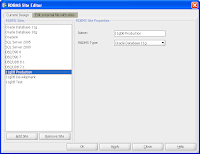 So let's assume you have the relational model all set. Add new database sites using the Tools > RDBMS Site Administration as shown above. This invokes the RDBMS Site editor. Here you can add as many new sites as you need. They can be reused, so there is no need to be too specific, you only need to add new sites if you want more than one, say Oracle Database 11g, physical model in a design. In the next image we show that three additional sites have been added for the Oracle 11g Database.(click on any of the images to see them in full size)

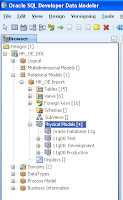 Now return to the relational model and create the new physical models. To do this, expand the Relational model and select the Physical Model node. Right-click for the context menu and select New. This allows you to choose the database site you wish to associate with the model. You can do this for each of you test, development and production sites. In the image shown above right, there are 4 different physical models.
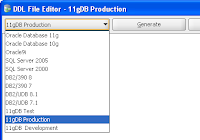 Once you have made the physical property updates for each physical database, you can start the DDL generation. Ensure you select the correct Physical model from the database sites in the DDL File Editor dialog before you start the generation.
Cloning Sites
Now each of these sites will have all the relational detail from the diagram, so the tables, columns, constraints will all be the same. You've created the different sites, so that you can have different tablespaces and possibly user definitions, but chances are you'll want your sequences and PL/SQL code to be the same. You can do this by adding that content to one of the physical models and then cloning the others from this. Select the new physical model and right-click, select Clone From. You can now select the model you want to clone.
So you may, for example, do a generic logical model for an airline application, but transform it to a number of slightly different relational models (applying different transformation rules or perhaps different glossaries. Now once you have that relational model set, you can have a number of different physical models. Often we have a test, development and production environment and want to have slightly different physical settings for these. We can do that in the physical model.

 So let's assume you have the relational model all set. Add new database sites using the Tools > RDBMS Site Administration as shown above. This invokes the RDBMS Site editor. Here you can add as many new sites as you need. They can be reused, so there is no need to be too specific, you only need to add new sites if you want more than one, say Oracle Database 11g, physical model in a design. In the next image we show that three additional sites have been added for the Oracle 11g Database.(click on any of the images to see them in full size)

 Now return to the relational model and create the new physical models. To do this, expand the Relational model and select the Physical Model node. Right-click for the context menu and select New. This allows you to choose the database site you wish to associate with the model. You can do this for each of you test, development and production sites. In the image shown above right, there are 4 different physical models.
 Once you have made the physical property updates for each physical database, you can start the DDL generation. Ensure you select the correct Physical model from the database sites in the DDL File Editor dialog before you start the generation.
Cloning Sites
Now each of these sites will have all the relational detail from the diagram, so the tables, columns, constraints will all be the same. You've created the different sites, so that you can have different tablespaces and possibly user definitions, but chances are you'll want your sequences and PL/SQL code to be the same. You can do this by adding that content to one of the physical models and then cloning the others from this. Select the new physical model and right-click, select Clone From. You can now select the model you want to clone.
31 January 2011
SQL Developer Data Modeler 3.0 is Production
I'm please to say that SQL Developer Data Modeler 3.0 is now production. The latest release is now available for download from OTN. There are various demonstrations available for you to get to know the new features and remind yourselves of other features.
See the main SQL Developer Data Modeler page on OTN for download links, new feature pages and demonstrations.
See the Oracle Press Release for more.
See the main SQL Developer Data Modeler page on OTN for download links, new feature pages and demonstrations.
See the Oracle Press Release for more.
Subscribe to:
Posts (Atom)