


 Posts
Posts



I've had a week back at the office following Oracle Open World in San Francisco and had some time to reflect on all that went on. If you have been following various blogs and write ups about the event you'll have heard about the various dinners bloggers or Ace's attended, which, while they may seem frivolous, are as an important part of any conference as the sessions themselves, by providing a valuable opportunity of meeting or catching up with folk in person. (See the updates from Mark Rittman on those.) Actually these kinds of events are really good for talking to folk about the products they use, their concerns, dislikes and likes.
This year the Oracle SQL Developer team were busy at the main event on the demo grounds. We had great feedback on the new Migration Workbench extension, which has been a great help to a number of companies. I also heard very positive feedback about the new Times Ten extension, now available in preview. We spent most of the time demonstrating the new features the team are currently working on. I found that SQL*Plus users, DBAs who use the command-line and our existing database developers all liked what they saw.
We also had a number of papers and a hands-on session at the Oracle Develop event. One of our sessions was in a room too small for the crowd and had to be moved to one larger. I was very pleased to see that our hands-on event was a sell out and only wished we had time for a second or even longer session. I'll upload all the hand-on material onto OTN.
I had an opportunity to meet and talk to Tom Haunert, editor of the Oracle Magazine. The brief podcast we recorded is available from the general Oracle Podcasts site on OTN. You'll find it under the Oracle Magazine.
I'd love to hear the kinds of topics you'd be interested in hearing. (Bearing in mind this is audio only and has a max time of about 12 minutes, although most are about 8 to 10 minutes.)
My only regrets not seeing everyone I'd hoped to see and not stopping to talk for longer with some folk I saw along the way, as I dashed to a presentation or back to the demogrounds. Maybe next year.
26 November 2007


02 November 2007
Gearing up for Oracle OpenWorld
One week to go before Oracle OpenWorld in San Francisco. There is a buzz in the air, with the preparation build-up, whether we are in California right now or not. One of the things they have added this year is "Oracle Connect" an on-line community for the conference, along with all the other information and events on the go. I think you can safely say, there is something for everyone! For those who don't like the formalities of some of the talks, there are 2 areas you might be interested in. The one is the "Unconference" and the other is the "No Slide Zone".
This year Larry is talking on Sunday night too. Take a look at the keynotes scheduled.
Kris and I will both be at the conference again this year, along with other developers from the team. Stop by the stand and introduce yourselves, we'd like to meet you.
This year Larry is talking on Sunday night too. Take a look at the keynotes scheduled.
Kris and I will both be at the conference again this year, along with other developers from the team. Stop by the stand and introduce yourselves, we'd like to meet you.
25 October 2007
Oracle's Official WIKI
There is a new place for information about all things Oracle! http://wiki.oracle.com/
While it may feel like there are so many places to find information, I think that having the various formats available suit different people and different styles. The new site that you may or may not be aware of is the Oracle Wiki. It's a place where the Oracle community, internal and external, can contribute and share content. The site already has links to Oracle OpenWorld and the different that attendees can see and do. You can get lost in the wiki content about Oracle World, without going to the main site, although I do recommend you do.
Back to the Wiki. Under the navigation section, there is a Developer Tools node and you'll find SQL Developer nestling there among some of oracle's older (and not so old) tools.
Content for SQL Developer can be found through a chatty forum, or more formally on the OTN technical pages or very formally through the SQL Developer documentation which we link to from the OTN pages listed above. So the wiki allows you add small components, or larger explanations, specific FAQs or links to articles you have written. Adding to the wiki is easy, so have fun and make it your space.
While it may feel like there are so many places to find information, I think that having the various formats available suit different people and different styles. The new site that you may or may not be aware of is the Oracle Wiki. It's a place where the Oracle community, internal and external, can contribute and share content. The site already has links to Oracle OpenWorld and the different that attendees can see and do. You can get lost in the wiki content about Oracle World, without going to the main site, although I do recommend you do.
Back to the Wiki. Under the navigation section, there is a Developer Tools node and you'll find SQL Developer nestling there among some of oracle's older (and not so old) tools.
Content for SQL Developer can be found through a chatty forum, or more formally on the OTN technical pages or very formally through the SQL Developer documentation which we link to from the OTN pages listed above. So the wiki allows you add small components, or larger explanations, specific FAQs or links to articles you have written. Adding to the wiki is easy, so have fun and make it your space.
24 October 2007
Browse Oracle APEX Applications Using SQL Developer
This is a quick alert that there is now a good article on the Integration of Oracle Application Express (APEX) and Oracle SQL Developer. You may already know that this feature was introduced with SQL Developer 1.2, but unless you had created an Oracle APEX connection you might not have realised the extent of the support that is available. The article provides an overview of all you can do:
"Using SQL Developer, you can perform the following functions:
- Browse your Application Express Applications
- Export and Import Applications
- Drop Applications
- Deploy Applications
- Modify Applications
- Export Pages
- Tune your Queries
- Included Application Express Reports
- Custom Exception Reports"
18 July 2007
Updates to Training and Online Material
The Oracle SQL Developer Tutorial has been updated to support SQL Developer 1.2 features. This tutorial is packed full of short demonstration viewlets; from installation, creating connections, through using functions, working with collections of data, PL/SQL debugging to creating reports.
The great thing about this tutorial, is that you can dip in and out of it at any point. There is a flow from installation to building reports, as the tutorial follows a scenario, but if you just want to know how to work with constraints you can go straight there.
The brief viewlets are interactive, so you can get a feel for the actions. If you just want to flick through the demonstration you can click the forward control.
If you are new to Oracle, then this tutorial is also great in that it walks you through the basics of SQL and getting to grips with DDL and DML, all the while using SQL Developer.
Other Collateral Updates
You may be aware of our homepage on OTN: http://www.oracle.com/technology/products/database/sql_developer/
The front page has links to documents that are a result of general questions that often come up, for example, Pricing, Support & Licensing Questions. The front page also links to viewlets, white papers, magazine articles and tutorials. Each of these categories contain recently updated material. Some of you have been asking for some material on how to create extensions for SQL Developer. There is now a published article in the latest Oracle magazine on that.
So dip into the tutorial or have a browse around the SQL Developer content. If there is anything you'd like to see added, then drop me a line and we'll see what we can do.
Sue
The great thing about this tutorial, is that you can dip in and out of it at any point. There is a flow from installation to building reports, as the tutorial follows a scenario, but if you just want to know how to work with constraints you can go straight there.
The brief viewlets are interactive, so you can get a feel for the actions. If you just want to flick through the demonstration you can click the forward control.
If you are new to Oracle, then this tutorial is also great in that it walks you through the basics of SQL and getting to grips with DDL and DML, all the while using SQL Developer.
Other Collateral Updates
You may be aware of our homepage on OTN: http://www.oracle.com/technology/products/database/sql_developer/
The front page has links to documents that are a result of general questions that often come up, for example, Pricing, Support & Licensing Questions. The front page also links to viewlets, white papers, magazine articles and tutorials. Each of these categories contain recently updated material. Some of you have been asking for some material on how to create extensions for SQL Developer. There is now a published article in the latest Oracle magazine on that.
So dip into the tutorial or have a browse around the SQL Developer content. If there is anything you'd like to see added, then drop me a line and we'll see what we can do.
Sue
29 June 2007
Multiple Table Quick Export in SQL Developer 1.2
There are a number of ways to export DDL scripts in SQL Developer. Two approaches have been in the product since its inception. The first approach is to select the SQL tab when you invoke the definition tabs for any object in SQL Developer. The second approach is to invoke the Export DDL dialog, using the Tools menu. This dialog allows you to select and filter different object types. You can also filter the data exported, should you choose.
New to SQL Developer 1.2 is a multi-select quick export DDL option:

New to SQL Developer 1.2 is a multi-select quick export DDL option:
- Expand any object node in the Navigator, e.g. Tables
- [ctrl] select the objects you want to export
- Right-click to invoke the context menu
- Select the option of choice:
- Save to File
- Save to Clipboard
- Save to Worksheet

28 June 2007
Magnification and General Font Size in SQL Developer
As a speaker at conferences, it is important that customers can see what I am demonstrating, no matter the size of the room, or how far back they sit. When I was working in the JDeveloper team, I used to change the font settings in JDeveloper so that the text would be clearly visible. For some time now, I have been using a Magnifying Glass instead of changing the font. Mostly becuase of the loss of real estate when making all the fonts much bigger. The magnifier I like is one I got from Source Forge - http://magnifier.sourceforge.net/
Using a magnifier is great for what I need, when speaking and doing demos, because I can show the audience just what I want them to see. It's no good if you need the font on your IDE to be a little bigger while you are working. Also real estate is typically less of problem when working at home or in the office, as most of us are not limited to the small screen of a laptop.
Changing the font size in SQL Developer is an enhancement that a few have asked for. In JDeveloper we just changed the setting in the ide.properties file. As we don't have the property in our ide.properties file, it didn't seem to be something we could control. While working on something quite different today, I came across the ide.properties file in SQL Developer again, and while the font property is not there, it occurred to me that by adding it, it might override the default. It does!
Increasing the Font Size in SQL Developer
Have fun!
Using a magnifier is great for what I need, when speaking and doing demos, because I can show the audience just what I want them to see. It's no good if you need the font on your IDE to be a little bigger while you are working. Also real estate is typically less of problem when working at home or in the office, as most of us are not limited to the small screen of a laptop.
Changing the font size in SQL Developer is an enhancement that a few have asked for. In JDeveloper we just changed the setting in the ide.properties file. As we don't have the property in our ide.properties file, it didn't seem to be something we could control. While working on something quite different today, I came across the ide.properties file in SQL Developer again, and while the font property is not there, it occurred to me that by adding it, it might override the default. It does!
Increasing the Font Size in SQL Developer
- Locate the ide.properties file in your installation in the following folder:
{your SQL Developer install directory}\sqldeveloper\sqldeveloper\system\oracle.sqldeveloper.1.2.0.2998
- you'll see I am using SQL Developer 1.2 - Add the line Ide.FontSize=14 or what ever size suits you. The default for the IDE is 11
- Restart SQL Developer
Have fun!
13 June 2007
Conferences: ODTUG Kaleidoscope and Oracle Develop...
Someone reminded me, yesterday, that I fly to the States this weekend. It's been a while since I've been at a conference, and I hadn't really forgotten, it just that it's suddenly there! Maybe that's happened to you. You know there are a few events on and you've been meaning to sort things out to go to one, but suddenly it's June and you've done nothing about it yet. There is still time. There is an event in the States and a few in Europe.
Next week is Daytona, Florida. It's the ODTUG big annual event and I have been going for years, through various guises, a good many of them as Designer PM and then as the PM for MDA, more specifically database modeling and all things database in JDeveloper and now as PM for SQL Developer. There is a common thread there if you know the tools.
So I have a couple of papers at the event , but also love to hear what others, from around the world, are doing too. and of course catch up. Often at these events, it's an opportunity of putting a face to a name from a forum or new group. If you live in the area, or haven't finally decided, take a look at what's on. http://odtugkaleidoscope.com/
I know that this year the conference is attracting lots of great speakers, and they have pulled in a bigger crowd - that just means more networking. Perhaps I'll see you there.
When I get back, Oracle Develop is on in London. (Next week Develop is on Prague and Munich) This is a two day event, with hands on, parallel streams and words and news about current and new products. Unlike ODTUG, which is a users group with lots of talks from users, Oracle Develop is an Oracle event, where we bring you news about what current in the company. Take a look here: http://www.oracle.com/technology/events/develop2007/index.html
This is the place to come and learn and ask Oracle questions. The event has already been a great success in Asia.
Try to get to one of these, specially if they're just down the road from you.
Sue
Next week is Daytona, Florida. It's the ODTUG big annual event and I have been going for years, through various guises, a good many of them as Designer PM and then as the PM for MDA, more specifically database modeling and all things database in JDeveloper and now as PM for SQL Developer. There is a common thread there if you know the tools.
So I have a couple of papers at the event , but also love to hear what others, from around the world, are doing too. and of course catch up. Often at these events, it's an opportunity of putting a face to a name from a forum or new group. If you live in the area, or haven't finally decided, take a look at what's on. http://odtugkaleidoscope.com/
I know that this year the conference is attracting lots of great speakers, and they have pulled in a bigger crowd - that just means more networking. Perhaps I'll see you there.
When I get back, Oracle Develop is on in London. (Next week Develop is on Prague and Munich) This is a two day event, with hands on, parallel streams and words and news about current and new products. Unlike ODTUG, which is a users group with lots of talks from users, Oracle Develop is an Oracle event, where we bring you news about what current in the company. Take a look here: http://www.oracle.com/technology/events/develop2007/index.html
This is the place to come and learn and ask Oracle questions. The event has already been a great success in Asia.
Try to get to one of these, specially if they're just down the road from you.
Sue
12 June 2007
More details from other team members..
I said I'd add in the detail about the Export DDL and just how it's done, and I will... I do just want to point out that Kris and Donal have written up more specific details about the 2 main aspects of SQL Developer 1.2. So, if you've not already seen them:
Kris and the APEX updates: SQL Developer 1.2 will support the upcoming Oracle APEX release.
Donal and the New Migration Workbench: Donal walks through the top new features and what you can expect from the new integrated Migration Workbench.
Enjoy!
Kris and the APEX updates: SQL Developer 1.2 will support the upcoming Oracle APEX release.
Donal and the New Migration Workbench: Donal walks through the top new features and what you can expect from the new integrated Migration Workbench.
Enjoy!
11 June 2007
Oracle SQL Developer 1.2 is Production
You may have forgotten me as it's been sometime since I last updated this site. The reasons are multiple and not important here, but I do want to tell you that Oracle SQL Developer 1.2 has landed!
What, you might ask, is SQL Developer 1.2 and how is it different from 1.1.2 or 1.1.3 for that matter? In our world of numbers, each point in the release number is a point of significance! So 1.1.2 and 1.1.3 are patch releases to the 1.1 production release. This means that 1.2 is more than a patch release and indeed it is. SQL Developer 1.2 is the first release that we're shipping with the new, rewritten Migration Workbench. So, as a feature of SQL Developer, you'll find details about it on the SQL Developer homepages on OTN.
The Migration Workbench team work on a number of migration related products and utilities and so they have a separate Migration Technology Center on OTN. There you'll see the work they have done on migrating Microsoft Access applications to Oracle APEX - but that's another story. The Migration Technology Center links to a section focused on the new Migration Workbench. The documents include Getting Started, a data sheet and a bunch of viewlets, in bite size chunks, covering all aspects of Migrating from MySQL, Microsoft SQL Server and Microsoft Access to Oracle.
While we're talking updates, the SQL Developer pages themselves have had a bit of a revamp, with a number of new or updated articles. Take a look.
Tomorrow, I'll tell you about the new export options available...
What, you might ask, is SQL Developer 1.2 and how is it different from 1.1.2 or 1.1.3 for that matter? In our world of numbers, each point in the release number is a point of significance! So 1.1.2 and 1.1.3 are patch releases to the 1.1 production release. This means that 1.2 is more than a patch release and indeed it is. SQL Developer 1.2 is the first release that we're shipping with the new, rewritten Migration Workbench. So, as a feature of SQL Developer, you'll find details about it on the SQL Developer homepages on OTN.
The Migration Workbench team work on a number of migration related products and utilities and so they have a separate Migration Technology Center on OTN. There you'll see the work they have done on migrating Microsoft Access applications to Oracle APEX - but that's another story. The Migration Technology Center links to a section focused on the new Migration Workbench. The documents include Getting Started, a data sheet and a bunch of viewlets, in bite size chunks, covering all aspects of Migrating from MySQL, Microsoft SQL Server and Microsoft Access to Oracle.
While we're talking updates, the SQL Developer pages themselves have had a bit of a revamp, with a number of new or updated articles. Take a look.
Tomorrow, I'll tell you about the new export options available...
19 April 2007
How to Add Tabs to SQL Developer
Kris has blogged about this, so you may have solved all your extra tab requirements already, but I have seen a few request for features that will make your lives easier, and that you can add into SQL Developer today, without waiting for us. So if you haven't worked out how to do this yet, then take a read.
Suppose you want to add a new tab to your tables definitions that shows all the column comments, or more partitioned information, or sub-partitined information. Today if you need this information, you might use SQL*Plus or the SQL Developer SQL Worksheet and you'd query the Dictionary Tables. You might might say something like:
SELECT COLUMN_NAME,
COMMENTS
FROM ALL_COL_COMMENTS
WHERE OWNER = :OBJECT_OWNER
AND TABLE_NAME = :OBJECT_NAME;
So let's put this code into an XML file:
Open a blank page in something like Notepad or Wordpad and add the following:
Select Add Row and use the drop-list under type to add a new EDITOR type. For the location, browse to your saved file location and select the file.
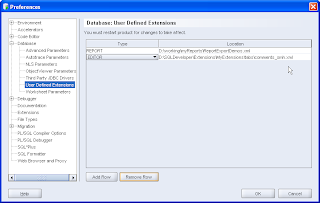
Shut down SQL Developer and when you restart it, navigate to a connection, expand your tables node and select a table. The new tab appears after your SQL tab and if your table has comments, you'll see them.
So that's easy, now you can do more: Let's look at the sub-partition request I had.
What do I need to know about Sub Partitions? You might want to start by describing the table to see the kinds of detail you are interested in. You'll see that if you describe all_table_subpartitions that it has table_owner, not just owner, like the previous query. I was interested in these columns:
Select PARTITION_NAME, SUBPARTITION_NAME,
HIGH_VALUE, HIGH_VALUE_LENGTH,
SUBPARTITION_POSITION, TABLESPACE_NAME
from ALL_TAB_SUBPARTITIONS
where table_owner = :OBJECT_OWNER and table_name = :OBJECT_NAME;
I'd suggest you try that in the SQL Worksheet first and then once again add that code into a new empty file.
The XML file would look something like this:
You'll need to restart SQL Developer to register the new extension. When you restart you should see the tabs as follows:
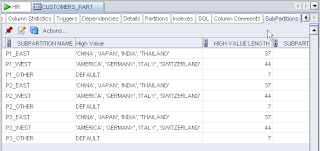
Let us know how that goes, what extensions you have added and let's add them to the SQL Developer Exchange!
Suppose you want to add a new tab to your tables definitions that shows all the column comments, or more partitioned information, or sub-partitined information. Today if you need this information, you might use SQL*Plus or the SQL Developer SQL Worksheet and you'd query the Dictionary Tables. You might might say something like:
SELECT COLUMN_NAME,
COMMENTS
FROM ALL_COL_COMMENTS
WHERE OWNER = :OBJECT_OWNER
AND TABLE_NAME = :OBJECT_NAME;
So let's put this code into an XML file:
Open a blank page in something like Notepad or Wordpad and add the following:
Did you notice that same piece of SQL in the middle of the XML tags? Yup, that's our Column Comments SQL. Save this file to a sensible location. I have an Extensions folder, but you might want to add this to a folder under your Documents and Settings. Now open Oracle SQL Developer 1.1.2.25.79 and navigate to Tools -> Preferences. Expand the Database Node and select User Defined Extensions.
<items>
<item type="editor" node="TableNode" vertical="true">
<title><![CDATA[Column Comments]]></title>
<query>
  <sql><![CDATA[select COLUMN_NAME, COMMENTS
from ALL_COL_COMMENTS
where owner = :OBJECT_OWNER and table_name = :OBJECT_NAME]]></sql>
        </query>
 </item>
</items>
Select Add Row and use the drop-list under type to add a new EDITOR type. For the location, browse to your saved file location and select the file.

Shut down SQL Developer and when you restart it, navigate to a connection, expand your tables node and select a table. The new tab appears after your SQL tab and if your table has comments, you'll see them.
So that's easy, now you can do more: Let's look at the sub-partition request I had.
What do I need to know about Sub Partitions? You might want to start by describing the table to see the kinds of detail you are interested in. You'll see that if you describe all_table_subpartitions that it has table_owner, not just owner, like the previous query. I was interested in these columns:
Select PARTITION_NAME, SUBPARTITION_NAME,
HIGH_VALUE, HIGH_VALUE_LENGTH,
SUBPARTITION_POSITION, TABLESPACE_NAME
from ALL_TAB_SUBPARTITIONS
where table_owner = :OBJECT_OWNER and table_name = :OBJECT_NAME;
I'd suggest you try that in the SQL Worksheet first and then once again add that code into a new empty file.
The XML file would look something like this:
<items>Once you have saved that file, add a new User Defined Extensions of Type EDITOR as you did before.
<item type="editor" node="TableNode" vertical="true">
<title><![CDATA[My Sub Partitions]]></title>
<query>
<sql><![CDATA[Select PARTITION_NAME, SUBPARTITION_NAME, HIGH_VALUE,
HIGH_VALUE_LENGTH, SUBPARTITION_POSITION, TABLESPACE_NAME
from ALL_TAB_SUBPARTITIONS
where table_owner = :OBJECT_OWNER and table_name = :OBJECT_NAME]]></sql>
</query>
</item>
</items>
You'll need to restart SQL Developer to register the new extension. When you restart you should see the tabs as follows:

Let us know how that goes, what extensions you have added and let's add them to the SQL Developer Exchange!
05 April 2007
Conferences or not...
Looking at the next few months, it looks like April, May, June is conference season, and that's just the spring conference season. I remember when conference season was Feb, June and November, now it seems that conference season is pretty much all the time.
The first one you might be aware of is Collaborate. This is in Las Vegas, starting on the 15th April. It looks like there's a lot on, so if you're in the area, take a look at the agenda and get on down. Not one I can make, so report back if you get to go!
The next one was to be held here in Europe. The EOUC was to be held in Amsterdam in early May, but we have been told and have now seen the announcements that this event has been cancelled.
This means that you really have to look out for Oracle Develop! You may remember events similar to these in the past, when Oracle organized 2-day events in lots of cities around the world. These events are focused on developers and should give you the technical detail you are looking for in your subject area.
There will be hands on sessions and an opportunity to meet members from the development organization, depending on which city you go to. I'll be doing 2 SQL Developer papers in London, in June. See the agenda, get registered! See you there.
The first one you might be aware of is Collaborate. This is in Las Vegas, starting on the 15th April. It looks like there's a lot on, so if you're in the area, take a look at the agenda and get on down. Not one I can make, so report back if you get to go!
The next one was to be held here in Europe. The EOUC was to be held in Amsterdam in early May, but we have been told and have now seen the announcements that this event has been cancelled.
This means that you really have to look out for Oracle Develop! You may remember events similar to these in the past, when Oracle organized 2-day events in lots of cities around the world. These events are focused on developers and should give you the technical detail you are looking for in your subject area.
There will be hands on sessions and an opportunity to meet members from the development organization, depending on which city you go to. I'll be doing 2 SQL Developer papers in London, in June. See the agenda, get registered! See you there.
13 March 2007
Shay's Blog on being a Good Forum Member
Shay Shmeltzer, a PM for JDeveloper, wrote a great blog for OTN forum users. Please read it.
Everyone of his points are pertinent and relevant, so even though I am loathe to single out a few, I will! The ones I said "YES" out loud to, are #1, 6 and 8.
If you haven't found it before, the SQL Developer Forum on OTN is quite active.
Sue
Everyone of his points are pertinent and relevant, so even though I am loathe to single out a few, I will! The ones I said "YES" out loud to, are #1, 6 and 8.
If you haven't found it before, the SQL Developer Forum on OTN is quite active.
Sue
12 March 2007
Some New Bits for You: The Migration Workbench and a new Search
What Release of SQL Developer are you Using?
I am sure you are all on SQL Developer 1.1 Patch 2 (1.1.2.25.79) If you are, then you might be interested in the 2 features I am going to talk about below. I do know some of you are not on patch 2 and there are still many of you still on 1.0 (1.0.0.15.57). I am sure there are lots of reasons you don't upgrade to a new release. Better the devil you know...etc. Maybe you are from a big company and so new software is rolled out slowly. Maybe you just didn't hear the news. (I've been a pretty poor blogger...) Maybe you are concerned about some of the entries on the forum and so won't try the new release. Did it occur to you that you may use the product for different things? That you might find the updates just perfect for you? Performance improvements, a few new context menus, some powerful reporting capabilities?
Let's look at the releases. SQL Developer 1.0 was our initial release and many of you were excited by the release and started to use it. It does what you need, so you're happy. SQL Developer 1.1 brought a whole bunch of new features and a whole rewrite of underlying technology. When a rewrite happens, inevitably a few features may not make it back into the product. We had to weigh up delaying the release or getting it out to you quickly. We decided that the number of new features outweighed the few that were missing. In the same way as we did for 1.0, we quickly followed with 2 patch releases, filling in the gaps with the bugs that slipped the net. I know this is frustrating for you and there are a few of the inevitable rants about testing and quality. We agree, but the overwhelming feedback has been better in each release and we feel the latest patch release of SQL Developer brings you more functionality, performance and stability than the others. Try it, download from here!
Migration Workbench - Early Adopter Release
Just last week we added something new. It might not be something you all need, but we know that many of you do have multiple databases and they're not all Oracle. We have seen your interest in the ability to connect to and browse third party databases. Well, the team that brought you the Oracle Migration Workbench, have rewritten the Workbench as an extension to SQL Developer. This extension is designed to give you a seamless experience; moving from browsing a third party database to migrating the database schema definitions and schema data to an Oracle database schema. Once you have completed the migration you can continue to work with and query your data, using SQL Developer.
The Workbench Extension is currently a preview or early adopter release and so is only available through Check For Updates, using SQL Developer 1.1. patch 2 (1.1.2.25.79) So that's one really important reason to move up to Patch 2. We will release SQL Developer Migration Workbench as a complete SQL Developer install for production. For more information about the new extension see this page.
A Snippet of Information - Searching Database Objects.
 In SQL Developer 1.1, you might have notice the new DB Search Object. Have you tried it? You'll find it in a minimized window on the right, near your Snippets window. (That is until you start rearranging your windows.)
It's neat in that you can do a search for a database object and it'll search across schemas. In my example below I did a wild card search for occurrences of EMP%. It produced a healthy list.
Once an object is found, the same context menus, you'll find for your objects in the navigator, are available to you in the search window.

So this week's task for you is to update your SQL Developer release and have a play. My tasks for this week are to update each of my blogs daily! (Aside from being slack here, I have outstanding photo and Delhi entries to update!) Let's see how we do.
Sue
I am sure you are all on SQL Developer 1.1 Patch 2 (1.1.2.25.79) If you are, then you might be interested in the 2 features I am going to talk about below. I do know some of you are not on patch 2 and there are still many of you still on 1.0 (1.0.0.15.57). I am sure there are lots of reasons you don't upgrade to a new release. Better the devil you know...etc. Maybe you are from a big company and so new software is rolled out slowly. Maybe you just didn't hear the news. (I've been a pretty poor blogger...) Maybe you are concerned about some of the entries on the forum and so won't try the new release. Did it occur to you that you may use the product for different things? That you might find the updates just perfect for you? Performance improvements, a few new context menus, some powerful reporting capabilities?
Let's look at the releases. SQL Developer 1.0 was our initial release and many of you were excited by the release and started to use it. It does what you need, so you're happy. SQL Developer 1.1 brought a whole bunch of new features and a whole rewrite of underlying technology. When a rewrite happens, inevitably a few features may not make it back into the product. We had to weigh up delaying the release or getting it out to you quickly. We decided that the number of new features outweighed the few that were missing. In the same way as we did for 1.0, we quickly followed with 2 patch releases, filling in the gaps with the bugs that slipped the net. I know this is frustrating for you and there are a few of the inevitable rants about testing and quality. We agree, but the overwhelming feedback has been better in each release and we feel the latest patch release of SQL Developer brings you more functionality, performance and stability than the others. Try it, download from here!
Migration Workbench - Early Adopter Release
Just last week we added something new. It might not be something you all need, but we know that many of you do have multiple databases and they're not all Oracle. We have seen your interest in the ability to connect to and browse third party databases. Well, the team that brought you the Oracle Migration Workbench, have rewritten the Workbench as an extension to SQL Developer. This extension is designed to give you a seamless experience; moving from browsing a third party database to migrating the database schema definitions and schema data to an Oracle database schema. Once you have completed the migration you can continue to work with and query your data, using SQL Developer.
The Workbench Extension is currently a preview or early adopter release and so is only available through Check For Updates, using SQL Developer 1.1. patch 2 (1.1.2.25.79) So that's one really important reason to move up to Patch 2. We will release SQL Developer Migration Workbench as a complete SQL Developer install for production. For more information about the new extension see this page.
A Snippet of Information - Searching Database Objects.
 In SQL Developer 1.1, you might have notice the new DB Search Object. Have you tried it? You'll find it in a minimized window on the right, near your Snippets window. (That is until you start rearranging your windows.)
It's neat in that you can do a search for a database object and it'll search across schemas. In my example below I did a wild card search for occurrences of EMP%. It produced a healthy list.
Once an object is found, the same context menus, you'll find for your objects in the navigator, are available to you in the search window.

So this week's task for you is to update your SQL Developer release and have a play. My tasks for this week are to update each of my blogs daily! (Aside from being slack here, I have outstanding photo and Delhi entries to update!) Let's see how we do.
Sue
12 February 2007
A Conference I am Not Attending
The months roll by! I should have told you about the release of SQL Developer 1.1 and then didn't and now Patch 1 is out. If you're still on SQL Developer 1.0, then do download the Patch release. It's a full install, and well worth the update. I'll start writing again and telling you more about what we're doing and about the product.
RMOUG
I should be packing today to be flying out to Denver for the RMOUG Training Days this week. This was the first conference I attended as a fledgling PM many years ago and so it's really strange not to be attending it this week. Denver is the kind of city where you'll be walking in warm sunshine one day and playing in the snow on the sidewalks the next. With RMOUG in February, that has certainly happened to us.
I really like the RMOUG event. I think it's a serious conference with folk attending who are serious about learning and sharing what they know. I always think it's a "no fluff, just stuff" event.
I have also always been struck at how few Oracle folk go, compared to other events, and I like the low key approach. (As a product manager, perhaps I shouldn't admit that!)
This year 2 of my team will be there, so there's an added regret not to be able to make it. Mike Hichwa, VP of the Database Tools Group, and Kris Rice, architect for SQL Developer, will both be doing quite a bit of work there. Mike and Kris are both doing a bit of training on Tuesday in the pre-event training session and then Mike kicks off with the keynote on Wednesday morning.
Kris is doing 2 SQL Developer talks on Wednesday, so if you have any questions, he's the man to catch.
If you are still prevaricating about whether to go, I'm sure there is still time to change your mind and dash along. Great city, great event, a worthwhile gathering.
How's this for a list of big names, taken straight from the RMOUG presentations page...
Adams | Aldridge | Arseneau | Ault | Baker | Baxter | Beresniewicz | Blake | Briggs | Brooks | Brown B | Brown T | Burleson D | Burleson J | Carlson | Caviness | Closson | Cunningham | Dacko | de Visser | Deshpande | Dijcks | Dorsey | Engel |Fink | Fons | Freeman | Fuston | Garmany | Haastrup |
Hailey | Haisley | Hall | Hay | Hichwa | Hotka | Ioan | Jackson | Jenne | Jeunnette | Karam| Katsaris | King | Koletzke | Koopmann | Kurtz | Kutrovsky | Leal | Lemme | Likarish | Looney | Marx | Millsap | Mishek | Moore | Moskovitz | Munsinger | Nanda | Ostrowski | Pal | Peters | Phillips | Presser | Pystynen | Reading | Rice | Richards | Scheerer | Schrag | Senegacnik | Still | Sutton | Sweeney |Swing | Than | Thater | Tierstein | Turner-Underwood | Vaidyanatha | Vallath | Weaver | Wille | Wimsatt | Wood |
Other things...
As for me, I'll just have to think about all the different people I have met, and friends I have made over the years at RMOUG and hope they have a very fine time.
I am packing later this week. It's not work related, so my suitcase will not hold my "Oracle uniform". I'm heading East, with a small team, to Delhi. We're going to do a little work in one of the Delhi slums, called Zakhira. So I will be blogging again, but for a while, it might be here, on the delhiminimission instead.
RMOUG
I should be packing today to be flying out to Denver for the RMOUG Training Days this week. This was the first conference I attended as a fledgling PM many years ago and so it's really strange not to be attending it this week. Denver is the kind of city where you'll be walking in warm sunshine one day and playing in the snow on the sidewalks the next. With RMOUG in February, that has certainly happened to us.
I really like the RMOUG event. I think it's a serious conference with folk attending who are serious about learning and sharing what they know. I always think it's a "no fluff, just stuff" event.
I have also always been struck at how few Oracle folk go, compared to other events, and I like the low key approach. (As a product manager, perhaps I shouldn't admit that!)
This year 2 of my team will be there, so there's an added regret not to be able to make it. Mike Hichwa, VP of the Database Tools Group, and Kris Rice, architect for SQL Developer, will both be doing quite a bit of work there. Mike and Kris are both doing a bit of training on Tuesday in the pre-event training session and then Mike kicks off with the keynote on Wednesday morning.
Kris is doing 2 SQL Developer talks on Wednesday, so if you have any questions, he's the man to catch.
If you are still prevaricating about whether to go, I'm sure there is still time to change your mind and dash along. Great city, great event, a worthwhile gathering.
How's this for a list of big names, taken straight from the RMOUG presentations page...
Adams | Aldridge | Arseneau | Ault | Baker | Baxter | Beresniewicz | Blake | Briggs | Brooks | Brown B | Brown T | Burleson D | Burleson J | Carlson | Caviness | Closson | Cunningham | Dacko | de Visser | Deshpande | Dijcks | Dorsey | Engel |Fink | Fons | Freeman | Fuston | Garmany | Haastrup |
Hailey | Haisley | Hall | Hay | Hichwa | Hotka | Ioan | Jackson | Jenne | Jeunnette | Karam| Katsaris | King | Koletzke | Koopmann | Kurtz | Kutrovsky | Leal | Lemme | Likarish | Looney | Marx | Millsap | Mishek | Moore | Moskovitz | Munsinger | Nanda | Ostrowski | Pal | Peters | Phillips | Presser | Pystynen | Reading | Rice | Richards | Scheerer | Schrag | Senegacnik | Still | Sutton | Sweeney |Swing | Than | Thater | Tierstein | Turner-Underwood | Vaidyanatha | Vallath | Weaver | Wille | Wimsatt | Wood |
Other things...
As for me, I'll just have to think about all the different people I have met, and friends I have made over the years at RMOUG and hope they have a very fine time.
I am packing later this week. It's not work related, so my suitcase will not hold my "Oracle uniform". I'm heading East, with a small team, to Delhi. We're going to do a little work in one of the Delhi slums, called Zakhira. So I will be blogging again, but for a while, it might be here, on the delhiminimission instead.
11 December 2006
SQL Developer, Migrations and Third Party Databases
A week or so ago, I popped over to Ireland to see some of the developers who are based there. I have mentioned before that the team based in Dublin are the Migration Technology Group. They are a busy team; building the Migration Workbench as an extension to SQL Developer, are also working on SQL Developer and have just released the Oracle Application Express Application Migration Workshop. Take a look at Donal's blog for a bit more on that.
There is lots to tell you about the trip, the work they are doing and have already released and I'll come back and tell you more another time, right now I want to give you a dip into something you can test in SQL Developer.
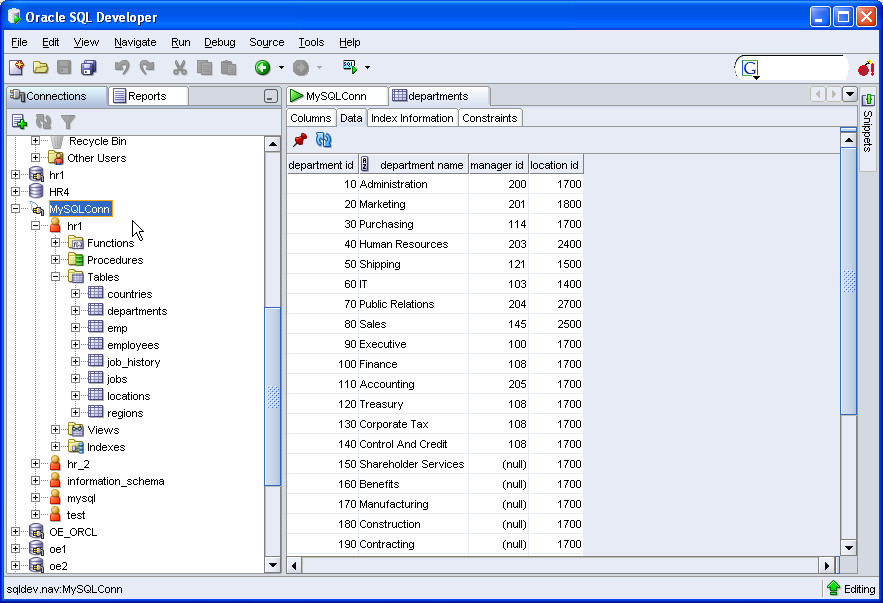
Part of the Migration Workbench functionality is the ability to connect to and review the objects in a third party database, such as MySQL, SQL Server and Access. In fact these are the three third party databases the team are targeting for their first release. So the Migration Workbench extension to SQL Developer, will allow you to browse your third party database, and then migrate all or some of these objects and data to Oracle. Very exciting! Well, the full Workbench is only due for next year. What we've added to SQL Developer 1.1 is the ability to connect to and browse a third party database. Here's How:
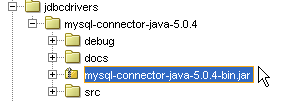
1. JDBC Drivers: Assuming you have an MySQL or SQL Server database, verify you have the correct jdbc drivers. This Getting Started document on SQL Developer 1.1 has links for you to download the drivers you will need.
2. SQL Developer 1.1: This functionality will only be available in SQL Developer Release 1.1. You can test the functionality with the current evaluation release, 1.1.0.22.71, available from here.
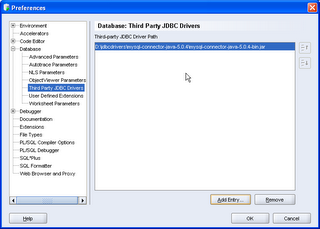
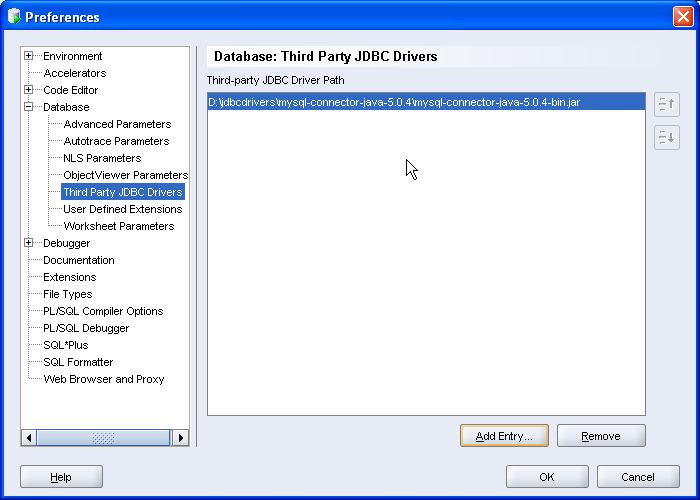
3. In SQL Developer, navigate to the Tools menu: Preferences >Database > ThirdParty JDBC Drivers.
4. Click Add Entry and add your specific jar file.
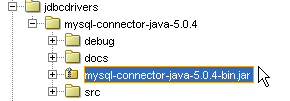
The jars on this preference panel are used for all third party databases.
5. Now you can add your connections. Navigate to the Connections dialog and add a new connection.
My example is for a MySQL Database. As for Oracle, be sure your third party database is up and running!

6. Test and save the connection. Note, in my example I have an ACCESS connection tab too. This will be available in the SQL Developer releases post Evaluation Release 3 (1.1.0.22.71.)
7. You should now see the third party connection in the navigator. Remember this is read only access you have. However, the appropriate tabs and details are available for you to browse and review your database objects.
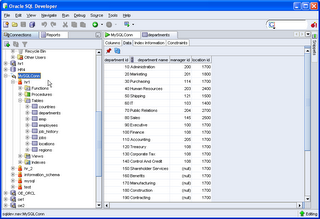 Have fun!
There is lots to tell you about the trip, the work they are doing and have already released and I'll come back and tell you more another time, right now I want to give you a dip into something you can test in SQL Developer.
Part of the Migration Workbench functionality is the ability to connect to and review the objects in a third party database, such as MySQL, SQL Server and Access. In fact these are the three third party databases the team are targeting for their first release. So the Migration Workbench extension to SQL Developer, will allow you to browse your third party database, and then migrate all or some of these objects and data to Oracle. Very exciting! Well, the full Workbench is only due for next year. What we've added to SQL Developer 1.1 is the ability to connect to and browse a third party database. Here's How:
1. JDBC Drivers: Assuming you have an MySQL or SQL Server database, verify you have the correct jdbc drivers. This Getting Started document on SQL Developer 1.1 has links for you to download the drivers you will need.
2. SQL Developer 1.1: This functionality will only be available in SQL Developer Release 1.1. You can test the functionality with the current evaluation release, 1.1.0.22.71, available from here.
3. In SQL Developer, navigate to the Tools menu: Preferences >Database > ThirdParty JDBC Drivers.
4. Click Add Entry and add your specific jar file.
The jars on this preference panel are used for all third party databases.
5. Now you can add your connections. Navigate to the Connections dialog and add a new connection.
My example is for a MySQL Database. As for Oracle, be sure your third party database is up and running!

6. Test and save the connection. Note, in my example I have an ACCESS connection tab too. This will be available in the SQL Developer releases post Evaluation Release 3 (1.1.0.22.71.)
7. You should now see the third party connection in the navigator. Remember this is read only access you have. However, the appropriate tabs and details are available for you to browse and review your database objects.
 Have fun!
15 November 2006
SQL Developer 1.1. How Do I Build a Master Detail Report (with Chart)?
Perfect, a query on the Forum triggered a thought for this entry. "How do I create a report that has a table and chart in it?"
Let's start with a Master-Detail report.
1. Using SQL Developer 1.1 Evaluation Release 2 (1.1.0.21.97) go to the reports tab and select "Add a Report" under the User Defined Reports. I'll leave you to fill in the name, description and tooltip details. The report we are creating uses the demo schema HR, with the EMPLOYEES, DEPARTMENTS and LOCATIONS tables.
2. Although you only see one panel at this stage, you are creating the Master query. Set the Style as Table and enter the following query:
select d.department_id, department_name, city
from departments d, locations l
where d.location_id = l.location_id
Note: No trailing ';'
You can elect to test the reports at any stage, using the Test button.
3. Now to add the detail.
Select the Add Child button to open a new panel in the dialog.
The basic detail query, without chart or any complexities is as follows:
Select * from employees
where department_id = :DEPARTMENT_ID
Note: The bind is CASE sensitive. Also useful to note, the child query knows that this bind is from the table above.
Another example using that bind variable is:
select :DEPARTMENT_NAME, last_name, salary
from employees where department_id = :DEPARTMENT_ID
It is not that interesting, to have the department name in the detail records, because you'll just see that name duplicated.
4. Run the report to see the master detail in operation.
That's it, a Master -Detail report in action.
Making the Detail a Chart.
Let's take it further and pull the CHART into play...
5. Select Edit to open the report again.
From the previous blog entry on charts, you saw that we need to select X, Y and data, so we'll do the same here. Replace the child query with:
select m.last_name, e.last_name, e.salary
from employees e, employees m
where m.employee_id = e.manager_id
and e.department_id = :DEPARTMENT_ID
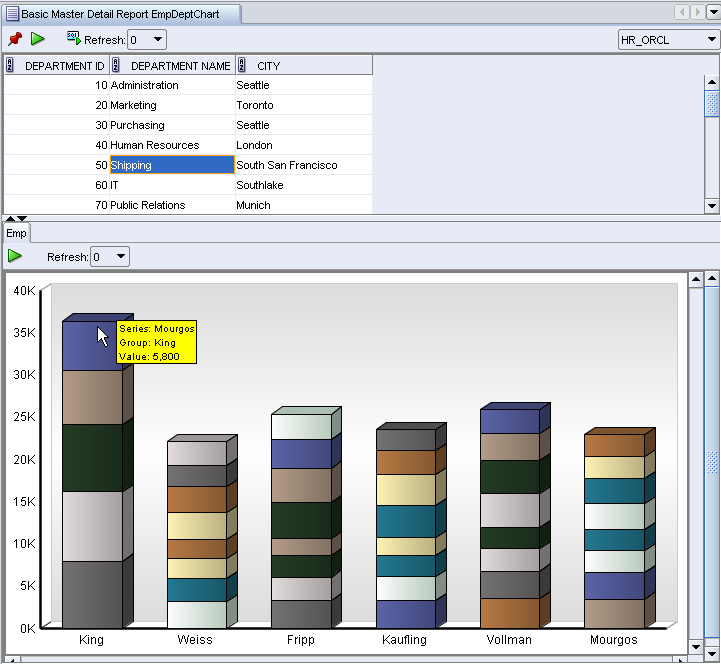
So now I am looking at the departments table and for each department, I want to know who works for each manager in that department and see their salaries.
To create the chart, set the child style to CHART and then look at the chart details and set them to BAR_VERT_STACK and select the Test button.
When you are happy select Apply. Here's mine:
Let's start with a Master-Detail report.
1. Using SQL Developer 1.1 Evaluation Release 2 (1.1.0.21.97) go to the reports tab and select "Add a Report" under the User Defined Reports. I'll leave you to fill in the name, description and tooltip details. The report we are creating uses the demo schema HR, with the EMPLOYEES, DEPARTMENTS and LOCATIONS tables.
2. Although you only see one panel at this stage, you are creating the Master query. Set the Style as Table and enter the following query:
select d.department_id, department_name, city
from departments d, locations l
where d.location_id = l.location_id
Note: No trailing ';'
You can elect to test the reports at any stage, using the Test button.
3. Now to add the detail.
Select the Add Child button to open a new panel in the dialog.
The basic detail query, without chart or any complexities is as follows:
Select * from employees
where department_id = :DEPARTMENT_ID
Note: The bind is CASE sensitive. Also useful to note, the child query knows that this bind is from the table above.
Another example using that bind variable is:
select :DEPARTMENT_NAME, last_name, salary
from employees where department_id = :DEPARTMENT_ID
It is not that interesting, to have the department name in the detail records, because you'll just see that name duplicated.
4. Run the report to see the master detail in operation.
That's it, a Master -Detail report in action.
Making the Detail a Chart.
Let's take it further and pull the CHART into play...
5. Select Edit to open the report again.
From the previous blog entry on charts, you saw that we need to select X, Y and data, so we'll do the same here. Replace the child query with:
select m.last_name, e.last_name, e.salary
from employees e, employees m
where m.employee_id = e.manager_id
and e.department_id = :DEPARTMENT_ID
So now I am looking at the departments table and for each department, I want to know who works for each manager in that department and see their salaries.
To create the chart, set the child style to CHART and then look at the chart details and set them to BAR_VERT_STACK and select the Test button.
When you are happy select Apply. Here's mine:
13 November 2006
SQL Developer 1.1. How Do I Build a Chart?
I did a few "Sneak Peeks" into 1.1, in an attempt to show you what you might expect down the line. Now that 1.1 evaluation release is available, you can go back and look a those and find the features I mentioned.
I'd now like to take this further and do a series of "SQL Developer 1.1: How Do I ....", first using the evaluation drops as they become available and continue that into the production release.
In showing how to go about discovering new things and working with 1.1 in general, I could take 2 quite different approaches. The one approach would be to be quite organized and plan a whole schedule of entries and the other is to write random ad hoc entries that just jump in and out of the tool all over the place. I'm opting for the latter approach, because right now I am inspired to do a quite write up, just covering a basic chart in SQL Developer 1.1
Assumptions:
The query I will use in my example is for the user SCOTT/TIGER and requires that you have access to SCOTT's EMP and DEPT tables and a Connection to SCOTT.
Starting with the Reports Tab, select User Defined Reports and, using the context menu, select Add Report. If you're diligent, you could add a folder first, so that all your reports are saved into carefully planned categories.
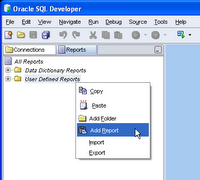 Once you have invoked the new report dialog, there are three areas you should take special note of:
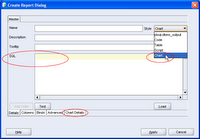 It is obviously important to complete other details, such as name and tooltip, these I'll leave you to do. I want to create a chart of Employees' Salaries per Department. Here's my query. Note, no trailing ';'
select emp.deptno, emp.ename, sal
from emp, dept
where emp.deptno = dept.deptno
order by dept.deptno, sal
When creating a chart, the rule of thumb is select group, series, data from table
Before you test the chart, select the Chart Details and change the chart type to BAR_VERT_STACK. For the rest of the options, you can make your own choices. For bigger reports, the Legend can take up quite a bit of real estate, so I tend to set that to False. You can see what suits you. Once you have set the Chart Details, you can return to the Details tab and Test the chart or just select Apply.
Once back in the Navigator, select your report and select the connection you have for SCOTT.
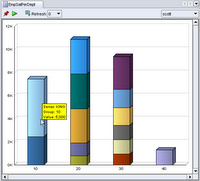 The stripy pajama report reflects the 4 departments in the table , with each employee and salary. The mouseover for each node indicates Employee name and Salary. The power of the chart is that a glance you can see that, based on my data, Department 20 has the greatest salary bill, while Department 10 appears to have the highest paid employee.
This is a trivial example, but you'll note that the results returned are quite rich. Why not try this against some of your System data?
I'd now like to take this further and do a series of "SQL Developer 1.1: How Do I ....", first using the evaluation drops as they become available and continue that into the production release.
In showing how to go about discovering new things and working with 1.1 in general, I could take 2 quite different approaches. The one approach would be to be quite organized and plan a whole schedule of entries and the other is to write random ad hoc entries that just jump in and out of the tool all over the place. I'm opting for the latter approach, because right now I am inspired to do a quite write up, just covering a basic chart in SQL Developer 1.1
Building a Chart using SQL Developer 1.1
At this stage I should point out, that the only 1.1 software you have access to is SQL Developer 1.1 Evaluation Release 1.1.0.21.41. That's what I am going to use. If you do not yet have that release, then go to OTN and follow the links to download it.Assumptions:
The query I will use in my example is for the user SCOTT/TIGER and requires that you have access to SCOTT's EMP and DEPT tables and a Connection to SCOTT.
Starting with the Reports Tab, select User Defined Reports and, using the context menu, select Add Report. If you're diligent, you could add a folder first, so that all your reports are saved into carefully planned categories.
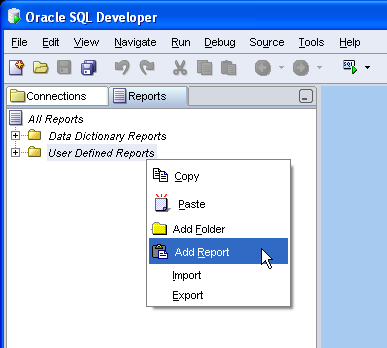 Once you have invoked the new report dialog, there are three areas you should take special note of:
- The Style of report, in this case a CHART
- The SQL text
- Chart Details
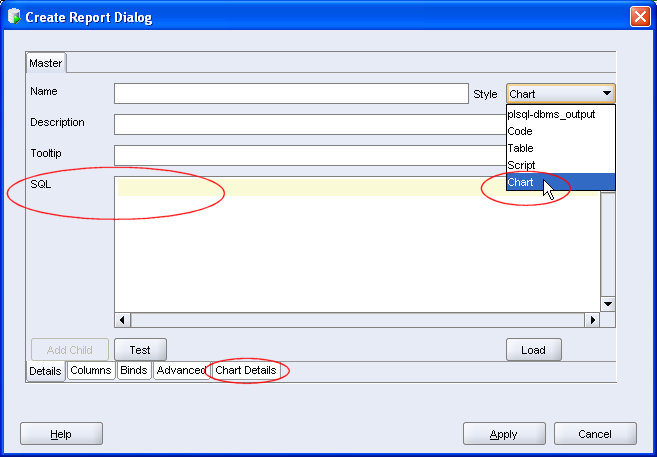 It is obviously important to complete other details, such as name and tooltip, these I'll leave you to do. I want to create a chart of Employees' Salaries per Department. Here's my query. Note, no trailing ';'
select emp.deptno, emp.ename, sal
from emp, dept
where emp.deptno = dept.deptno
order by dept.deptno, sal
When creating a chart, the rule of thumb is select group, series, data from table
Before you test the chart, select the Chart Details and change the chart type to BAR_VERT_STACK. For the rest of the options, you can make your own choices. For bigger reports, the Legend can take up quite a bit of real estate, so I tend to set that to False. You can see what suits you. Once you have set the Chart Details, you can return to the Details tab and Test the chart or just select Apply.
Once back in the Navigator, select your report and select the connection you have for SCOTT.
 The stripy pajama report reflects the 4 departments in the table , with each employee and salary. The mouseover for each node indicates Employee name and Salary. The power of the chart is that a glance you can see that, based on my data, Department 20 has the greatest salary bill, while Department 10 appears to have the highest paid employee.
This is a trivial example, but you'll note that the results returned are quite rich. Why not try this against some of your System data?
09 November 2006
SQL Developer Presentations from Oracle World Available
If you missed Oracle World in San Francisco, or even if you were there, the presentations for the talks are now available for you to browse.
This link takes you to the Content Catalog. Note this app does require a username and password, but they are there for you to use.
If you want to see the talks that Kris and I did, just enter "sue harper" into the Speaker name field and you'll get the Overview and Advanced presentations. (No demos, just power points!) Kris and I will be doing blog entries of the demos in the next few weeks.
If you want to see more SQL Developer related talks, enter "SQL Developer" and you'll also get Donal's talk on the work the Migration Workbench team are doing and how they're using SQL Developer.
Of course you know how to use a simple app like this, but I want to be sure you see the good stuff... ;-)
This link takes you to the Content Catalog. Note this app does require a username and password, but they are there for you to use.
If you want to see the talks that Kris and I did, just enter "sue harper" into the Speaker name field and you'll get the Overview and Advanced presentations. (No demos, just power points!) Kris and I will be doing blog entries of the demos in the next few weeks.
If you want to see more SQL Developer related talks, enter "SQL Developer" and you'll also get Donal's talk on the work the Migration Workbench team are doing and how they're using SQL Developer.
Of course you know how to use a simple app like this, but I want to be sure you see the good stuff... ;-)
07 November 2006
Oracle SQL Developer 1.1 Evaluation Release is Now Available!
Need I say more? The long awaited evaluation copy of Oracle SQL Developer 1.1 is now available for you to play with. Please send us your comments! I'll give you the links in a mo, please note, this is NOT a Supported release, it is for evaluation purposes only. The team is still working on the code and closing bugs as I write. We'll be doing regular drops for you to evaluate over the next few weeks and will be using a FeedBack Application to track issues and comments.
You will not be supported through Oracle Support or the Forum, only the feedback site. You will not get the evaluation software from the production download site, instead follow the links through the short survey and on to the evaluation release download. (For subsequent downloads you'll be redirected past the survey) When you reach the download page, there are links to a few very useful documents:
No, I can't tell you the production date yet.
Have fun!
You will not be supported through Oracle Support or the Forum, only the feedback site. You will not get the evaluation software from the production download site, instead follow the links through the short survey and on to the evaluation release download. (For subsequent downloads you'll be redirected past the survey) When you reach the download page, there are links to a few very useful documents:
- New Features - This is a list of new features, quite comprehensive, possibly missing a few little features here and there
- Known Issues - This is a list of bugs already logged, some already fixed in a later build and which you'll pick up in next week evaluation drop.
- Getting Started - This is really important. If you are using 1.0, there are some files you need to back up if you want to preserve them and go back to SQL Developer 1.0.
No, I can't tell you the production date yet.
Have fun!
Subscribe to:
Posts (Atom)
